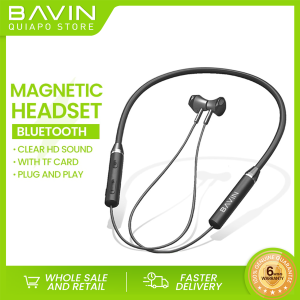
BAVIN BH30 Bluetooth Wireless Earphone Sports Magnetic Neckband with TF Card Plug & Play Clear HD sound
BAVIN BH30 Bluetooth Wireless Earphone Sports Magnetic Neckband with TF Card Plug & Play Clear HD sound
BAVIN BH30 is a compact design Bluetooth wireless earphone with a sports magnetic neckband, offering clear HD sound and TF card plug & play functionality. This article will guide you through the key features, how to use your BAVIN BH30 earphones, their suitability for sports enthusiasts, and frequently asked questions and troubleshooting tips.
What Makes BAVIN BH30 Stand Out
Key Features: Clear HD Sound & Sports Magnetic Neckband
BAVIN BH30 earphones boast clear HD sound, providing an immersive audio experience. The sports magnetic neckband keeps the earphones securely in place during physical activities, ensuring uninterrupted sound and comfort.
Convenience: TF Card Plug & Play
The TF card plug & play feature allows you to enjoy your favorite music and podcasts stored on a microSD card without relying on your smartphone or other devices. Simply insert the card into the earphones, and you're ready to go.
How to Use Your BAVIN BH30 Earphones
Step-by-Step Guide to Charging
- Connect the 12cm charging cable to the earphones' charging port.
- Plug the other end of the cable into a USB power source.
- Wait for the charging indicator light to turn green, indicating a full charge.
Connecting to Devices: Bluetooth Pairing Instructions
- Press and hold the power button until the LED light flashes blue, indicating pairing mode.
- On your device, navigate to Bluetooth settings and select 'BAVIN BH30' from the list of available devices.
- Once connected, the LED light will turn solid blue, and you can start enjoying your music.
BAVIN BH30: A Perfect Match for Sports Enthusiasts
Why Choose BAVIN BH30 for Your Next Workout
The BAVIN BH30 earphones are designed with sports enthusiasts in mind. Their compact design and magnetic neckband provide a secure fit, allowing you to focus on your workout without worrying about earphones falling out or getting tangled.
How to Securely Wear Your Earphones During Exercise
To ensure a secure fit during exercise, follow these steps:
- Place the earbuds in your ears, making sure they sit comfortably.
- Align the magnetic neckband behind your neck.
- Adjust the earbuds and neckband to your preferred position.
FAQs & Troubleshooting Tips
Common Issues & Solutions
Issue: Earphones won't connect to my device. Solution: Make sure the earphones are in pairing mode by pressing and holding the power button until the LED light flashes blue. Then, try connecting again.
Issue: Sound quality is poor. Solution: Check if the earbuds are properly inserted and adjust their position if necessary. Also, ensure the earphones are charged and the volume is set to an appropriate level.
Maximizing Battery Life
To extend the battery life of your BAVIN BH30 earphones, follow these tips:
- Charge the earphones fully before first use.
- Disconnect from devices when not in use.
- Avoid exposing the earphones to extreme temperatures.

BAVIN Quiapo Philippines
Review

You May Also Like
Driver Unit 150Watts Crown Trumpa DU-150 PA
FT STAR GT-35BT 800W RMS 8ohms Titanium Compression Driver Unit 34MM Coil For Karaoke Horn Tweeter With Capacitor

SK GD11 Bone Conduction TWS Headphones Bluetooth V5.3 Ear Clip Lightweight Business Sports Game Headset with Mic Noise Reduction
MUSICER 4 Inches Dual Magent Woofer Instrumental HI-FI Speaker 200 Watts
Motorola Radio Walkie Talkie Long Range 20KM Walkie-Talkies Motorola 370S Full Band 128CHS High Power 15 Watts High Capacity 6800mAh Type C Charging IP54 Waterproof Two Way Radio
Langsdom Theta Pro TG12 Wireless Bluetooth 5.3 Hands Free Earphones Earbuds for Gaming Music Travel
Awei Q5i Built-in Microphone On-cord Control In-Ear Headphone HD Sound
Replacement Foam Earpads for H800 Headphone Ear Cushions Foam Ear pads Earcups Headphone Lightweight Earmuff Cover
Wireless ZK-TB21 Bluetooth Amplifier – 160W*2 + 220W Subwoofer for Car Audio
VITOG TWS Bluetooth Earphone: A Complete Guide
AIR31 TWS Headphones 5.3 Wireless Earphones Bluetooth Headset Noise Cancelling HD HiFi Stereo Earbuds For Huawei Xiaomi IPhone