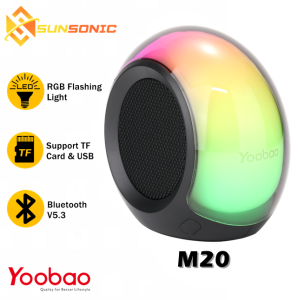
Yoobao M20 TWS Portable Wireless Bluetooth V5.3 Powerful Bass with USB /TF Card /FM Radio /AUX Function RGB Speaker
Yoobao M20 TWS Portable Wireless Bluetooth V5.3 Powerful Bass with USB /TF Card /FM Radio /AUX Function RGB Speaker
What is the Yoobao M20 TWS Bluetooth Speaker?
The Yoobao M20 TWS Portable Wireless Bluetooth V5.3 Speaker is a high-quality, compact audio device designed to deliver powerful bass audio, USB and TF card function, FM radio, and AUX function. It features a sleek design, portable wireless connectivity, and an RGB speaker that enhances your listening experience.
Key Features
- Powerful Bass Audio: The Yoobao M20 TWS Bluetooth Speaker provides deep, rich sound quality with powerful bass audio.
- USB and TF Card Function: This speaker supports both USB and TF card storage, allowing you to easily play music files stored on external devices.
- FM Radio: With built-in FM radio functionality, you can listen to your favorite radio stations and stay updated with the latest news and music.
- AUX Function: Connect the AUX cord to enjoy audio playback from various devices, such as smartphones, tablets, or laptops.
- Portable Wireless Bluetooth V5.3: Enjoy seamless connectivity with your device via Bluetooth 5.3, offering a stable and reliable connection.
Included Accessories
- 1 X Yoobao M20 Bluetooth Portable Wireless Speaker
- 1 X AUX Cord
- 1 X Type-C Charging Cable
- 1 X Manual
How to Set Up the Yoobao M20 TWS Bluetooth Speaker
Setting up the Yoobao M20 TWS Bluetooth Speaker is simple and straightforward. Follow these steps to get started:
Connecting to Your Device
- Turn on the speaker by pressing the power button.
- Enable Bluetooth on your device and search for available devices.
- Select the Yoobao M20 TWS Bluetooth Speaker from the list of available devices.
- Once connected, start playing audio from your device.
Using the USB & TF Card Function
To play music files stored on a USB or TF card:
- Insert the USB or TF card into the designated slot on the speaker.
- Press the corresponding button (USB or TF) to select the storage device.
- Use the play/pause, next/previous track buttons to navigate through your music files.
Tuning the Powerful Bass Audio
Adjust the bass audio settings according to your preferences:
- Press the EQ button to access the equalizer settings.
- Use the +/- buttons to adjust the bass level.
- Save your preferred settings by pressing the EQ button again.
Exploring Additional Features of the Yoobao M20 TWS Bluetooth Speaker
RGB Speaker with FM Radio
Enjoy a vibrant listening experience with the built-in RGB speaker, which changes colors based on the audio being played. Additionally, the FM radio functionality allows you to listen to your favorite radio stations and stay updated with the latest news and music.
Portable Wireless Bluetooth V5.3 Connectivity
With its compact design and portable wireless connectivity, the Yoobao M20 TWS Bluetooth Speaker is perfect for use on-the-go. Enjoy seamless audio playback from various devices, such as smartphones, tablets, or laptops, without the hassle of tangled wires.
Enhancing Your Listening Experience
Customize your listening experience with the following features:
- Volume Control: Adjust the volume using the +/– buttons to find the perfect balance for your ears.
- Auxiliary Input: Connect the AUX cord to play audio from external devices, such as smartphones, tablets, or laptops.
- Microphone: The built-in microphone allows for hands-free calls and voice commands.
Frequently Asked Questions About the Yoobao M20 TWS Bluetooth Speaker
Battery Life & Charging
Q: How long does the battery last? A: The Yoobao M20 TWS Bluetooth Speaker has a battery life of up to 10 hours.
Q: How long does it take to charge the speaker? A: It takes approximately 2 hours to fully charge the speaker.
Sound Quality & Customization
Q: Can I customize the sound settings? A: Yes, you can adjust the bass level and equalizer settings to suit your preferences.
Q: Is there a way to control the volume? A: Yes, use the +/– buttons to adjust the volume according to your needs.
Compatibility & Connectivity
Q: Is the speaker compatible with both Android and iOS devices? A: Yes, the Yoobao M20 TWS Bluetooth Speaker is compatible with both Android and iOS devices.
Q: Can I connect multiple devices simultaneously? A: No, only one device can be connected at a time.
Q: Is there a way to connect the speaker to a computer? A: Yes, you can use the AUX cord to connect the speaker to a computer.

Sunsonic Official Store
Review

You May Also Like

Edifier | Edifier R18T Wired Mini Multimedia Computer Speaker Desktop Laptop Desktop Speakers Compact Size Wood Body AUX Interface
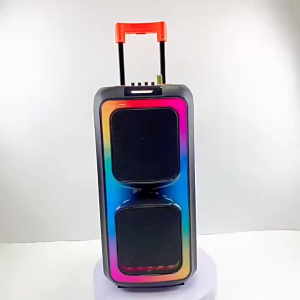
8-inch Bluetooth speaker dual speakers wireless microphone LED light 4500 mah large-capacity battery
Yoobao M20 Super Bass Wireless Bluetooth V5.3 TWS Speaker with FM Radio TF Card USB Function and RGB Lightning Effect

QIXI SK-2063 Enhanced Bass KARAOKE Bluetooth RGB Speaker with Handle Multi Function with Two Wireless Microphone
ZK-TB21 TDA7498E 2.1 Channel Bluetooth Digital Amplifier 160W 2+220W High Power Audio Module para sa Car at Home Audio
Soft Sponge Ear Cushions Replacement Earpads For H150 H151 H130 Multiple Headphone Models Noise Reduction Accessories
MINISO MS105 AI Translator Earbud 150 Languages Translation Wireless Bluetooth 6.0 Earbuds Touch Control Noise Reduction Earphones In-Ear Earphones With Mic
Wooask F56 Smart Translator Earbuds Wireless Multilingual OWS Real Time AI Translation Headphones 144 Languages Online with 8 Offline Packs
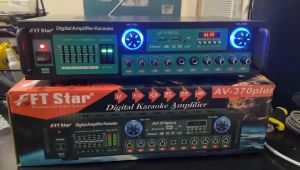
FT STAR Digital Karaoke Professional Mixing Amplifier With Equalizer(BT/FM/USB/SD) 400WX2 - AV-370PLUS

Potentiometer 6legs Sakura Konzert Universal 100K Volume Control 6 pin Master Volume
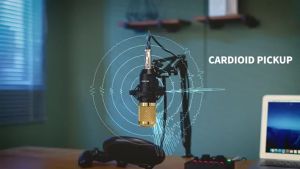
RIXTON Podcast Equipment Bundle Audio Interface with All in One Live Sound Card and Condenser Microphone Perfect for Recording Broadcasting Live Streaming (Gold)