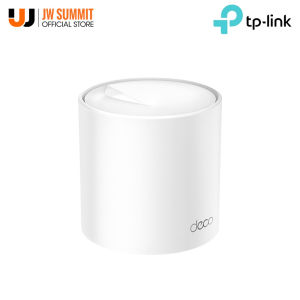
TP-Link Deco X60 AX5400 V3.20 Whole Home Mesh Wi-Fi 6 System Overview
TP-Link Deco X60 AX5400 V3.20 Whole Home Mesh Wi-Fi 6 System Overview
The TP-Link Deco X60 AX5400 V3.20 Whole Home Mesh Wi-Fi 6 System is a cutting-edge networking solution that provides seamless whole-home coverage, scalability, and advanced security features. In this comprehensive guide, we'll delve into the key features, installation process, and security measures of the Deco X60 Mesh Wi-Fi system, available in 1-Pack, 2-Pack, and 3-Pack configurations.
Key Features & Performance
AX5400 Wi-Fi 6 Router Capabilities
The TP-Link Deco X60 AX5400 V3.20 is equipped with Wi-Fi 6 technology, delivering exceptional performance and reliability. With its AX5400 speed rating, this mesh router system ensures fast and stable internet connectivity throughout your home, making it ideal for streaming, gaming, and other bandwidth-intensive applications.
Seamless Whole Home Coverage
One of the standout features of the TP-Link Deco X60 AX5400 V3.20 is its ability to provide seamless whole-home coverage. By using multiple nodes, the Deco X60 Mesh Wi-Fi system eliminates dead zones and weak signals, ensuring that every corner of your house has reliable Wi-Fi access. Whether you're working from home, watching movies, or playing online games, you can enjoy uninterrupted connectivity.
Deco X60 Mesh Wi-Fi System Scalability
The TP-Link Deco X60 AX5400 V3.20 is designed to be scalable, allowing you to expand your network as needed. Available in 1-Pack, 2-Pack, and 3-Pack configurations, this mesh router system can adapt to your home's unique layout and size. By adding more nodes, you can extend your network's reach and accommodate more devices, ensuring that everyone in your household can enjoy a fast and secure internet experience.
Installation & Setup
TP-Link Deco X60 AX5400 V3.20 Installation Process
Setting up the TP-Link Deco X60 AX5400 V3.20 Whole Home Mesh Wi-Fi 6 System is a straightforward process. Simply plug in the nodes, connect them to your modem, and follow the on-screen instructions using the TP-Link Tether app. The app will guide you through the installation steps, including selecting the optimal placement for each node, configuring your network settings, and securing your Wi-Fi connection.
Setting Up 1-Pack, 2-Pack, & 3-Pack Systems
Depending on your home's size and layout, you can choose the appropriate Deco X60 Mesh Wi-Fi system configuration: 1-Pack, 2-Pack, or 3-Pack. Each pack includes all the necessary components to set up a seamless whole-home network, with the option to add more nodes later if needed. The TP-Link Tether app makes it easy to configure and manage your mesh network, regardless of the pack size you choose.
Configuring TP-Link Deco X60 Mesh Network
Once your TP-Link Deco X60 AX5400 V3.20 Whole Home Mesh Wi-Fi 6 System is set up, you can use the TP-Link Tether app to customize your network settings. From adjusting Wi-Fi channels and frequencies to setting parental controls and guest networks, the app offers a wide range of configuration options to help you optimize your network performance and security.
Security & Privacy
TP-Link Deco X60 AX5400 V3.20 Security Features
The TP-Link Deco X60 AX5400 V3.20 Whole Home Mesh Wi-Fi 6 System comes equipped with advanced security features to protect your network and devices. These include WPA3 encryption, automatic firmware updates, and parental controls, which help safeguard your home network against cyber threats and unauthorized access.
Protecting Connected Devices & Data
With the TP-Link Deco X60 AX5400 V3.20, you can rest assured that your connected devices and data are secure. The system's built-in security features, such as WPA3 encryption and automatic firmware updates, help keep your network safe from potential threats. Additionally, the TP-Link Tether app allows you to monitor and manage your connected devices, ensuring that only authorized users have access to your network.
Customizing Privacy Settings
The TP-Link Deco X60 AX5400 V3.20 Whole Home Mesh Wi-Fi 6 System offers a variety of privacy settings to help you maintain control over your network and data. From setting up guest networks to enabling parental controls, the TP-Link Tether app provides an intuitive interface for customizing your privacy settings according to your preferences.

JW Summit
Review

You May Also Like
Creativity DIY Stars Rhinestone Sticker Blue Wave Point Drip Glue Silver Border Phone Cover Case for iPhone 17 16 15 14 Pro Max
Case for tecno camon 30 pro 5g camon 30S 4g 30 4G phone casing Softcase Silicone shockproof Cover new design aesthetic Wireless Magnetic Attachment with lanyard SPDTBS01
Antislip Silicone Cover Case For Handheld Gimbals Accessory Mobile Recording Device Secure Grip Outdoor Photography Gear
(Buy 1 take 1 ) Full tempered glass for Asus Zenfone Max Pro M1/ZB601KL ASUS Zenfone Max (M1) ZB555KL Asus Zenfone Max Pro (M1) ZB602KL Asus Zenfone Max Pro (M2) ZB631KL(2pcs)
Adjustable Magnetic Camera Mount Stand Featuring 1/4inch Tripod Thread Cold Shoe Adapter For Pocket 3 Action Cameras
![Case Samsung Z Flip 6 Z Flip 5 Z Flip 4 Z Flip 3 Case [Full Cover Hinge Protection] Slim Phone Case Protection Metal Volume Key Protection Wireless Charging for Galaxy Z Flip 4 5G](https://img.lazcdn.com/g/ff/kf/S5bdba03ce6ce41e9b997641e65c33f57J.jpg_300x300q80.jpg)
Case Samsung Z Flip 6 Z Flip 5 Z Flip 4 Z Flip 3 Case [Full Cover Hinge Protection] Slim Phone Case Protection Metal Volume Key Protection Wireless Charging for Galaxy Z Flip 4 5G
LPO Samsung Laptop Battery R428 AA-PB9NC6B for Samsung R418 R420 R460 R468
Magnetic Luxury Leather Wallet Card Slot Flip Cover for Your Phone
Ultra-Thin Redmi K50 Phone Case Womens Style Magnetic Suction Full Cover Gyro Stress Relief Creative Gradient Glitter Powder Transparent Protection Cover
Short Phone Strap Wealth Lucky Character Anti-Loss Wrist Cord Universal Phone Case Accessory Versatile Stylish Digital Gear
Plating Glitter Soft Casing for Oppo realme C30 Phone Case