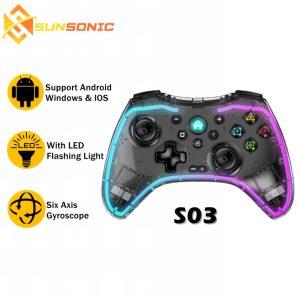
BSP S03 Transparent Wireless Bluetooth Gaming Controller
BSP S03 Transparent Wireless Bluetooth Gaming Controller
The BSP S03 Transparent Wireless Bluetooth Gaming Controller is a compact gaming controller designed for ultimate convenience and portability. This innovative controller offers users a unique experience with its transparent design, wireless Bluetooth connectivity, and advanced features.
What is the BSP S03 Transparent Wireless Bluetooth Gaming Controller?
The BSP S03 Transparent Wireless Bluetooth Gaming Controller is a high-quality gaming controller that offers users a seamless gaming experience. This controller is designed to be compact, lightweight, and easy to carry around, making it perfect for gamers who want to enjoy their favorite games on the go.
Key Features of the BSP S03
Here are some of the key features of the BSP S03 Transparent Wireless Bluetooth Gaming Controller:
- Transparent Design: The transparent design of the controller makes it stand out from other controllers on the market. This design allows users to see through the controller, giving it a sleek and modern look.
- Wireless Bluetooth Connectivity: The BSP S03 is equipped with wireless Bluetooth connectivity, allowing users to connect it to their devices wirelessly. This feature eliminates the need for any cables, making it easier to move around and play games.
- Compact Size: The controller is compact and lightweight, making it easy to carry around. It fits comfortably in the hands of most users, providing a comfortable gaming experience.
- Advanced Features: The BSP S03 comes with several advanced features, such as adjustable sensitivity settings, customizable button mapping, and more.
Comparison with Other Controllers
Compared to other controllers on the market, the BSP S03 offers several advantages. Its transparent design sets it apart from other controllers, making it a unique addition to any gamer's collection. Additionally, its wireless Bluetooth connectivity and compact size make it ideal for gamers who want to play on the go.
How to Set Up the BSP S03 Transparent Wireless Bluetooth Gaming Controller
Setting up the BSP S03 Transparent Wireless Bluetooth Gaming Controller is simple and straightforward. Here are the steps to follow:
Connecting the Controller to Your Device
- Turn on your device and ensure that Bluetooth is enabled.
- Press and hold the power button on the controller until the LED light turns on.
- On your device, select the controller from the list of available Bluetooth devices.
- Once connected, the LED light on the controller will turn off.
Charging the Controller
The BSP S03 comes with a charging cable that can be used to charge the controller. To charge the controller, simply plug the charging cable into the controller and connect it to a power source. The LED light on the controller will turn red while charging and will turn off once fully charged.
How to Use the BSP S03 Transparent Wireless Bluetooth Gaming Controller
Using the BSP S03 Transparent Wireless Bluetooth Gaming Controller is easy and intuitive. Here are some basic controls and advanced features to help you get started:
Basic Controls
- Directional Pad: Use the directional pad to move your character or camera in games.
- Action Buttons: Use the action buttons to perform various actions in games, such as jumping, shooting, and more.
- Start/Select Buttons: Use the start/select buttons to access menus and options in games.
Advanced Features
- Adjustable Sensitivity Settings: Adjust the sensitivity settings of the controller to your liking, allowing you to fine-tune the controller's responsiveness.
- Customizable Button Mapping: Map the buttons on the controller to your preferred settings, allowing you to customize the controller to your gaming style.
Troubleshooting Common Issues with the BSP S03 Transparent Wireless Bluetooth Gaming Controller
If you experience any issues with the BSP S03 Transparent Wireless Bluetooth Gaming Controller, here are some common problems and their solutions:
Connection Problems
- Controller Not Connecting: Ensure that Bluetooth is enabled on your device and that the controller is turned on. If the problem persists, try resetting the controller by holding down the power button for 10 seconds.
- Controller Disconnecting: If the controller disconnects during gameplay, try restarting both the controller and your device.
Battery Issues
- Battery Not Holding Charge: If the battery is not holding charge, try charging the controller for a longer period of time or using a different power source.
- Battery Draining Quickly: If the battery is draining quickly, try turning off any unnecessary features on the controller or reducing the sensitivity settings.
Conclusion
The BSP S03 Transparent Wireless Bluetooth Gaming Controller is a high-quality gaming controller that offers users a unique experience with its transparent design, wireless Bluetooth connectivity, and advanced features. Its compact size and lightweight design make it perfect for gamers who want to play on the go, while its adjustable sensitivity settings and customizable button mapping allow users to fine-tune the controller to their gaming style. Whether you're a casual gamer or a hardcore enthusiast, the BSP S03 is sure to provide you with hours of entertainment.

Sunsonic Official Store
Review

You May Also Like
Redmi K50 Supreme Version K50 Esports Version K60 Supreme Screen Replacement for Xiaomi 13T Total Assembly Digital Accessories
VRQR 9D Anti Scratch Film Tempered Glass for Vivo Y12 Y12i Y91C Y1S Y95 Y91 Y93 Y17 Y15 Y50 Y30 Y30i Y19 Y11 2019 I35 Y16 Y02 Y02S Y77 Y77E (t1) phone front glass Edge Fully Coverage Protective Screen Protector
WOMIER 132Keys Retro Black Purple Cherry Profile Double Shot PBT Keycaps Custom Key cap for 60% 65% 75% 100% Gateron Cherry MX Gamer Mechanical Keyboard
PWMs Fan Extension Cable 4Pin Male to Female Connectors for Graphics Cooling with Automatic Temperature Control
SAMSUNG S25 ULTRA S25 EDGE / S25 PLUS / S25 FE / S24 ULTRA / S24 PLUS / S24 Case XUNDD Magnet Airbag Case
Apple 17Promax Phone Case with 360 Rotating Magnetic Stand Full Cover Ice Crystal Transparent Shockproof for Men And Women
Cute Cartoon Katy KT Cat Silicone Phone Case for Apple iPhone 16 pro Max 15 pro 14 Transparent 13 Soft Shell 12 Couples Anti-Collision Strip Anti-Fall
Coffee Tamping Station 51mm 54mm 58mm Portafialter Holder Stand Mat For Delonghi Breville E61 Espresso Accessories Barista Tools
Nylon magnetic buckle strap suitable for Samsung Galaxy Watch 8 40mm/44mm/Classic 46mm One-second replacement strap Mens sports
Tri-Town Magnetic Wireless Charge Case For iPhone 11 16 15 14 13 12 Pro Max Shockproof Acrylic Back Cover
Travel-Friendly Phone Tripod & Monopod: A Comprehensive Guide