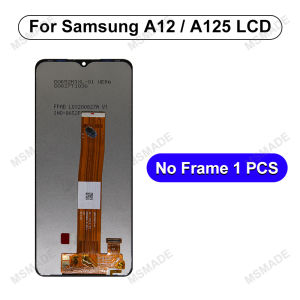
6.5\" AAA+ IPS For Samsung Galaxy A12 LCD A125 Display SM-A125F Touch Screen Digitizer For Samsung A12 Display Replacement Parts

6.5" AAA+ IPS For Samsung Galaxy A12 LCD A125 Display SM-A125F Touch Screen Digitizer For Samsung A12 Display Replacement Parts

What Are IPS Display Replacement Parts?

IPS display replacement parts refer to the components required to replace the damaged or malfunctioning display on a Samsung Galaxy A12 device. These parts include the LCD screen, touch digitizer, and other related components specific to the SM-A125F model.

Key Components: SM-A125F Display Components

The SM-A125F display components include:

  • LCD Screen: The actual display panel that shows images and videos.
  • Touch Digitizer: The layer that detects and responds to touch inputs.
  • Frame and Adhesive Tape: Components that hold the display in place and secure it to the device.

Benefits of IPS Display Technology

IPS (In-Plane Switching) display technology offers several advantages over other types of displays:

  • Wide Viewing Angles: IPS displays provide consistent color accuracy and contrast even when viewed from different angles.
  • High Color Accuracy: IPS displays offer accurate color reproduction, making them ideal for watching videos, browsing photos, and other visual tasks.
  • Better Contrast Ratio: IPS displays have a higher contrast ratio compared to other types of displays, resulting in better image quality.

How to Choose the Right IPS Display Replacement Part

When choosing an IPS display replacement part for your Samsung Galaxy A12, consider the following factors:

  • Compatibility: Ensure the replacement part is compatible with your device model (SM-A125F).
  • Quality: Opt for high-quality replacement parts that offer good image quality and durability.
  • Price: Compare prices from different suppliers to find the best value for your budget.

Step-by-Step Guide to Replacing Your Samsung A12 Display

Replacing the display on your Samsung Galaxy A12 requires some technical knowledge and tools. Follow these steps to replace the screen and touch digitizer:

Tools & Materials Needed

  • Screwdriver: A small screwdriver to remove screws from the device.
  • Spudger: A tool to gently pry open the device case.
  • Heat Gun: To soften adhesive tape holding the display in place.
  • Replacement Parts: The new LCD screen, touch digitizer, and other related components.

Preparing Your Device for Display Replacement

  1. Turn off your device and remove the battery if possible.
  2. Remove the screws securing the device case.
  3. Use the spudger to gently pry open the device case.
  4. Disconnect any cables connecting the old display to the motherboard.

Replacing the A12 Screen & Touch Digitizer

  1. Remove the old LCD screen and touch digitizer.
  2. Apply new adhesive tape to secure the new display components.
  3. Connect the new display to the motherboard using the appropriate cables.
  4. Reassemble the device case and test the new display.

Troubleshooting Common Issues with Display Replacement

Even after replacing the display, you may encounter some issues. Here are some solutions:

Fixing Touch Sensitivity Problems

If the new display has touch sensitivity issues, try the following:

  • Calibrate the Touch Screen: Use the device's built-in calibration tool to adjust touch sensitivity.
  • Check Connections: Ensure all cables connecting the touch digitizer to the motherboard are secure.

Addressing Display Distortion

If the new display shows distortion, try the following:

  • Check Connections: Ensure all cables connecting the LCD screen to the motherboard are secure.
  • Replace Adhesive Tape: Sometimes, replacing the adhesive tape holding the display in place can resolve distortion issues.

Ensuring Proper Alignment of the IPS Display

To ensure proper alignment of the new IPS display:

  • Use a Spudger: Gently press the display into place using a spudger.
  • Check Alignment: After reassembling the device case, check that the display is properly aligned.

Tips for Extending the Life of Your New Display

To extend the life of your new IPS display:

Regular Maintenance & Cleaning

  • Clean the Display: Use a soft cloth to clean the display regularly.
  • Avoid Using Harsh Chemicals: Do not use harsh chemicals or abrasive materials to clean the display.

Avoiding Physical Damage

  • Use a Protective Case: Protect the device from drops and impacts using a protective case.
  • Avoid Excessive Pressure: Do not apply excessive pressure to the touch digitizer.

Proper Handling & Storage

  • Handle With Care: Handle the device with care to avoid dropping or damaging it.
  • Store in a Safe Place: Store the device in a safe place away from extreme temperatures and humidity.
Global Merch Park

Global Merch Park

Seller ratings 97%

You May Also Like
8in1 Universal DC Power Adapter Socket Female Plug Charger Tips for ACER ASUS Samsung Laptop
00:13

8in1 Universal DC Power Adapter Socket Female Plug Charger Tips for ACER ASUS Samsung Laptop

Crazy Horse Leather Skin Decal Sticker Cover for Surface Laptop 1 2 3 4 5 13.5" Surface Book 1 2 3 13.5" 15"  pro pro6
00:58

Crazy Horse Leather Skin Decal Sticker Cover for Surface Laptop 1 2 3 4 5 13.5" Surface Book 1 2 3 13.5" 15" pro pro6

WeiTech Powerbank 10000mAh 22.5W Fast Charge USB-C Port & 15W Wireless Powerbank w/ Smart Watch Charging W/ LED Display BAVIN (PC1078)
00:31

WeiTech Powerbank 10000mAh 22.5W Fast Charge USB-C Port & 15W Wireless Powerbank w/ Smart Watch Charging W/ LED Display BAVIN (PC1078)

22mm Sport Nylon Loop For CMF Watch Pro 2 Strap Replacement Watchband Bracelet For CMF by Nothing Watch Pro 2 Correa Wristband
00:27

22mm Sport Nylon Loop For CMF Watch Pro 2 Strap Replacement Watchband Bracelet For CMF by Nothing Watch Pro 2 Correa Wristband

Original Smart TV Remote for KASSEL TV MIKATA TV JPS SMART TV ACE Android TV Remote ITEL STAR-X NOVA VGL TV (must be Identical to your old TV Remote Control) - Lazada
00:10

Original Smart TV Remote for KASSEL TV MIKATA TV JPS SMART TV ACE Android TV Remote ITEL STAR-X NOVA VGL TV (must be Identical to your old TV Remote Control) - Lazada

Samsung A6+Plus SM-A6050 A605F/G Brushed Soft Silicone Anti-Fingerprint Slip-Resistant Full Coverage Shockproof Phone Case
00:38

Samsung A6+Plus SM-A6050 A605F/G Brushed Soft Silicone Anti-Fingerprint Slip-Resistant Full Coverage Shockproof Phone Case

Brightbling Pulsator Washing Machine Drain Hose Drainage Pipe Outlet Water Pipe Soft Tube Stretchable Ripple
00:19

Brightbling Pulsator Washing Machine Drain Hose Drainage Pipe Outlet Water Pipe Soft Tube Stretchable Ripple

FFDWAA Transparent E-Reader Case Soft TPU Protective Shell Premium 2022 9/10/11th Gen Back Cover for Kindle Paperwhite 1/2/3/4/5
00:10

FFDWAA Transparent E-Reader Case Soft TPU Protective Shell Premium 2022 9/10/11th Gen Back Cover for Kindle Paperwhite 1/2/3/4/5

Handmade Crystal Butterfly Knot Mobile Phone Necklace Crossbody Shoulder Bag Chain Womens Fashion Accessory Versatile Strap
00:27

Handmade Crystal Butterfly Knot Mobile Phone Necklace Crossbody Shoulder Bag Chain Womens Fashion Accessory Versatile Strap

【Fast Shipping】 Headphone Holder U Shape Wooden Headphones Stand Holder Universal Head Mounted Hook Desk Display Shelf Earphone Bracket Hanger Wooden Earphone Holder
00:21

【Fast Shipping】 Headphone Holder U Shape Wooden Headphones Stand Holder Universal Head Mounted Hook Desk Display Shelf Earphone Bracket Hanger Wooden Earphone Holder

V2S PC01 Mini Power Bank 5000 MAH Portable Mobile Phone Charger Battery Power Bank Plug Play Type-C With Built-In Cable
00:54

V2S PC01 Mini Power Bank 5000 MAH Portable Mobile Phone Charger Battery Power Bank Plug Play Type-C With Built-In Cable

Case for OPPO Find N3 / OnePlus Open Classic and Fashionable Folding Screen Mobile Phone Back Cover Anti-drop Anti-fingerprint Shockproof Protective Case
00:27

Case for OPPO Find N3 / OnePlus Open Classic and Fashionable Folding Screen Mobile Phone Back Cover Anti-drop Anti-fingerprint Shockproof Protective Case