140mm PC Fan: Silent & Efficient Cooling Solutions
140mm PC Fan: Silent & Efficient Cooling Solutions
Introduction to 140mm PC Fans
What Are 140mm PC Fans?
A 140mm PC fan is a type of computer cooling device designed to help dissipate heat generated by components within a PC case. These fans come in various sizes, but the 140mm size is particularly popular due to its balance between airflow and noise levels. They are typically used in conjunction with other cooling solutions, such as liquid cooling systems or heatsinks, to maintain optimal operating temperatures for your computer's components.
Why Choose 140mm Fans for Silent Cooling?
140mm PC fans are known for their ability to provide efficient cooling while minimizing noise levels. They are often preferred over smaller fans because they can move more air with less force, resulting in quieter operation. Additionally, many 140mm fans come equipped with advanced features like PWM (Pulse Width Modulation) control, which allows for more precise speed adjustments and further noise reduction.
Choosing the Right 140mm PC Fan
Factors to Consider
When selecting a 140mm PC fan, consider the following factors:
- Airflow: Look for fans with high airflow ratings, measured in cubic feet per minute (CFM), to ensure efficient cooling.
- Noise Level: Opt for fans with low noise levels, measured in decibels (dB), to maintain a quiet computing environment.
- Voltage: Check the fan's voltage requirements to ensure compatibility with your power supply unit (PSU).
- PWM Control: Consider fans with PWM control for more precise speed adjustments and noise reduction.
Comparing 4pin CPU Cooler Fans & 14 cm Case Fans
When comparing 4pin CPU cooler fans and 14 cm case fans, consider the following:
- Purpose: 4pin CPU cooler fans are designed specifically for cooling CPUs, while 14 cm case fans are used for general cooling within the PC case.
- Compatibility: Ensure that the fan you choose is compatible with your motherboard and PSU.
- Performance: Compare airflow ratings, noise levels, and voltage requirements to determine which fan will provide the best performance for your needs.
Enhancing Your Setup with Quiet RGB Fans
Advantages of RGB Fans
RGB fans offer several advantages over non-RGB fans, including:
- Aesthetic Appeal: RGB fans can add a visually stunning element to your PC build, enhancing its overall appearance.
- Customization: Many RGB fans come with software or hardware controls, allowing you to customize the lighting effects to your liking.
- Compatibility: RGB fans often come with compatibility features, such as addressable RGB headers, to work seamlessly with other RGB components in your build.
Silent RGB Fan Recommendations
Some popular silent RGB fan options include:
- Noctua NF-A14 PWM RGB: Known for its exceptional airflow and noise levels, this fan offers a wide range of customization options through its included software.
- Corsair LL140 RGB Pro: Featuring a sleek design and excellent airflow, this fan offers customizable RGB lighting and PWM control for precise speed adjustments.
- Cooler Master MF140R RGB: This fan provides excellent airflow and noise levels, along with customizable RGB lighting and PWM control.
Installation & Maintenance Tips
How to Install a 140mm PC Fan
To install a 140mm PC fan, follow these steps:
- Prepare Your Workspace: Ensure you have a clean, static-free workspace before beginning the installation process.
- Remove the Old Fan: Carefully remove any existing fans from your PC case using a screwdriver.
- Install the New Fan: Align the new fan with the mounting holes on your PC case and secure it in place using screws.
- Connect the Fan: Connect the fan's power cable to the appropriate header on your motherboard or PSU.
- Test the Fan: Power on your computer and test the fan's operation to ensure it is working correctly.
Maintaining Optimal Performance
To maintain optimal performance for your 140mm PC fan, follow these tips:
- Regularly Clean the Fan: Use compressed air to remove dust and debris from the fan blades and surrounding areas.
- Monitor Temperatures: Keep an eye on your computer's temperatures using software like HWMonitor or MSI Afterburner.
- Adjust Fan Speeds: Use software like Noctua NF-SmartControl or Corsair iCUE to adjust fan speeds and optimize performance.

Global Merch Park
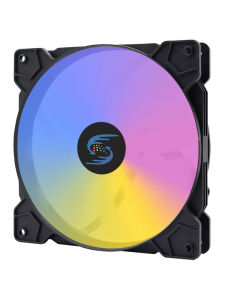
Review
You May Also Like
Macbook pro Retina A1398 A1425 A1502 Rubber Footpad Bottom Case Compatible Laptop Computer Accessories Digital Parts And Components

Rantoper 34-inch Curved Monitor: A Comprehensive Guide

Panther PUP 501 Uninterruptible Power Supply500VA 300 Watts with Digital Display (UPS)
Acer Seaview Palace Pro PC Case With Screen Tempered Glass Micro ATX/ATX Gaming Desktop Case
YGT DOUBLE RING RAIBOW LED FAN RGB 3-PIN 12V 0.2A 120MM
【New Arrival】 MAX6675 Module DC 3-5V Temperature Degrees Module with Cable Cord Temperature Thermocouple Sensor MAX6675 Module
High Resolution 1.8Inch/2.4inch TFT Screen Module EC11 Encoders Module SPI Interfaces Electronic Component ST7735S
Virtual Surround Sound GS20 Type C/USB Mini Sound Card External for Computers Tablets Notebook PC Widely Ued

14 Inch IPS Laptop LCD Screen N140GLE GE1 N140GLE-GE1 Display Matrix Panel Replacement 2560x1600 eDP 40 Pins 90Hz Non-Touch

HikVision C100 480GB SATA 2.5

High Power Rapid Electric Vehicle Power Adapter Intelligent Auto Recognition Technology Multiple Interface Compatibility