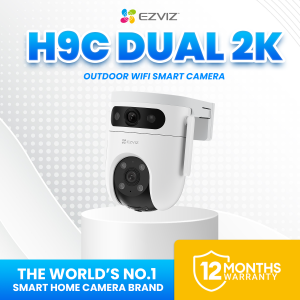
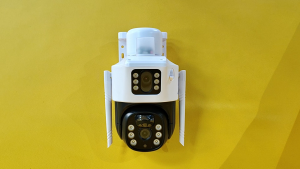
EZVIZ H9c Dual 2K & 2K Dual Lens Weatherproof Outdoor CCTV Camera
Key Features of the EZVIZ H9c
The EZVIZ H9c Dual 2K & 2K Dual Lens Weatherproof Outdoor CCTV Camera is a high-end surveillance camera that offers exceptional features for both residential and commercial use. This camera boasts dual 2K cameras, a 360-degree pan and tilt capability, and a weatherproof IP65 design, making it an ideal choice for outdoor surveillance.
Dual 2K Cameras
The EZVIZ H9c features two 2K cameras, each equipped with a 1/2.7" progressive scan CMOS image sensor. The upper camera has a 2.8mm lens with a viewing angle of diagonal 130°, horizontal 108°, and vertical 56°. The bottom camera has a 6mm lens with a viewing angle of diagonal 62°, horizontal 55°, and vertical 28°. These cameras provide high-resolution images, allowing you to capture every detail of your surroundings.
360 Degree Pan & Tilt
The EZVIZ H9c offers a 360-degree pan and tilt capability, enabling you to monitor a wide area from a single camera. With a pan angle of 350° and a tilt angle of 80°, this camera can cover all angles of your property, ensuring maximum coverage and security.
Weatherproof IP65 Design
The EZVIZ H9c is designed to withstand harsh weather conditions, making it perfect for outdoor use. Its IP65 rating ensures that it is protected against dust and water splashes, allowing it to operate seamlessly in any environment.
Installation & Setup Guide
Setting up the EZVIZ H9c Dual 2K & 2K Dual Lens Weatherproof Outdoor CCTV Camera is a simple process that can be completed in a few easy steps.
Connecting the Camera to Your Wi-Fi Network
To connect the camera to your Wi-Fi network, first, download the EZVIZ app on your smartphone or tablet. Then, follow the on-screen instructions to connect the camera to your Wi-Fi network. Once connected, you can access the camera's live feed and recorded footage through the app.
Setting Up Motion Detection Alerts
The EZVIZ H9c comes with built-in motion detection capabilities, allowing you to receive alerts whenever movement is detected in your surveillance area. To set up motion detection alerts, open the EZVIZ app and navigate to the camera settings. From there, you can customize the sensitivity of the motion detection and set up alerts to be sent to your phone or email.
Configuring Night Vision Settings
The EZVIZ H9c features IR-cut filter with auto-switching, which allows it to automatically switch between day and night modes. This feature ensures that the camera captures clear images even in low-light conditions. To configure the night vision settings, open the EZVIZ app and navigate to the camera settings. From there, you can adjust the sensitivity of the night vision mode and set up alerts to be sent to your phone or email.
Benefits of Using the EZVIZ H9c
The EZVIZ H9c Dual 2K & 2K Dual Lens Weatherproof Outdoor CCTV Camera offers numerous benefits for both residential and commercial use.
Enhanced Security with Dual Cameras
With its dual 2K cameras, the EZVIZ H9c provides enhanced security by capturing every detail of your surroundings. This feature allows you to monitor multiple areas simultaneously, ensuring maximum coverage and security.
Easy Access via Connect Cellphone CCTV Camera
The EZVIZ H9c can be easily accessed through the EZVIZ app, allowing you to monitor your property from anywhere in the world. This feature provides peace of mind, knowing that you can check on your property at any time.
High-Quality 2K Resolution Outdoor Surveillance
The EZVIZ H9c offers high-quality 2K resolution outdoor surveillance, providing clear images and videos of your surroundings. This feature ensures that you can capture every detail of your property, making it easier to identify potential threats and take action.
Frequently Asked Questions
What is the viewing angle of the EZVIZ H9c cameras?
The upper camera has a viewing angle of diagonal 130°, horizontal 108°, and vertical 56°, while the bottom camera has a viewing angle of diagonal 62°, horizontal 55°, and vertical 28°.
How does the camera handle low-light conditions?
The EZVIZ H9c features IR-cut filter with auto-switching, which allows it to automatically switch between day and night modes. This feature ensures that the camera captures clear images even in low-light conditions.
Can I customize the video compression settings?
Yes, the EZVIZ H9c allows you to customize the video compression settings through the EZVIZ app. You can choose from Quad HD, Full HD, Hi Def, and Standard video bit rates, depending on your preference.

Ezviz PH
Review
You May Also Like

LS VISION 16MP 4-Lens 3-Screen Wifi Security Camera: A Comprehensive Guide

V380 PRO CCTV Camera HD 3 Lens 3 Screens Wireless WiFi camera Outdoor IP66 Waterproof Surveillance 360 Home IP Security Cameras Night Vision With Alarm Sensor Smart Camera CCTV With Voice

Hikvision CCTV IP Camera HD 2MP/4MP Full-Color With Audio Network Camera Outdoor IP67 Waterproof Security Camera

TP-Link Official Store | Tapo C210/C211 | 2K 3MP Indoor 360 Degrees Pan and Tilt Wireless WiFi IP Security CCTV Sale Hidden Camera Connect to Cellphone Two Way Audio with Mic and Speaker

Xiaomi Drone With Camera Mini Drone With 4K Camera Original 4K HD Drone Camera For Vlogging

Telescope Long Range Original Universal 18X Zoom HD Optical Cell Phone Lens Observing Telephoto Lens

V380 Pro dual-lens camera can be used in conjunction with a mobile phone without the need for WIFI connection. It features multiple modes with night vision and two-way audio functions making it suitable for home surveillance.

V380 Q6 Pro Black & White CCTV Camera: 1080P Smart Home Security & WiFi Connect to Cellphone

TTArtisan AF 35mm F1.8 Mark II: High-Performance Camera Lens for Nikon Z & Sony E

PNZEO Compact Indoor Plug-in Mini Smart Home Security Camera 4K FHD IR Night Vision Motion Detection Pet/Nanny Monitor Cam

V380 PRO Dual Lens 1080P HD Full CCTV Camera Connect Cellphone With 2 Way Audio And Speaker Wireless WiFi IP Security Cameras Night Vision 360 panoramic Motion Detection Surveillance Camera