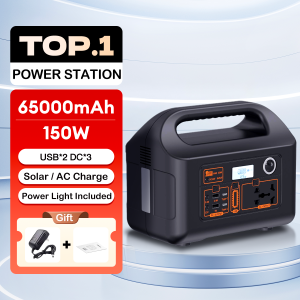
Portable Power Station 150W Multi-Function Power Bank 50000mAh Large Capacity Power Supply
Portable Power Station 150W Multi-Function Power Bank 50000mAh Large Capacity Power Supply
Understanding the Portable Power Station
Key Features & Benefits
Compact Power Charging Station is a versatile and powerful portable power bank with a 50000mAh large capacity power supply. Its 150W multi-function output allows you to charge various devices simultaneously, including smartphones, tablets, laptops, and even small appliances. This portable power station is designed for outdoor enthusiasts, emergency preparedness, and daily use.
The benefits of using this power bank include:
-
High capacity: With a massive 50000mAh battery, you can charge multiple devices without worrying about running out of power.
-
Fast charging: Thanks to its 150W output, this power bank charges devices quickly and efficiently.
-
Versatile charging options: The power station supports multiple charging methods, including USB-C, USB-A, and AC outlets, ensuring compatibility with a wide range of devices.
-
Compact design: Despite its large capacity, this power bank is lightweight and portable, making it perfect for outdoor adventures and emergency situations.
How It Compares to Other Power Banks
Compared to other power banks on the market, the Compact Power Charging Station stands out due to its high capacity, fast charging capabilities, and versatile charging options. While other power banks may offer similar features, few can match the combination of power, speed, and convenience offered by this multi-function power bank.
Setting Up Your Power Station
Unboxing & Initial Setup
When you receive your Compact Power Charging Station, carefully unbox it and familiarize yourself with its components. These typically include the power bank itself, a charging cable, and any necessary adapters.
To set up your power station, simply connect the included charging cable to a power source and plug the other end into the power bank's USB-C port. Allow the power bank to charge fully before using it for the first time.
Connecting Devices
Once your power station is charged, connecting devices is easy. Simply plug your device's charging cable into one of the available ports (USB-C, USB-A, or AC outlet) and watch as your device begins to charge.
Charging & Battery Management
Charging Methods
The Compact Power Charging Station supports several charging methods, including:
-
USB-C: This port can be used to charge the power bank itself or to charge compatible devices.
-
USB-A: Ideal for charging smartphones, tablets, and other small devices.
-
AC outlet: Allows you to charge larger devices, such as laptops, or power small appliances.
Battery Life Expectancy
With a 50000mAh battery capacity, the Compact Power Charging Station can provide ample power for various devices. Battery life expectancy depends on the device being charged and its power consumption. However, with proper care and maintenance, this power bank can last for years.
Multi-Function Outdoor Charging
Ideal Scenarios for Use
The Compact Power Charging Station is perfect for outdoor enthusiasts who want to stay connected and powered up during camping trips, hiking adventures, or other outdoor activities. It can also be used as an emergency power source during natural disasters or power outages.
Additional Features & Accessories
In addition to its powerful charging capabilities, the Compact Power Charging Station may come with additional features and accessories, such as:
-
Built-in LED flashlight: Perfect for illuminating your path during nighttime adventures.
-
Carabiner clip: Allows you to easily attach the power bank to your backpack or belt loop.
-
Portable solar panel: Charge the power bank using the sun's energy, making it even more versatile.
Maintaining Your Portable Power Station
Regular Maintenance & Care
To ensure your Compact Power Charging Station remains in good working condition, follow these simple maintenance tips:
-
Keep it clean: Wipe the power bank with a soft, dry cloth to remove dust and debris.
-
Store it properly: When not in use, store the power bank in a cool, dry place away from direct sunlight.
-
Avoid overcharging: Unplug the power bank once it reaches 100% to prevent damage to the battery.
Troubleshooting Common Issues
If you encounter any issues with your Compact Power Charging Station, try the following troubleshooting tips:
-
Device not charging: Ensure that the charging cable is securely connected to both the device and the power bank. If the issue persists, try using a different charging cable.
-
Power bank not charging: Check that the charging cable is securely connected to both the power source and the power bank. If the issue persists, try using a different power source or charging cable.

MK mall
You May Also Like
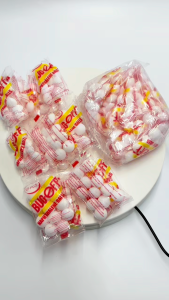
COD 144pcs/pack Moth Balls: Natural Camphor Ball Naphthalene Balls Bug Off Fragrance MothBalls Pest Removal

Ceramic Glazed Pots: Durable & Versatile Containers for Indoor Plants
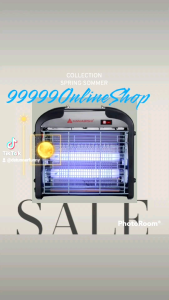
Hanabishi Insect Killer HENSK40 SQM: A Pest Management Solution
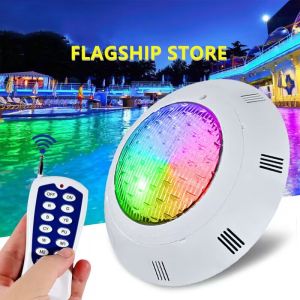
Underwater Light IP68 Waterproof Lamp Fountain Spotlight Landscape Pond with Remote Control Engineering lights Outdoor Garden Lawn Lamp Water Features Swimming Pool Light AC12V LED light RGB Underwater Pool Lights
REVO Premium Pruning Scissors Gardening Tools
Barbecue Rack Gas Burner Stove Rack Outdoor Camping Portable Folding Burner Stove Stand Bracket
BBQ Smoker Grill with Built-in Thermometer Round BBQ Grill Vertical Charcoal Smoker with Air Vent 2 Access Doors for Camping

Ultra-high Pressure Cleaning Machine: A Powerful Tool for Household & Garden Washing
![[COD] CHENJ KITCHEN 10Pcs Watermelon Stand Fruit Stand Support Basket Frame Vegetables Plant Tray Rack Melon Squash Pumpkin Protective Holder](https://img.lazcdn.com/g/p/732ca558323b42150b9faf42f4cc686c.jpg_300x300q80.jpg)
[COD] CHENJ KITCHEN 10Pcs Watermelon Stand Fruit Stand Support Basket Frame Vegetables Plant Tray Rack Melon Squash Pumpkin Protective Holder
Avocado Plant in plastic bag
PANSON Mosquito Killer Lamp Sensor Lamp LED Insects Killer UV Light Electric