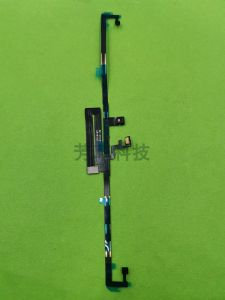
Face ID Optical Sensing Ribbon Cable for iPad Pro 12.9 4th Generation Lanruisi Apple Digital Accessories Compatible
Face ID Optical Sensing Ribbon Cable for iPad Pro 12.9 4th Generation Lanruisi Apple Digital Accessories Compatible
What is Optical Sensing Ribbon Cable?
Understanding the Basics of Optical Sensing Ribbon Cable
An optical sensing ribbon cable is a specialized component that plays a critical role in enabling the Face ID feature on iPad Pro 12.9 4th Generation devices. This cable connects the front-facing camera system to the iPad's motherboard, allowing the device to recognize and authenticate users based on their facial features.
Compatibility with iPad Pro 12.9 4th Generation
The optical sensing ribbon cable is specifically designed to work with the iPad Pro 12.9 4th Generation, ensuring seamless integration with the device's hardware and software. It is important to choose a compatible cable to avoid any potential issues during installation or usage.
Lanruisi Apple Digital Accessories: Trusted Brand for Optical Sensing Ribbon Cables
Lanruisi is a reputable brand known for producing high-quality digital accessories that are compatible with Apple devices. Their optical sensing ribbon cables have been tested and certified to meet the highest standards of performance and reliability, making them a trusted choice for iPad Pro users.
How to Choose the Right Optical Sensing Ribbon Cable for iPad Pro
Factors to Consider When Selecting an Optical Sensing Ribbon Cable
When choosing an optical sensing ribbon cable for your iPad Pro, consider the following factors:
- Compatibility: Ensure that the cable is specifically designed for the iPad Pro 12.9 4th Generation.
- Quality: Look for cables made by reputable brands known for producing high-quality digital accessories.
- Price: Compare prices from different retailers to find the best value for your budget.
Key Features of the Face ID Optical Sensing Ribbon Cable
The optical sensing ribbon cable used in the iPad Pro 12.9 4th Generation features the following key components:
- High-speed data transfer capabilities
- Durable and flexible construction
- Precision-engineered connectors for secure attachment
Comparison with Other Optical Sensing Ribbon Cables on the Market
When comparing Lanruisi's optical sensing ribbon cable with other cables available on the market, consider the following factors:
- Compatibility: Ensure that the cable is specifically designed for the iPad Pro 12.9 4th Generation.
- Quality: Look for cables made by reputable brands known for producing high-quality digital accessories.
- Price: Compare prices from different retailers to find the best value for your budget.
Installation & Setup Guide for Optical Sensing Ribbon Cable
Step-by-Step Instructions for Installing Optical Sensing Ribbon Cable
Follow these steps to install the optical sensing ribbon cable on your iPad Pro 12.9 4th Generation:
- Power off your iPad and remove the battery if necessary.
- Carefully disconnect the existing optical sensing ribbon cable from the motherboard.
- Attach the new optical sensing ribbon cable to the motherboard, ensuring that the connectors are securely attached.
- Reconnect the battery and power on your iPad.
Troubleshooting Common Issues During Installation
If you encounter any issues during installation, refer to the following troubleshooting tips:
- Ensure that the cable is securely attached to the motherboard.
- Check that the connectors are properly aligned and not damaged.
- Verify that the battery is fully charged before powering on your iPad.
Tips for Ensuring Optimal Performance of Optical Sensing Ribbon Cable
To ensure optimal performance of the optical sensing ribbon cable, follow these tips:
- Keep the front-facing camera system clean and free of dust or debris.
- Avoid exposing the cable to extreme temperatures or moisture.
- Regularly update your iPad's software to ensure compatibility with the optical sensing ribbon cable.
Benefits of Upgrading to Optical Sensing Ribbon Cable
Enhanced Security with Face ID Optical Sensing Ribbon Cable
The optical sensing ribbon cable enables the Face ID feature, which provides enhanced security by recognizing and authenticating users based on their facial features. This ensures that only authorized individuals can access your iPad and its contents.
Improved User Experience with Optical Sensing Ribbon Cable
By enabling the Face ID feature, the optical sensing ribbon cable enhances the overall user experience by providing a seamless and convenient way to unlock your iPad and access its features.
Long-Term Cost Savings with Optical Sensing Ribbon Cable
Investing in a high-quality optical sensing ribbon cable can save you money in the long run by reducing the need for frequent replacements and repairs. Additionally, the enhanced security provided by the Face ID feature can help protect your device and its contents from unauthorized access, reducing the risk of costly data loss or theft.

TB EL SHOP
Review

You May Also Like
2X Ultra Clear/Anti-Glare/Anti Blue-Ray Screen Protector Guard Cover for HP 14-ep0047TU 14-ep0048TU 14-ep0049TU 14\" Laptop 16:9
Magsafe Magnetic Pixel Mario Phone Case for Apple 17Promax Xiaomi 14 Silver Protective Cover for iPhone 16 pro 13 12 Trendy Brand 11
Luxury Starry Sky Shockproof Glass Casing for infinix Hot 60Pro Plus 60i 4G 5G 2025 Case Tempered Glass Protective Cover for Hot60Pro Hot60ProPlus 60Pro+ Hot60 Hot60i TPU Edge Back
for Game Boy Classic GB-DMG GBO Cover for Case Lid Door Replacement for GB Back Door Cover
Quick Release Camera Wrist Strap for Ricoh GR2 GR3 GR3X Sony RX100M5M6M7 ZV1 Single Digit Micro Single Digital Camera Accessories
Full Cover Sausage Dog Oil Painting iPhone Case Womens Style Cute Cartoon Ins Wind Protection Shell Anti-Fall with Lanyard for Apple 16Pro Max
![[COD] SHPYHT TOY 16A Universal EU Travel Adapter Euro Converter UK US AU To EU AC Power Socket Plug Travel Charger Adapter Converter 250V](https://img.lazcdn.com/g/p/a83c17bc0e6eb9e2ecfd42144b82ae6c.jpg_300x300q80.jpg)
[COD] SHPYHT TOY 16A Universal EU Travel Adapter Euro Converter UK US AU To EU AC Power Socket Plug Travel Charger Adapter Converter 250V

YAQING Universal Stylus Touch Pen for Android iOS Windows Tablet Mobile Phone
![[In Stock] Air Conditioner Drain Hose 6FT/3FT Window Air Conditioner Drain Kit](https://img.lazcdn.com/g/p/cd4c0469454c567ae789033b14cf053a.png_300x300q80.png)
[In Stock] Air Conditioner Drain Hose 6FT/3FT Window Air Conditioner Drain Kit
Ice Maker Spare Parts CM81455094 Ice Full Sensor Ice Thickness Sensor For Icematic Scotsman MV456 MVH456 Ice Machine Replacement
Multiple Layer Protective Shell for 2024 Bluetooth-compatible Speaker Quick Release Buckles Construction