


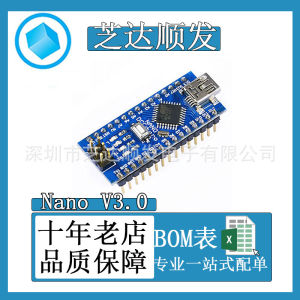
Nano V3.0 CH340G Improved Version Atmega328P/ Development Board Applicable Arduino Chip

Nano V3.0 CH340G Improved Version Atmega328P/ Development Board Applicable Arduino Chip
I. Preparations: Tips: When Installing the Driver, You Do Not Need to Connect the Board to the Computer!
- First, You Need to Install the Driver. The Driver Download Address Is: â . Linux Driver, Supports 32-Bit/64-Bit Systems:
â¡. Mac OS Driver, Supports 32-Bit/64-Bit Systems:
⢠Windows Driver, Support 32/64-Bit Windows 10/8.1/8/7/Vista/XP, Server 2016/2012/2008/2003, 2000/ME/98:
- Install USB to Serial Port Driver After Downloading to the Computer, Decompress It Directly, Decompress It and Double-Click It to Run Click Install and Wait Patiently until the Driver Pre-Installation Is Successful! ", Note That the Driver Installation Has Been Completed, Click OK and Close the Installation Interface
- Install the Arduino Software. the Software Download Address Is as Follows: ? Setlang=cn II. Pre-Use Inspection Tips: Please Wear Anti-Static Equipment (Such as Anti-Static Wrist Strap) before Using the Board, Or Wash Your Hands First and Touch the Iron The Faucet Has Eliminated Static Electricity on the Body (Static Electricity Can Easily Damage the Chip Or Cause the Boot Program to Be Lost)
- Connect to the Computer with USB Cable and Observe Whether the Indicator Light "PWR" on the Board Is Always on and Whether the Indicator Light "L" Is Flashing.
- If "PWR" Is Always on, the Power Supply Is Normal, and "L" Flashing Indicates That the Board Is Working Normally (Blink Is Pre-Downloaded before Leaving the Factory Program)
- If Everything Is Checked Properly, You Can Start Downloading the Program for Testing.
- Open the Arduino Software
- Select a Program and Click: File â Example â 01.Basics â Blink
- Select the Development Board Model. Click Tools â Development Board â Arduino Nano
- Select the Processor Model. Click Tools â Processors â ATmega328 P(Old Bootloader) Tips:The Old Version of Arduino Software Has Only ATmega328 P and No ATmega328 P(Old Bootloader) For This Option, You Should Select ATmega328 P. As Long as You Have the Option ATmega328 P(Old Bootloader) You Must Select This Option. You Cannot Select ATmega328 P! Otherwise, the Program Cannot Be Downloaded.
- Select the Port Number. Right-Click "Computer", Select "Management", and Select "Device Management" in the Pop-up Menu. Manager ", Click Triangular Symbol in Front of Port on the Right Side of the Menu, Find USB-SERIAL Ch340, and the COM Port behind The Number Is the Port Number.
- Program Burning First, Click the Program Compilation Button "â". If There Is No Problem with the Program, the Software Will Prompt "Compile Completed". Â After the Program Is Compiled, Click the Download Button. When You See the Message "Upload Successful" below the Software, It Indicates That the Program Has Been Successfully Downloaded to the Development Board. We're Done! IV. Analysis of Common Problems
- the Ch340 Driver Is Not Installed Or the Driver of the Corresponding Operating System Is Not Installed.
- Model Selection Does Not Correspond
- Port Selection Does Not Correspond
- When Downloading the Program, It Is Best Not to Use External Circuits with Relatively Large Power Consumption. Because the External Circuit Consumes Too Much Power, the Computer USB The Power Supply of the Port Is Insufficient, and the Operating Is Lowered, Resulting in That the ATmega328 Chip Cannot Work Properly.
- the Loss of the Boot Program, Usually Caused by Static Electricity, Can Only Re-Burn the Boot Program, There Is No Other Way
- the Program Cannot Be Compiled and Translated. This Has Nothing to Do with the Development Board. Please Check the Program According to the Prompts below the Software.

ghapmk
Seller ratings 93%
Review

Oops
This video has no reviews.
You May Also Like
00:11
Defender 3400 Extreme Case Tan
00:08
3*18650 UPS Uninterruptible Power Supply Enclosure DC12V Equal Potential Optical Modem Router Mobile Power Bank Housing
00:39
EXPOSE 15.6 inch Portable Touchable Monitor Touchscreen for Laptop Extension 1080P FHD 103% sRGB IPS Screen
00:12
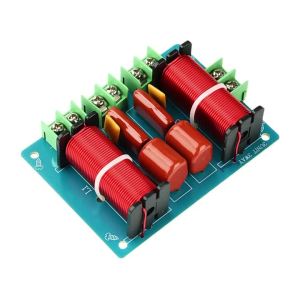
diymore | 250W 3-Way Crossover (2 High 1 Low) Hi-Fi Audiophile-Grade Home Theater Speaker System Solder-Free WEAH-360
![[COD] AqToCna Ship within 24 hours SubZero Seven-Ultimate 15W MK Thermal Pad CPU GPU Graphics Motherboard Silicone Grease Pad Heat Dissipation Silicone Pad](https://img.lazcdn.com/g/p/d0d6c57a984ac4026a9a5b80cfe09352.jpg_300x300q80.jpg)
00:07
[COD] AqToCna Ship within 24 hours SubZero Seven-Ultimate 15W MK Thermal Pad CPU GPU Graphics Motherboard Silicone Grease Pad Heat Dissipation Silicone Pad
00:29
2026 New 15.6-inch IPS Full HD Laptop Stand Adjustable Portable Laptop Screen Original Intel Celeron N5095 Quad Core RAM 16GB 512GB Built-in WEBCAM/Camera Online class/learning Wifi Bluetooth SSD Windows 10 Professional and MS Office
00:42
Mechanic Master C28 ITX/MATX Motherboard/Full Tower/Water-Cooled Portable Computer Case With TemperedGlass
00:20
Circuitrocks LED Four Digit Numeric Display Red Common Anode
00:09
3S 25A 18650 Li-ion BMS Board 11.1V/12.6V Power Tools E-Bike E-Scooter Raspberry Pi Arduino DIY Kit Power Bank TP4056 LM2596

00:26
5/10PCS 868-915MHz Antenna 2dBi for ESP32 LoRa V3/LORA32U4II 7cm Built-in GSM 824-960MHz UF.L Connector Wireless Module
00:16
12cm Big 4 Pin High Speed Desktop Chassis Fan 12V Computer Case Radiator Cooler Classic PC Desktop Laptop Accessaries Supplies

00:52
Laptop LCD Screen 14.0 inches 30 Pins FHD 1920 x 1080 Thin Screen Borderless NV140FHM-N4N NV140FHM-N4T
Hot Search
quality sleep mattressgmat reviewerTolsen Industrial Wall Scraper (1.2" | 1.5" | 2" | 2.5" | 3" | 4" | 5" | 6" | 8" | 10") GRIPro Seriesszdenger multi collagen peptidesOEDO Ginseng Body Hair Removal Cream for Men and Women Hand Leg Hair Loss Depilatory Cream Removal Armpit Hair Care Depilatory Creamled branch vine lamprisen christ statuebrembo brake caliper set for monteroleather cloth per yard for sofamalunggayairscapetony moly piky biky art pop enamel tintlacoste pour elle magneticarwana gold ringgardening seat on wheels


















