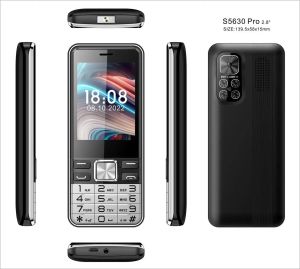
Four 4 Sim Cards Elderly Push Button Mobile Phone 2.8\" Large Display Big Key Long Standby Senior Cellphone Quick Dial Low Price
Four 4 Sim Cards Elderly Push Button Mobile Phone 2.8" Large Display Big Key Long Standby Senior Cellphone Quick Dial Low Price
Introduction to the Four Sim Card Senior Cellphone
In today's world, staying connected is more important than ever, especially for our elderly population. The Four Sim Card Elderly Push Button Mobile Phone offers a user-friendly solution with its large display, big keys, and quick dial function, making it an ideal choice for seniors who want to stay connected with loved ones. This article will explore the key features, benefits, and usage instructions for this innovative device.
Key Features
- Four Sim Card Slots: Allows users to switch between multiple numbers easily, reducing the need for carrying multiple phones.
- 2.8" Large Display: Provides better visibility for seniors with limited eyesight.
- Big Keys: Facilitates easy navigation and dialing for users with limited dexterity.
- Quick Dial Function: Enables fast access to frequently called contacts.
- Long Standby Mode: Extends battery life for extended periods of use.
Why Choose This Device?
The Four Sim Card Senior Cellphone is designed specifically for elderly users, addressing their unique needs and challenges. It offers a simple, intuitive interface that promotes independence and social connection. By combining affordability with advanced features, this device ensures that seniors can enjoy the benefits of modern technology without feeling overwhelmed.
How to Use the Quick Dial Function
The quick dial feature is a valuable tool for seniors who frequently call the same contacts. Follow these steps to set up and use this function:
Setting Up Quick Dial Contacts
- Press the Menu button on your phone.
- Select Phonebook from the menu.
- Scroll down to Quick Dial and press OK.
- Enter the contact name and number, then save the entry.
Making Calls with Quick Dial
- Press the Call button on your phone.
- Scroll to the desired quick dial contact.
- Press OK to initiate the call.
Benefits of the Large Display and Big Keys
The Four Sim Card Senior Cellphone is equipped with a 2.8 inch large display, ensuring better visibility for seniors with limited eyesight. Additionally, the big keys provide an easy-to-navigate interface, promoting independent use and reducing frustration.
Improved Visibility for Seniors
The large display enhances readability, making it easier for seniors to see important information, such as incoming calls, messages, and battery life.
Easy Navigation with Big Keys
The big keys offer a user-friendly interface, allowing seniors to easily navigate through menus, make calls, and send messages without feeling overwhelmed by small buttons.
Enhancing Battery Life with Long Standby Mode
Battery life is crucial for seniors who rely on their phones for daily communication. The Four Sim Card Senior Cellphone offers a long standby mode to extend battery life and ensure continuous connectivity.
Turning On/Off Long Standby Mode
- Press the Menu button on your phone.
- Select Settings from the menu.
- Scroll down to Power Management and press OK.
- Toggle the switch next to Long Standby Mode to turn it on or off.
Extending Battery Life with Proper Usage
To maximize battery life, it's essential to use the device responsibly. This includes turning off long standby mode when not needed, avoiding unnecessary screen brightness adjustments, and regularly updating the software.
Conclusion & Final Thoughts
In conclusion, the Four Sim Card Elderly Push Button Mobile Phone offers a user-friendly solution for seniors who want to stay connected with loved ones. With its large display, big keys, quick dial function, and long standby mode, this device promotes independence and social connection. By following the usage instructions and maintaining proper care, seniors can enjoy the benefits of modern technology without feeling overwhelmed.
Summarizing the Benefits
- User-friendly interface for seniors
- Large display for improved visibility
- Big keys for easy navigation
- Quick dial function for frequent contacts
- Long standby mode for extended battery life
Final Recommendations
We highly recommend the Four Sim Card Senior Cellphone for elderly users who want to stay connected with loved ones. With its affordable price and advanced features, this device offers a valuable solution for promoting independence and social connection.

GlobalLifestyle
Review

You May Also Like
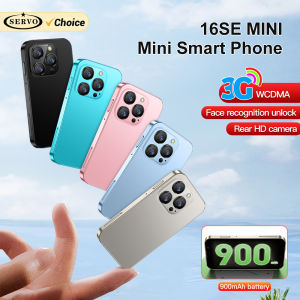
SERVO 16SE Mini Smartphone: A Compact Device with Big Features

LABUBU Tab Kids Tablet Android 14.0 12GB+512GB 5G/Wi-Fi Tablet 7.0" Screen Display Online Class tablet 3800mAh Battery
Intercom Handset High Quality
Small Phone Attachment Holder Not Slip Texture Designs Travel Friendly Phone Case for Active Lifestyles
D1001 Cordless Landline Fixed Telephone Home Desk Phone with Caller Identification Sound Noise Reduction Telephones For Office Home Hotel
HTC U12 PLUS: A Comprehensive Guide
Sony Ericsson W995 Unlocked Slider Music Phone: Features & Specifications
Redmi Tab SE 16GB+1TB 90Hz Display 8000mAh Battery Quad Speakers Expandable Storage Metal Body Low Blue Light

【100% original legit】Noki 106 Keypad Phone original Dual Sim FM Basic Phone Radio Keypad CellPhon
Violin Phone Charm with Colorful Beads Stylish Keyring Pendant Guitar Key Chain Suitable for Travel and Parties Wear
For Nokia E5 E5-00 Original Unlocked 2.36 5MP WIFI Bluetooth FM WCDMA Symbian OS Phones