Wide Input Voltage Power Supply: A Comprehensive Guide

Wide Input Voltage Power Supply: A Comprehensive Guide

What is a Wide Input Voltage Power Supply?

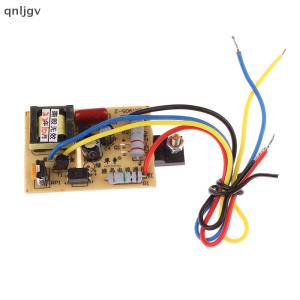
A wide input voltage power supply is a versatile device designed to operate efficiently across a broad range of input voltages. These power supplies are essential for applications that require stable output voltages despite fluctuating input conditions. They are commonly used in various industries, including telecommunications, industrial automation, and consumer electronics.

How does a Wide Input Voltage Power Supply work?

The working principle of a wide input voltage power supply involves converting the incoming AC voltage to a stable DC output voltage. This process typically consists of rectification, filtering, regulation, and monitoring stages. These power supplies are equipped with advanced features like overvoltage protection, short-circuit protection, and thermal management to ensure reliable operation under different conditions.

Benefits of using a Wide Input Voltage Power Supply

  1. Flexibility: A wide input voltage power supply can accommodate various input voltages, making it suitable for diverse applications and environments.
  2. Efficiency: These power supplies are designed to maintain high efficiency across their entire input range, reducing energy waste and lowering operating costs.
  3. Reliability: With built-in protection mechanisms, wide input voltage power supplies provide reliable performance even under challenging conditions.

Choosing the Right Power Supply for Your Needs

Selecting the appropriate power supply depends on specific requirements and application needs. Here are some factors to consider when choosing a power supply:

Key Factors to Consider When Selecting a Power Supply

  1. Input Voltage Range: Determine the required input voltage range based on the available power source.
  2. Output Voltage and Current: Identify the desired output voltage and current levels needed for your application.
  3. Efficiency: Choose a power supply with high efficiency to minimize energy waste and operating costs.
  4. Protection Features: Look for built-in protection mechanisms such as overvoltage, short-circuit, and thermal management.

Common Applications of Wide Input Voltage Power Supplies

Wide input voltage power supplies find applications in various industries, including:

  • Telecommunications
  • Industrial automation
  • Consumer electronics
  • Medical devices
  • Data centers

Understanding SMPS Power Supplies

Switched-mode power supplies (SMPS) are highly efficient power conversion devices that convert AC voltage to DC voltage using high-frequency switching techniques. They offer several advantages over traditional linear power supplies.

Advantages of SMPS Power Supplies

  1. High Efficiency: SMPS power supplies can achieve efficiencies up to 95%, reducing energy waste and lowering operating costs.
  2. Compact Size: Due to their high efficiency, SMPS power supplies can be designed in smaller packages compared to linear power supplies.
  3. Lightweight: SMPS power supplies are typically lighter than linear power supplies, making them suitable for portable applications.

How to Choose the Right SMPS Power Supply

When selecting an SMPS power supply, consider the following factors:

  • Input voltage range
  • Output voltage and current requirements
  • Efficiency and power factor correction
  • Protection features

Exploring Variable Voltage Power Supplies

Variable voltage power supplies offer adjustable output voltages, making them ideal for testing and development purposes. They provide flexibility and precision in controlling voltage levels.

Benefits of Using a Variable Voltage Power Supply

  1. Flexibility: Adjust output voltage levels to meet specific requirements.
  2. Precision: Achieve accurate voltage control for testing and development purposes.
  3. Versatility: Suitable for various applications, including R&D, prototyping, and troubleshooting.

How to Use a Variable Voltage Power Supply

To use a variable voltage power supply:

  1. Connect the power supply to a suitable input voltage source.
  2. Set the desired output voltage using the control knob or digital interface.
  3. Connect the load to the power supply output terminals.

High Power DC Adapters: A Closer Look

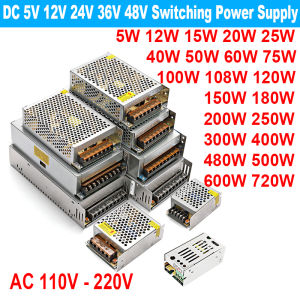
High power DC adapters are designed to provide stable DC output voltages for applications requiring higher power levels. They are commonly used in industrial automation, telecommunications, and data centers.

Choosing the Right High Power DC Adapter

When selecting a high power DC adapter, consider the following factors:

  • Input voltage range
  • Output voltage and current requirements
  • Efficiency and power factor correction
  • Protection features

Applications of High Power DC Adapters

High power DC adapters find applications in various industries, including:

  • Industrial automation
  • Telecommunications
  • Data centers
  • Medical devices

In conclusion, wide input voltage power supplies, SMPS power supplies, variable voltage power supplies, and high power DC adapters offer versatile solutions for different applications. By understanding their features, benefits, and selection criteria, you can choose the right power supply for your specific needs.

GlobalLifestyle
GlobalLifestyle

Seller ratings 97%

You May Also Like

80MM CPU Air Cooler 4PIN PWM Cooling PC Radiator Fan for Intel 2011 X79 X99 CPU Fan Ventilador
00:11

80MM CPU Air Cooler 4PIN PWM Cooling PC Radiator Fan for Intel 2011 X79 X99 CPU Fan Ventilador

Headphone Splitter Sound Cable 3.5mm Port 3 Way Splitter Adapter Cable for Speaker Player Adapter
00:14

Headphone Splitter Sound Cable 3.5mm Port 3 Way Splitter Adapter Cable for Speaker Player Adapter

[COD] SUILEI 1200W 20A DC-DC Converter Boost Car Step-up Power Supply Module 8-60V to 12-83V
00:07

[COD] SUILEI 1200W 20A DC-DC Converter Boost Car Step-up Power Supply Module 8-60V to 12-83V

MACHINIST X99 Motherboard: LGA 2011-3 & Xeon E5 V3&V4 CPU Support
00:27

MACHINIST X99 Motherboard: LGA 2011-3 & Xeon E5 V3&V4 CPU Support

Huayuke DR-CV-20: ETL Certified 20W Constant Dimming Silicon Controlled Rectifier
00:14

Huayuke DR-CV-20: ETL Certified 20W Constant Dimming Silicon Controlled Rectifier

laptop Gaming laptop TUF/9th  I5-9300H/I7-9750H /AMD Ryzen 7-3750h 120Hz High refresh rate FHD camera +RGB keyboard lighting/professional game book + large design software I7 9Th Gen - Lazada
00:58

laptop Gaming laptop TUF/9th I5-9300H/I7-9750H /AMD Ryzen 7-3750h 120Hz High refresh rate FHD camera +RGB keyboard lighting/professional game book + large design software I7 9Th Gen - Lazada

Expose CCTV UPS Power Supply For Wifi Router Modem Power Bank Backup Security Camera Battery DC
01:42

Expose CCTV UPS Power Supply For Wifi Router Modem Power Bank Backup Security Camera Battery DC

Chest Protection & Anti-Exposure Tube Top: A Comprehensive Guide
00:16

Chest Protection & Anti-Exposure Tube Top: A Comprehensive Guide

Comprehensive lightweight laptop i7-8500Y | Office creative and entertainment all take care of dual band WiFi Bluetooth 5.0 HDMI+Type-C dual output | Upgradeable memory/hard drive
00:27

Comprehensive lightweight laptop i7-8500Y | Office creative and entertainment all take care of dual band WiFi Bluetooth 5.0 HDMI+Type-C dual output | Upgradeable memory/hard drive

Thermalright Assassin Spirit 120 Vision ARGB Air Cooler: A Comprehensive Guide\\n\\n Introduction & Overview\\n\\nThe Thermalright Assassin Spirit 120 Vision ARGB Air Cooler is a top-tier cooling solution designed for PC enthusiasts who prioritize performance and aesthetics. This 120mm CPU cooler combines cutting-edge thermal technology with customizable RGB lighting, making it a must-have for gamers and overclockers alike.\\n\\n What is the Thermalright Assassin Spirit 120 Vision ARGB Air Cooler?\\n\\nThe Thermalright Assassin Spirit 120 Vision ARGB Air Cooler is a high-performance CPU cooler that utilizes advanced thermal design and ARGB lighting technology. This 120mm cooler offers exceptional thermal performance and customizable RGB lighting, making it a popular choice among PC enthusiasts.\\n\\n Key Features & Benefits\\n\\n- **Advanced Thermal Design**: The Assassin Spirit 120 Vision ARGB Air Cooler features a highly efficient heat sink and optimized fan design, ensuring superior thermal performance and quiet operation.\\n- **Customizable RGB Lighting**: With support for popular RGB lighting controllers, users can customize the lighting effects to match their system aesthetics.\\n- **Compatibility**: Designed to fit a wide range of CPU sockets, this cooler is compatible with most modern motherboards.\\n- **Ease of Installation**: The Assassin Spirit 120 Vision ARGB Air Cooler comes with all necessary mounting hardware and is easy to install, even for beginners.\\n\\n Why Choose the Thermalright Assassin Spirit 120 Vision ARGB Air Cooler?\\n\\nIf you're looking for a top-tier cooling solution that combines exceptional thermal performance with customizable RGB lighting, the Thermalright Assassin Spirit 120 Vision ARGB Air Cooler is the perfect choice. Its advanced thermal design, ease of installation, and compatibility make it a popular choice among PC enthusiasts.\\n\\n Performance & Efficiency\\n\\nThe Thermalright Assassin Spirit 120 Vision ARGB Air Cooler offers outstanding performance and efficiency, thanks to its advanced thermal design and ARGB lighting technology.\\n\\n How to Optimize Thermal Performance\\n\\nTo get the most out of your Thermalright Assassin Spirit 120 Vision ARGB Air Cooler, follow these tips:\\n\\n- **Ensure Proper Installation**: Follow the manufacturer's instructions carefully to ensure proper installation and optimal thermal contact.\\n- **Use High-Quality Thermal Paste**: Apply a thin layer of high-quality thermal paste to maximize heat transfer between the CPU and the cooler.\\n- **Monitor Temperatures**: Regularly monitor your CPU temperatures using software tools like HWMonitor or MSI Afterburner to ensure optimal performance.\\n\\n Understanding ARGB Air Cooler Technology\\n\\nARGB air coolers combine advanced thermal technology with customizable RGB lighting, allowing users to create a visually stunning PC build. The Assassin Spirit 120 Vision ARGB Air Cooler supports popular RGB lighting controllers, making it easy to customize the lighting effects to match your system aesthetics.\\n\\n Maximizing RGB Lighting Effects\\n\\nTo get the most out of your Thermalright Assassin Spirit 120 Vision ARGB Air Cooler's RGB lighting, consider the following tips:\\n\\n- **Choose a Compatible RGB Controller**: Ensure your motherboard or graphics card supports popular RGB lighting controllers like ASUS Aura Sync, MSI Mystic Light, or Corsair iCUE.\\n- **Experiment with Lighting Effects**: Try different lighting effects and colors to find the perfect match for your system aesthetics.\\n- **Synchronize with Other RGB Devices**: Sync your cooler's RGB lighting with other RGB devices in your build for a cohesive look.\\n\\n Installation & Setup\\n\\nInstalling the Thermalright Assassin Spirit 120 Vision ARGB Air Cooler is straightforward, even for beginners. Follow these steps to get started:\\n\\n How to Install the Thermalright Assassin Spirit 120 Vision ARGB Air Cooler\\n\\n1. **Prepare Your Workspace**: Ensure your workspace is clean and well-lit before beginning the installation process.\\n2. **Remove Old Cooler**: Carefully remove any existing CPU cooler before installing the Assassin Spirit 120 Vision ARGB Air Cooler.\\n3. **Apply Thermal Paste**: Apply a small amount of high-quality thermal paste to the CPU surface.\\n4. **Install the Cooler**: Mount the cooler onto the CPU socket, ensuring proper alignment and secure installation.\\n5. **Connect Power & RGB Cables**: Connect the power and RGB cables to the appropriate motherboard headers.\\n\\n Connecting the ARGB Lighting\\n\\nTo connect the ARGB lighting, follow these steps:\\n\\n1. **Identify ARGB Headers**: Locate the ARGB headers on your motherboard or graphics card.\\n2. **Connect ARGB Cable**: Connect the ARGB cable from the cooler to the appropriate header.\\n3. **Configure RGB Settings**: Use your motherboard or graphics card's software to configure the RGB settings.\\n\\n Configuring the RGB Lighting Settings\\n\\nTo configure the RGB lighting settings, follow these steps:\\n\\n1. **Launch RGB Software**: Open the RGB software provided by your motherboard or graphics card manufacturer.\\n2. **Select Cooler**: Locate the cooler in the software and select it for configuration.\\n3. **Choose Lighting Effects**: Select the desired lighting effects and colors.\\n4. **Save Settings**: Save your settings and exit the software.\\n\\n Maintenance & Troubleshooting\\n\\nRegular maintenance and troubleshooting can help ensure optimal performance and longevity of your Thermalright Assassin Spirit 120 Vision ARGB Air Cooler.\\n\\n How to Clean & Maintain the Thermalright Assassin Spirit 120 Vision ARGB Air Cooler\\n\\nTo clean and maintain your cooler, follow these steps:\\n\\n- **Power Off System**: Ensure your system is powered off before cleaning the cooler.\\n- **Remove Dust**: Use compressed air to remove dust from the cooler's fins and fan blades.\\n- **Check for Obstructions**: Inspect the cooler for any obstructions that may impede airflow.\\n- **Reapply Thermal Paste**: Reapply thermal paste every 6-12 months to maintain optimal heat transfer.\\n\\n Common Issues & Solutions\\n\\nIf you're experiencing issues with your Thermalright Assassin Spirit 120 Vision ARGB Air Cooler, consider the following solutions:\\n\\n- **High Temperatures**: Check for proper installation, thermal paste application, and dust buildup.\\n- **No RGB Lighting**: Ensure the ARGB cable is connected correctly and the RGB settings are configured properly.\\n- **Fan Noise**: Adjust fan speed settings or clean the cooler to reduce noise.\\n\\n FAQs & Additional Resources\\n\\nFor more information on the Thermalright Assassin Spirit 120 Vision ARGB Air Cooler, consult the following resources:\\n\\n- **User Manual**: Refer to the user manual for detailed installation and usage instructions.\\n- **Thermalright Website**: Visit the Thermalright website for product information, support, and warranty details.\\n- **Online Forums**: Join online forums like Tom's Hardware or Reddit to connect with other users and share experiences.\n}
02:55

Thermalright Assassin Spirit 120 Vision ARGB Air Cooler: A Comprehensive Guide\\n\\n Introduction & Overview\\n\\nThe Thermalright Assassin Spirit 120 Vision ARGB Air Cooler is a top-tier cooling solution designed for PC enthusiasts who prioritize performance and aesthetics. This 120mm CPU cooler combines cutting-edge thermal technology with customizable RGB lighting, making it a must-have for gamers and overclockers alike.\\n\\n What is the Thermalright Assassin Spirit 120 Vision ARGB Air Cooler?\\n\\nThe Thermalright Assassin Spirit 120 Vision ARGB Air Cooler is a high-performance CPU cooler that utilizes advanced thermal design and ARGB lighting technology. This 120mm cooler offers exceptional thermal performance and customizable RGB lighting, making it a popular choice among PC enthusiasts.\\n\\n Key Features & Benefits\\n\\n- **Advanced Thermal Design**: The Assassin Spirit 120 Vision ARGB Air Cooler features a highly efficient heat sink and optimized fan design, ensuring superior thermal performance and quiet operation.\\n- **Customizable RGB Lighting**: With support for popular RGB lighting controllers, users can customize the lighting effects to match their system aesthetics.\\n- **Compatibility**: Designed to fit a wide range of CPU sockets, this cooler is compatible with most modern motherboards.\\n- **Ease of Installation**: The Assassin Spirit 120 Vision ARGB Air Cooler comes with all necessary mounting hardware and is easy to install, even for beginners.\\n\\n Why Choose the Thermalright Assassin Spirit 120 Vision ARGB Air Cooler?\\n\\nIf you're looking for a top-tier cooling solution that combines exceptional thermal performance with customizable RGB lighting, the Thermalright Assassin Spirit 120 Vision ARGB Air Cooler is the perfect choice. Its advanced thermal design, ease of installation, and compatibility make it a popular choice among PC enthusiasts.\\n\\n Performance & Efficiency\\n\\nThe Thermalright Assassin Spirit 120 Vision ARGB Air Cooler offers outstanding performance and efficiency, thanks to its advanced thermal design and ARGB lighting technology.\\n\\n How to Optimize Thermal Performance\\n\\nTo get the most out of your Thermalright Assassin Spirit 120 Vision ARGB Air Cooler, follow these tips:\\n\\n- **Ensure Proper Installation**: Follow the manufacturer's instructions carefully to ensure proper installation and optimal thermal contact.\\n- **Use High-Quality Thermal Paste**: Apply a thin layer of high-quality thermal paste to maximize heat transfer between the CPU and the cooler.\\n- **Monitor Temperatures**: Regularly monitor your CPU temperatures using software tools like HWMonitor or MSI Afterburner to ensure optimal performance.\\n\\n Understanding ARGB Air Cooler Technology\\n\\nARGB air coolers combine advanced thermal technology with customizable RGB lighting, allowing users to create a visually stunning PC build. The Assassin Spirit 120 Vision ARGB Air Cooler supports popular RGB lighting controllers, making it easy to customize the lighting effects to match your system aesthetics.\\n\\n Maximizing RGB Lighting Effects\\n\\nTo get the most out of your Thermalright Assassin Spirit 120 Vision ARGB Air Cooler's RGB lighting, consider the following tips:\\n\\n- **Choose a Compatible RGB Controller**: Ensure your motherboard or graphics card supports popular RGB lighting controllers like ASUS Aura Sync, MSI Mystic Light, or Corsair iCUE.\\n- **Experiment with Lighting Effects**: Try different lighting effects and colors to find the perfect match for your system aesthetics.\\n- **Synchronize with Other RGB Devices**: Sync your cooler's RGB lighting with other RGB devices in your build for a cohesive look.\\n\\n Installation & Setup\\n\\nInstalling the Thermalright Assassin Spirit 120 Vision ARGB Air Cooler is straightforward, even for beginners. Follow these steps to get started:\\n\\n How to Install the Thermalright Assassin Spirit 120 Vision ARGB Air Cooler\\n\\n1. **Prepare Your Workspace**: Ensure your workspace is clean and well-lit before beginning the installation process.\\n2. **Remove Old Cooler**: Carefully remove any existing CPU cooler before installing the Assassin Spirit 120 Vision ARGB Air Cooler.\\n3. **Apply Thermal Paste**: Apply a small amount of high-quality thermal paste to the CPU surface.\\n4. **Install the Cooler**: Mount the cooler onto the CPU socket, ensuring proper alignment and secure installation.\\n5. **Connect Power & RGB Cables**: Connect the power and RGB cables to the appropriate motherboard headers.\\n\\n Connecting the ARGB Lighting\\n\\nTo connect the ARGB lighting, follow these steps:\\n\\n1. **Identify ARGB Headers**: Locate the ARGB headers on your motherboard or graphics card.\\n2. **Connect ARGB Cable**: Connect the ARGB cable from the cooler to the appropriate header.\\n3. **Configure RGB Settings**: Use your motherboard or graphics card's software to configure the RGB settings.\\n\\n Configuring the RGB Lighting Settings\\n\\nTo configure the RGB lighting settings, follow these steps:\\n\\n1. **Launch RGB Software**: Open the RGB software provided by your motherboard or graphics card manufacturer.\\n2. **Select Cooler**: Locate the cooler in the software and select it for configuration.\\n3. **Choose Lighting Effects**: Select the desired lighting effects and colors.\\n4. **Save Settings**: Save your settings and exit the software.\\n\\n Maintenance & Troubleshooting\\n\\nRegular maintenance and troubleshooting can help ensure optimal performance and longevity of your Thermalright Assassin Spirit 120 Vision ARGB Air Cooler.\\n\\n How to Clean & Maintain the Thermalright Assassin Spirit 120 Vision ARGB Air Cooler\\n\\nTo clean and maintain your cooler, follow these steps:\\n\\n- **Power Off System**: Ensure your system is powered off before cleaning the cooler.\\n- **Remove Dust**: Use compressed air to remove dust from the cooler's fins and fan blades.\\n- **Check for Obstructions**: Inspect the cooler for any obstructions that may impede airflow.\\n- **Reapply Thermal Paste**: Reapply thermal paste every 6-12 months to maintain optimal heat transfer.\\n\\n Common Issues & Solutions\\n\\nIf you're experiencing issues with your Thermalright Assassin Spirit 120 Vision ARGB Air Cooler, consider the following solutions:\\n\\n- **High Temperatures**: Check for proper installation, thermal paste application, and dust buildup.\\n- **No RGB Lighting**: Ensure the ARGB cable is connected correctly and the RGB settings are configured properly.\\n- **Fan Noise**: Adjust fan speed settings or clean the cooler to reduce noise.\\n\\n FAQs & Additional Resources\\n\\nFor more information on the Thermalright Assassin Spirit 120 Vision ARGB Air Cooler, consult the following resources:\\n\\n- **User Manual**: Refer to the user manual for detailed installation and usage instructions.\\n- **Thermalright Website**: Visit the Thermalright website for product information, support, and warranty details.\\n- **Online Forums**: Join online forums like Tom's Hardware or Reddit to connect with other users and share experiences.\n}

ALLAN CPU Cooler Aluminum Heatsink 4-Pin PWM 92mm 2500 RPM Fan Pre-Applied Thermal Paste for Intel Core i3 i5 i7 i9 Socket 1200 1151 1150 1155 1156 Desktop PC Computer
00:31

ALLAN CPU Cooler Aluminum Heatsink 4-Pin PWM 92mm 2500 RPM Fan Pre-Applied Thermal Paste for Intel Core i3 i5 i7 i9 Socket 1200 1151 1150 1155 1156 Desktop PC Computer

JUMPEAK MX120 360mm Modular Wireless Splicing 120mm PC Case Cooling Fan ARGB Infinite Mirror Light Effect For Water Cooler Fan
01:00

JUMPEAK MX120 360mm Modular Wireless Splicing 120mm PC Case Cooling Fan ARGB Infinite Mirror Light Effect For Water Cooler Fan