DAVU 2.5-inch Tool-Free Portable Hard Drive Box: A Comprehensive Guide
DAVU 2.5-inch Tool-Free Portable Hard Drive Box: A Comprehensive Guide
Introduction to DAVU 2.5-inch Tool-Free Portable Hard Drive Box
The DAVU 2.5-inch Tool-Free Portable Hard Drive Box is a compact and versatile solution for storing and transferring data from your notebook hard drive. It is designed to accommodate both solid-state drives (SSDs) and mechanical hard drives, making it a flexible choice for users with different storage needs. This guide will provide you with valuable insights into choosing, setting up, and using the DAVU 2.5-inch Tool-Free Portable Hard Drive Box.
What is a DAVU 2.5-inch Tool-Free Portable Hard Drive Box?
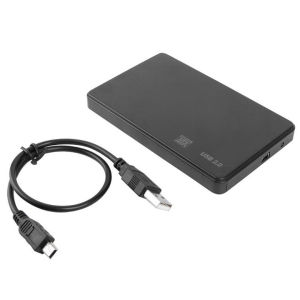
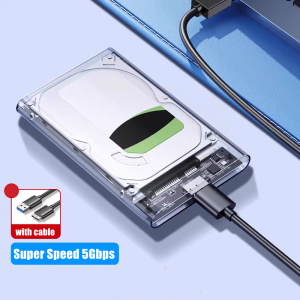
The DAVU 2.5-inch Tool-Free Portable Hard Drive Box is a rugged and lightweight case that houses your 2.5-inch hard drive. It offers a convenient way to store and transport your data while providing easy access through a USB3.0 interface. The tool-free design ensures quick installation and removal of your hard drive, eliminating the need for screws or other tools.
Benefits of Using a DAVU 2.5-inch Tool-Free Portable Hard Drive Box
-
Compact Hard Drive Storage Solutions: The DAVU 2.5-inch Tool-Free Portable Hard Drive Box is designed to be compact and lightweight, making it easy to carry around and store your data wherever you go.
-
USB3.0 Solid State Drive Compatibility: With USB3.0 support, the DAVU 2.5-inch Tool-Free Portable Hard Drive Box allows for faster data transfer speeds, ensuring that you can quickly back up or access your files.
-
Tool-Free Mechanical Hard Drive Installation: The tool-free design makes it easy to install and remove your hard drive, saving you time and effort.
Choosing the Right DAVU 2.5-inch Tool-Free Portable Hard Drive Box
When selecting a DAVU 2.5-inch Tool-Free Portable Hard Drive Box, consider the following factors:
Compact Hard Drive Storage Solutions
Look for a portable hard drive box that offers a compact and lightweight design, making it easy to store and transport your data. The DAVU 2.5-inch Tool-Free Portable Hard Drive Box is a great choice for users who need a reliable and convenient storage solution.
USB3.0 Solid State Drive Compatibility
Ensure that the portable hard drive box supports USB3.0, which provides faster data transfer speeds compared to older USB standards. This feature is particularly important for users who work with large files or require quick access to their data.
2.5-inch Portable Hard Drive Box Features
In addition to the above features, consider other features such as compatibility with both SSDs and mechanical hard drives, rugged construction, and ease of installation.
Using DAVU 2.5-inch Tool-Free Portable Hard Drive Box
Now that you have chosen the right DAVU 2.5-inch Tool-Free Portable Hard Drive Box, it's time to set it up and start using it.
How to Set Up Your DAVU 2.5-inch Tool-Free Portable Hard Drive Box
-
Open the case by pressing the release button on the side of the box.
-
Insert your 2.5-inch hard drive into the case, making sure it is securely seated.
-
Close the case by pressing down on the lid until it clicks into place.
-
Connect the USB cable to your computer and the portable hard drive box.
How to Transfer Data Using DAVU 2.5-inch Tool-Free Portable Hard Drive Box
Once your DAVU 2.5-inch Tool-Free Portable Hard Drive Box is set up, you can easily transfer data using the following steps:
-
Open File Explorer on your computer.
-
Locate the DAVU 2.5-inch Tool-Free Portable Hard Drive Box in the list of drives.
-
Drag and drop files from your computer to the portable hard drive box.
-
To transfer files back to your computer, simply drag and drop them from the portable hard drive box to your desired location on your computer.
Troubleshooting Common Issues with DAVU 2.5-inch Tool-Free Portable Hard Drive Box
If you encounter any issues with your DAVU 2.5-inch Tool-Free Portable Hard Drive Box, refer to the troubleshooting guide below:
-
Not Recognized by Computer: Ensure that the USB cable is securely connected to both the portable hard drive box and your computer. If the issue persists, try using a different USB port or cable.
-
Slow Data Transfer Speeds: Verify that your computer supports USB3.0 and that the portable hard drive box is properly connected. If the issue persists, try updating your computer's drivers or using a different USB port.
-
Hard Drive Not Detected: Check that the hard drive is securely seated in the case and that the case is closed properly. If the issue persists, try removing and reinserting the hard drive or using a different hard drive.

DAVU.PH
You May Also Like
![[COD] KOQZM KITCHEN Hot SDHC MMC CF Micro SD Memory Card Storage Carrying Pouch Case Holder Wallet](https://img.lazcdn.com/g/p/c038167b6791397d1acdc86eaf1cf1d3.jpg_300x300q80.jpg)
[COD] KOQZM KITCHEN Hot SDHC MMC CF Micro SD Memory Card Storage Carrying Pouch Case Holder Wallet
Acasis Dual Bay M.2 NVMe SSD Enclosure – Can Set raid1/raid0. 20Gbps USB-C Offline Cloning Dock 8TBx2 Tool-Free RAID 2230/2242/2260/2280 Support Built-in Cooling Fan for 4K Editing/Gaming/PC Build
Seagate 1TB & 2TB External Hard Drive: Easy Setup & Usage
1TB USB Flash Drive Type C 512gb 128gb 64gb Pendrive USB 3.0 Smartphone micro USB otg Memory Stick for iphone ios phoneds please pay attention to and collect the store so that you can find us more quickly when needed thank you
ORICO 95 Series 2Bay 4Bay 5Bay External Hard Drive 3.5 Inch USB3.0 HDD Docking Station Support RAID Mode Aluminum With 150W Internal Power Adaper

AVIDUS Micro SD Card: High-Speed Memory Solutions for Your Devices

90S PINOY BAND MUSIC COLLECTION | USB FLASHDRIVE with Songs Music / MEMORY CARD MP3 320 KBPS QUALITY
Travel Friendly EVA Case For 2.5Inch Hard Drives And Small Gadgets Carrying Bag Ensuring Secure Storage Travel Pouch

AVIDUS Micro SD Card: High-Speed Memory Card for CCTV & Camera
M.2 NVME Accelerator Double SSDs To PCIE Adapter Supports M+B Key SSDs To PCIE Converters NVME Adapter
Ultra-Fast USB/Type C to SATA Hard Drive Enclosure - 5Gbps UASP Compatible with 2.5-Inch HDD/SSD for PC Mac Laptops and Desktop