SERVO V9 Mini Mobile Phone: A Comprehensive Guide
SERVO V9 Mini Mobile Phone: A Comprehensive Guide
What is the SERVO V9 Mini Mobile Phone?
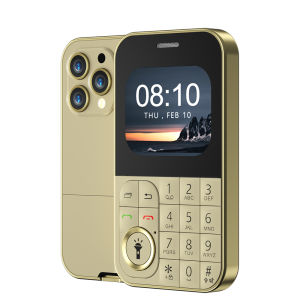
The SERVO V9 Mini Mobile Phone is a compact, lightweight GSM cellphone designed to provide essential communication features in a small package. This dual SIM card mobile phone offers a range of functionalities, including speed dial, blacklist, FM radio, flashlight, and Magic Voice technology, all within a 2.01-inch screen. The SERVO V9 Mini Mobile Phone is an ideal choice for users seeking a reliable and user-friendly small GSM cellphone.
Key Features
- Dual SIM card capability
- Speed dial functionality
- Blacklist feature
- FM radio
- Flashlight functionality
- Magic Voice technology
Dual SIM Card Capability
One of the standout features of the SERVO V9 Mini Mobile Phone is its dual SIM card capability. This allows users to manage two phone numbers simultaneously, making it perfect for those who need to keep their personal and professional lives separate. Users can easily switch between the two SIM cards using the phone's menu options.
Speed Dial Functionality
The SERVO V9 Mini Mobile Phone also includes a convenient speed dial feature, allowing users to quickly access frequently called numbers with just a few button presses. This is especially useful for elderly users who may have difficulty navigating through lengthy contact lists.
How to Use the SERVO V9 Mini Mobile Phone
Setting Up Your Dual SIM Cards
To set up your dual SIM cards, simply insert them into the designated slots on the back of the phone. Once the SIM cards are in place, power on the phone and follow the on-screen instructions to activate both SIM cards. You can then switch between the SIM cards by accessing the phone's menu options.
Using the Speed Dial Function
To use the speed dial function, press and hold the 'Speed Dial' button on the phone's keypad. A list of frequently called numbers will appear on the screen. Select the desired contact and press the 'Call' button to initiate the call.
How to Activate the Blacklist Feature
The SERVO V9 Mini Mobile Phone includes a blacklist feature, which allows users to block unwanted calls and messages. To activate this feature, go to the phone's menu options and select 'Blacklist.' From there, you can add numbers to the blacklist by entering their phone numbers or selecting them from your contact list.
SERVO V9 Mini Mobile Phone: Design & Build Quality
Compact Size & Lightweight Design
The SERVO V9 Mini Mobile Phone is designed to be compact and lightweight, making it easy to carry around in a pocket or purse. Despite its small size, the phone is built to last and withstand everyday wear and tear.
2.01" Screen & Magic Voice Technology
The SERVO V9 Mini Mobile Phone features a 2.01-inch screen, which is large enough to display essential information such as incoming calls, messages, and battery level. Additionally, the phone includes Magic Voice technology, which allows users to control certain functions using voice commands.
FM Radio & Flashlight Functionality
In addition to its communication capabilities, the SERVO V9 Mini Mobile Phone also includes an FM radio and flashlight functionality. Users can listen to their favorite radio stations or use the flashlight in low-light conditions.
Conclusion
The SERVO V9 Mini Mobile Phone is a compact, lightweight GSM cellphone that offers a range of essential communication features in a small package. With its dual SIM card capability, speed dial functionality, blacklist feature, FM radio, flashlight, and Magic Voice technology, the SERVO V9 Mini Mobile Phone is an ideal choice for users seeking a reliable and user-friendly small GSM cellphone.

GlobalLifestyle
Review

You May Also Like
New ONEMYTH M17 Pro Mini Smartphone 4G Dual SIM 4.0-inch HD Full Screen 2000mAh 2GB+16GB 3GB+64GB Android 12 Play Store Best Gif
Original New A97 5G Gaming phone 12GB+512GB android phone Fingerprint Smartphone cellphone sale
Unlocked Nokia X2-01 Symbian OS Keyboard: Full Set Guide

POCO C75 8GB RAM+256GB ROM 6.74” Display | 50MP Camera | Mediatek Helio G81 Ultra | Smooth | Stylish | Supercharged | 5 Year Warranty
Nokia N82 Mobile Phone: Features & Unlocked Benefits

Floral Wind Chime Phone Charm With Acrylic Beads Adjustable Colors Stylish Phone Charm For Keychain Purse Decoration

Delicate Star Flower Phone Chain Unique Phone Pendant Ceramic Texture Star Phone Strap Present for Fashion Individuals

🎄Christmas Gift🎄 Lenovo M11 Tab 5G | 4K Display | Dual SIM 4G + WiFi | 16GB RAM + 512GB ROM | 5 Year Warranty
Ulefone Armor Mini 20T Pro 5G 4.7" Display Rugged Phone LED Light Android 14 Smartphone 6200mAh 16GB+256GB 33W
D1002 PLDT Wireless Landline Phone w/ Speakerphone - Digital Cordless for Home/Office Handsfree
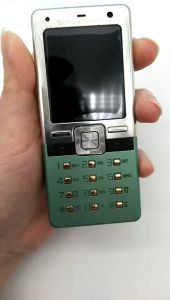
Sony Ericsson T650 Original Unlocked T650i T650C Mobile Phone 1.9inch 3G 3.15MP FM Phones