HP G8 Chromebook: A Lightweight Portable Laptop with 4GB RAM for Online Classes & Office Use
HP G8 Chromebook: A Lightweight Portable Laptop with 4GB RAM for Online Classes & Office Use
Introduction to HP G8 Chromebook
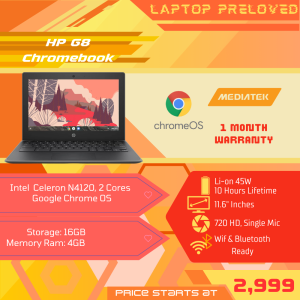
The HP G8 Chromebook is a lightweight and portable laptop designed to meet the needs of students and professionals alike. With its powerful Intel Celeron N4120 processor and 4GB RAM, this preloved Chromebook offers smooth performance for online classes and office work. In this article, we will explore the key features, performance capabilities, and usage tips for the HP G8 Chromebook.
Key Features
- Intel Celeron N4120 processor
- 4GB RAM for smooth online classes
- Preloved Chromebook for office use
- Lightweight and portable design
Why Choose HP G8 Chromebook?
The HP G8 Chromebook offers a perfect blend of affordability and performance, making it an ideal choice for students and professionals looking for a reliable device for online classes and office work. With its lightweight and portable design, you can easily carry it around and enjoy seamless productivity wherever you go.
Performance & Capabilities
Intel Celeron N4120 Processor
The HP G8 Chromebook is powered by the Intel Celeron N4120 processor, which delivers impressive performance for everyday tasks such as browsing the web, streaming videos, and running applications. This processor ensures that your online classes and office work run smoothly without any lag or delays.
4GB RAM for Smooth Online Classes
The HP G8 Chromebook comes equipped with 4GB RAM, which is perfect for online classes and other demanding tasks. With this amount of RAM, you can easily switch between multiple applications and tabs without any slowdowns or crashes.
Preloved Chromebook for Office Use
Even though the HP G8 Chromebook is a preloved device, it still offers excellent performance for office work. Its lightweight design makes it easy to carry around, and its long battery life ensures that you can stay productive throughout the day.
Usage Tips & Best Practices
Setting Up Your HP G8 Chromebook
To get started with your HP G8 Chromebook, simply plug in the power adapter and turn it on. Follow the on-screen instructions to set up your device and connect to Wi-Fi. Once you have completed the setup process, you can start using your Chromebook for online classes and office work.
Optimizing Performance for Online Classes
To optimize the performance of your HP G8 Chromebook for online classes, make sure to close any unnecessary applications and tabs. Additionally, you can adjust the settings to prioritize the performance of your browser and other essential applications.
Using HP G8 Chromebook for Office Work
The HP G8 Chromebook is perfect for office work, thanks to its lightweight design and long battery life. To maximize productivity, make sure to keep your device organized by using folders and labels to categorize your files and documents. Additionally, consider using cloud storage services to store and access your files from anywhere.
Conclusion
In conclusion, the HP G8 Chromebook is a lightweight and portable laptop that offers excellent performance for online classes and office work. With its Intel Celeron N4120 processor and 4GB RAM, this preloved Chromebook is a great choice for students and professionals looking for a reliable device at an affordable price. By following the usage tips and best practices outlined in this article, you can ensure that your HP G8 Chromebook runs smoothly and stays productive throughout the day.

LAPTOP PRELOVED
Review

You May Also Like
TPS61088 Power Stepping Up Boost Board Power Supply Module 5V 9V 12V 1MHz Switcher Frequency Module
Laptop Screen Privacy Filter with Magnetic Attachment High Transparency Scratch Resistant for Travel 12-17Inch Optional
DC 12V 30A Power Supply 360W AC 110V/220V To DC 12V Switch Power Supply Security Adapter Power Supply For LED Strip Light motor DC
2PCS 24V Dual Ball 92mm cooling fan 90mm 9cm 92x92x25mm 0.20A 3000RPM PC Computer Cooling Fan DC Brushless cooling fan
AMD RYZEN 5 5600G / RYZEN 7 5700G / A520M / (BRAND NEW) WHITE BUILD / GAMING DESKTOP COMPUTER / FREE INSTALLATION OF GAMES AND APPS
Eyoyo 10.5 inch Portable Small Monitor 1280P USB-C Portable Laptop Monitor with HDMI Second Display IPS Screen for PC Mac Phone PS4/5 Xbox Switch Plug and Play
15.6" HD Laptop LCD Touch Screen B156XTK02.1 NT156WHM-T02 For Lenovo IdeaPad 3 15ADA05 Display Matrix Panel 1366x768 eDP 40 Pins
Circuitroks T Plug Deans Connector M F Pair
New KIT 4GB 8GB 16GB DDR3 RAM 1333MHz 1600MHz 1866mhz Desktop Memory DDR3L 1.35V 240 Pins DIMM HyperX FURY Gaming Memory-Black
Antec A37 Push-down Pressure Profile CPU Cooler 4 Heat Pipes Air Cooling Radiator 90mm 4Pin LGA1700 PWM Fan For ITX Small Case
Synology HAT5300 16TB HAT5300 SATA III 3.5" Internal Enterprise HDD with 5 years Local Warranty