Maximizing Your Workspace: Upright Computer Brackets & Vertical Laptop Stands
Maximizing Your Workspace: Upright Computer Brackets & Vertical Laptop Stands
Are you looking to optimize your workspace while enhancing productivity? In this article, we will explore the world of upright computer brackets and vertical laptop stands, specifically focusing on products like the Gravity Storage Vertical Upright Base and MacBook Vertical Base. We will cover everything from understanding the benefits of these innovative tools to setting them up and maintaining them for optimal performance.
What is a Upright Computer Bracket?
An upright computer bracket is a device that allows you to mount your desktop computer monitor or laptop vertically on a wall or desk. This solution offers a space-saving alternative to traditional horizontal setups, making it perfect for small offices, home workspaces, or even classrooms.
Understanding the Benefits of Upright Computer Brackets
The benefits of using an upright computer bracket are numerous:
- Space Saving: By mounting your monitor or laptop vertically, you can free up valuable desk space, making your workspace more organized and clutter-free.
- Improved Ergonomics: Using an upright computer bracket can help improve posture by reducing neck strain and eye fatigue, leading to increased comfort during long work sessions.
- Increased Productivity: With a clear, uncluttered workspace, you may find yourself more focused and productive throughout the day.
How to Choose the Right Upright Computer Bracket for Your Needs
When selecting an upright computer bracket, consider the following factors:
- Compatibility: Ensure that the bracket is compatible with your monitor or laptop size.
- Mounting Options: Choose a bracket that offers multiple mounting options, such as wall or desk mounting, to accommodate different workspace configurations.
- Adjustability: Opt for a bracket that allows for easy adjustment of height and angle to suit your preferences and ergonomic needs.
Exploring Vertical Laptop Stands
A vertical laptop stand is a device designed specifically for laptops, allowing them to be mounted vertically on a wall or desk. This innovative solution provides similar benefits to upright computer brackets while catering to the unique needs of laptop users.
Key Features of a Laptop Vertical Stand
Look for the following features when choosing a vertical laptop stand:
- Adjustable Height and Angle: A good vertical laptop stand should allow for easy adjustment of height and angle to suit your preferences and ergonomic needs.
- Sturdy Construction: Ensure that the stand is made from durable materials to support the weight of your laptop and withstand daily use.
- Compatibility: Verify that the stand is compatible with your laptop size and brand.
Gravity Storage Bracket: A Smart Solution for Your Workspace
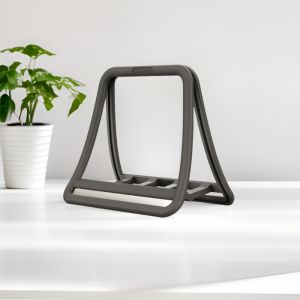
The Gravity Storage Bracket is a popular choice among users looking for a space-saving solution for their workspace. This bracket combines the benefits of an upright computer bracket with built-in storage, making it perfect for those who want to keep their workspace organized and clutter-free.
Mac Users: Apple Computer Support & Vertical Bases
If you're a Mac user, there are specific solutions available to cater to your needs, such as the MacBook Vertical Base and Apple Computer Vertical Bracket.
MacBook Vertical Base: Enhancing Your Productivity
The MacBook Vertical Base is designed specifically for MacBook users, providing a vertical mounting solution that enhances productivity and ergonomics. This base offers the following benefits:
- Compatibility: Works seamlessly with MacBook laptops.
- Adjustability: Allows for easy adjustment of height and angle to suit your preferences and ergonomic needs.
- Space Saving: Free up valuable desk space by mounting your MacBook vertically.
Apple Computer Vertical Bracket: The Perfect Fit for Your Mac
The Apple Computer Vertical Bracket is another excellent option for Mac users looking to optimize their workspace. This bracket offers similar benefits to other upright computer brackets, with the added advantage of being tailored to Mac computers.
Setting Up Your Upright Computer Bracket & Vertical Laptop Stand
Now that you've chosen the perfect upright computer bracket or vertical laptop stand, it's time to set it up. Follow these steps for a smooth installation process:
Step-by-Step Guide to Installing Your Upright Computer Bracket
- Choose a mounting location, either on a wall or desk.
- Attach the bracket to the chosen surface using the provided hardware.
- Mount your monitor or laptop onto the bracket, adjusting height and angle as needed.
Tips for Maximizing Your Vertical Laptop Stand Experience
- Position your laptop at eye level to maintain proper posture and reduce neck strain.
- Keep your keyboard and mouse within reach to minimize unnecessary movement.
- Adjust the height and angle of your laptop stand to suit your preferences and ergonomic needs.
Maintaining Your Upright Computer Bracket & Vertical Laptop Stand
To ensure the longevity and optimal performance of your upright computer bracket or vertical laptop stand, follow these maintenance tips:
Cleaning and Care Instructions for Your Upright Computer Bracket
- Wipe down the bracket regularly with a soft, dry cloth to remove dust and debris.
- Avoid using harsh chemicals or abrasive materials, as they may damage the surface of the bracket.
Troubleshooting Common Issues with Vertical Laptop Stands
- If your laptop is not securely attached to the stand, check that all hardware is properly tightened.
- If the stand is wobbly or unstable, ensure that it is mounted securely and adjust the height and angle as needed.

TB supermarket store
Review

You May Also Like

Creative Chinese Style Phone Case for OPPO Reno13 12Pro 11 Korean Stripes 10/9Pro Small Sheep Skin Full Cover New Year Red 8/7SE Wealth Brining Stand

Hollow Case for Huawei Band: A Comprehensive Guide

Original Short Ins Artistic Retro Colorful Wristband Phone Strap for Women Outdoor Travel Durable Nylon Braided Line Accessories

【E-WOITD】 2Pcs -plated Copper Cross Banana Speaker Plug Connector Adapter Audio Banana Connectors for Speaker Wire Amplifiers

Samsung Galaxy S21 S22 S23 24 S20 S10 S9 S8 Ultra Plus FE Note 8 9 10 20 Plus Ultra Lite Soft Hydrogel Clear Screen Protectors Front Back Film

50x70cm softbox Photography Accessories Free bulb with 2.1m light stand Photography Kit Photo Video Studio Light Stand Continuous

Ultra-Thin Magnetic Absorption Silicone Phone Case for Huawei Honor X50i with Airbag Shockproof Luxury Fashion Creative Design

Card Case For Samsung A52 A52S A15 A35 A55 With Diagonal Strap Lanyard Wallet Bag Case Mobile Phone Shell Coin Purse Cases Cover Samsung A13 Casing Leather Case With Card holder Samsung Galaxy A35 A14 A54 A16 Cards Slot Case With Rope

Transparent Tempered Glass Screen Protector for iQOO Neo5 SE Mobile Phone Full Screen Coverage Privacy Protection Anti Glare

13cm/15cm Portable Aircon Exhaust Hose Adjustable Mobile AC Exhaust Pipe Heat Exhaust Tube

BUTTGooDS Original Metal Alloy Dog Playing Frisbee Fridge Magnet: Nordic Modern Home Decor