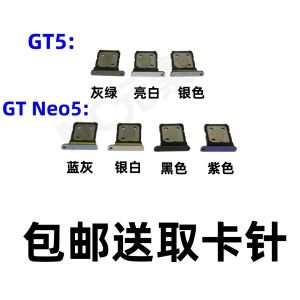
Applicable to Real Me Realme GT5/GT Neo5 Original Mobile Phone Rmx3820/3708 Card Disk SIM Card Slot
Applicable to Real Me Realme GT5/GT Neo5 Original Mobile Phone Rmx3820/3708 Card Disk SIM Card Slot
Introduction
In this guide, we will provide a comprehensive overview of the Realme GT5 and GT Neo5 SIM card slots, including their specifications, compatible SIM cards, and how to insert them. This article is designed to help users understand the intricacies of these devices' SIM card slots and troubleshoot any issues they may encounter.
Overview of Realme GT5 & GT Neo5 SIM Card Slots
The Realme GT5 and GT Neo5 SIM card slots are designed to accommodate various types of SIM cards, providing users with flexibility and convenience. These slots are located on the side of the device, allowing users to easily access and manage their SIM cards.
Key Features of Realme GT5 & GT Neo5 SIM Card Slots
Some key features of the Realme GT5 and GT Neo5 SIM card slots include:
- Dual SIM support
- Compatibility with nano-SIM cards
- Easy access to SIM card tray
Realme GT5 SIM Card Slot
RMX3820 SIM Card Slot Specifications
The Realme GT5 (RMX3820) SIM card slot is designed to accommodate two nano-SIM cards. It supports dual SIM functionality, allowing users to switch between two different SIM cards seamlessly.
Compatible SIM Cards for Realme GT5
The Realme GT5 is compatible with nano-SIM cards, which are commonly used in modern smartphones. Users can easily insert and manage their SIM cards within the device.
How to Insert SIM Card into Realme GT5
To insert a SIM card into the Realme GT5, follow these steps:
- Turn off the device and locate the SIM card tray on the side of the phone.
- Gently slide the tray out using a pin or paperclip.
- Insert the nano-SIM card into the designated slot, ensuring it is properly aligned.
- Push the tray back into the phone until it clicks into place.
Realme GT Neo5 SIM Card Slot
RMX3708 SIM Card Slot Specifications
The Realme GT Neo5 (RMX3708) SIM card slot is also designed to accommodate two nano-SIM cards. It supports dual SIM functionality, allowing users to switch between two different SIM cards seamlessly.
Compatible SIM Cards for Realme GT Neo5
The Realme GT Neo5 is compatible with nano-SIM cards, which are commonly used in modern smartphones. Users can easily insert and manage their SIM cards within the device.
How to Insert SIM Card into Realme GT Neo5
To insert a SIM card into the Realme GT Neo5, follow these steps:
- Turn off the device and locate the SIM card tray on the side of the phone.
- Gently slide the tray out using a pin or paperclip.
- Insert the nano-SIM card into the designated slot, ensuring it is properly aligned.
- Push the tray back into the phone until it clicks into place.
Realme GT5 & GT Neo5: SIM Card Slot Troubleshooting
Common Issues with Realme GT5 & GT Neo5 SIM Card Slots
Some common issues users may encounter with the Realme GT5 and GT Neo5 SIM card slots include:
- SIM card not recognized
- Network connection problems
- SIM card tray not opening
Solutions for Realme GT5 & GT Neo5 SIM Card Slot Issues
To resolve these issues, users can try the following solutions:
- Restart the device
- Remove and reinsert the SIM card
- Check for network coverage in the area
- Contact the carrier for assistance
Conclusion
In summary, this guide has provided a comprehensive overview of the Realme GT5 and GT Neo5 SIM card slots, including their specifications, compatible SIM cards, and how to insert them. We hope this information helps users understand the intricacies of these devices' SIM card slots and troubleshoot any issues they may encounter. For more information about Realme devices, please visit the official website or contact the customer support team.

TB EL SHOP
Review

You May Also Like
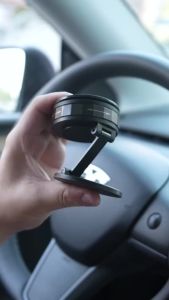
EYD VP05 Magnetic Vacuum Phone Holder 1.5kg Stable Adsorption 360° Rotation For 15 14 13promax

KEBETEME 2.4G Air Mouse Wireless Bluetooth Keyboard Voice Control Rechargeable IR Remote Control for TV

Boorca Huawei Mate30 pro Epoche Camera Lens Film High Definition Protective Tempered Glass for Mobile Phone Back Camera Protection

4Pcs/Set Silicone Charging Cable Protector Cute Cartoon Charger Protector Cover Compatible for IPhone 18W&20W Charger
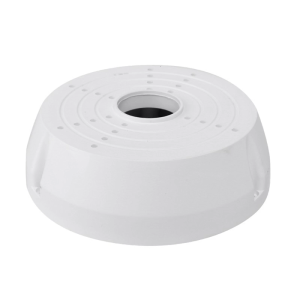
Universal CCTV Dome Mount Bracket Holder Adjustable Multiple Hole Design for Indoor Outdoor Security Camera Installation

Adorable Girl Rabbit Cartoon Style Phone Case Full Cover for Apple Huawei Xiaomi Oppo Vivo Honor iPhone Durable Protective Shell

Cool Pachat Dog Silicone Phone Case for OPPO Reno12 pro Womens Cute Cartoon Full Cover Soft Shell Summer New Style Best Friend Unique Design

2025 Brand New ASK Projector Bulb C2225/A3380/A3280/S1390/S1380/S1280/S1290
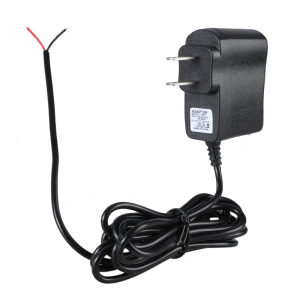
AA/3A/C/D EliminatorsUS Plug Power Supply Replace 1.5V 1A Batteries Eliminate Cable for Clock Holiday

Magnetic Tablets Stand Holder Mount Rack Stand for Holder Magnetic 360 Rotating Base Expandable Desktop Mount Rack

Mystery Lord Huawei MatePad 11 Tablet Case V8Pro Shell M6 with Pen Slot X8 Honor 9 Tri-Fold 8 VivoPadAir3 Xiaomi 6 Six5 pro Compatible