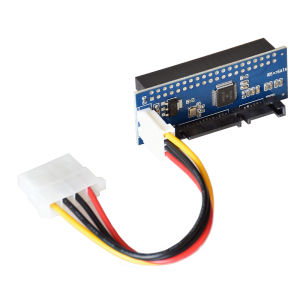
3.5-Inch Old Hard Disk IDE to Sata Conversion Card Parallel Port to Serial Port 39 Pin to 7+15 Interface Adapter Card
3.5-Inch Old Hard Disk IDE to Sata Conversion Card Parallel Port to Serial Port 39 Pin to 7+15 Interface Adapter Card
What is a Parallel Port to Serial Port Adapter?
A parallel port to serial port adapter is a device that converts data from a parallel interface to a serial interface, allowing compatibility between older and newer computer systems. This type of adapter is particularly useful when working with legacy hard drives or other storage devices that use the Integrated Drive Electronics (IDE) interface, which needs to be converted to the Serial Advanced Technology Attachment (SATA) interface.
Key Features of the Adapter
- Compatibility: Supports 3.5-inch IDE hard disks with a 39-pin connector.
- Conversion: Converts parallel data transfer to serial data transfer.
- Interface: Provides a 7-pin power connection and a 15-pin SATA interface.
How to Install the Adapter
- Disconnect the power supply from the computer.
- Remove the IDE hard drive from its current location.
- Connect the IDE hard drive to the adapter using the 39-pin connector.
- Attach the 7-pin power cable to the adapter.
- Connect the SATA interface to the motherboard or a SATA port hub.
- Power on the computer and configure the hard drive settings in the BIOS.
Hard Disk Adapter Card: IDE to SATA Conversion
A hard disk adapter card, also known as an IDE to SATA conversion card, is a specialized device that enables the connection of older IDE-based storage devices to modern computers that support SATA interfaces.
Benefits of IDE to SATA Conversion
- Improved Performance: SATA interfaces offer faster data transfer rates compared to IDE.
- Compatibility: Allows the use of older IDE hard drives in modern systems.
- Cost-Effective: Avoids the need to purchase new storage devices.
Steps to Convert IDE to SATA
- Purchase an IDE to SATA conversion card.
- Install the adapter card in an available PCI slot on the motherboard.
- Connect the IDE hard drive to the adapter using the 39-pin connector.
- Connect the SATA interface to the motherboard or a SATA port hub.
- Power on the computer and configure the hard drive settings in the BIOS.
Computer Hardware Conversion: A Comprehensive Guide
Converting old computer hardware to work with modern systems can be a cost-effective solution for extending the life of existing equipment. This guide provides valuable insights into the process of converting IDE-based hard drives to SATA interfaces.
Why Convert Old Hardware?
- Cost Savings: Avoid the expense of purchasing new storage devices.
- Data Preservation: Safeguard important files and documents stored on older hard drives.
- Resourcefulness: Make the most of existing hardware investments.
Tips for Successful Conversion
- Research Compatibility: Verify that the chosen adapter card is compatible with your specific hardware configuration.
- Follow Installation Instructions: Carefully read and adhere to the installation guidelines provided by the manufacturer.
- Backup Data: Before making any changes, ensure that all critical data is backed up to prevent potential loss.

TB EL SHOP
Review

You May Also Like

Kebidumei Foldable Double-Sided Magnetic Phone Ring Holder for Kickstand Magnet Grip for Phone 16 15 14 Phone Stand Holder

Soft TPU Silicone Phone Case For Infinix GT 20 Pro 20Pro GT20 InfinixGT20Pro 5G 2024 Casing Shockproof Protection Back Cover

Presbyopia Zoom in on Small Adjustable Degree Transition of Natural Light Filters Out Harmful Blue Light
KH Special Carbon Fiber Vinyl Laptop Sticker Skin Decals Protector Cover for MSI GE78HX 13VH 17.3\" msl17sl
Transparent Silicone Phone Case for Xiaomi Redmi K60 Ultra with Built-in Lens Film Anti-slip Protection Cover for Men And Women
6001220 OIL PIPE FOR PORTABLE BAG CLOSER SEWING MACHINE YAOHAN N600A
Suitable for Logitech G604 mouse sticker sports car Alcantara material quality anti slip sweat absorbing sticker protective film
Graphics Power Cable 8Pin to 8 Pin (6+2) 6Pin GPU Male Adapter Extension Cable 60+20cm

FREEL Silicone Strap For Apple Watch Band 45Mm 41mm 42mm 40mm 44mm 38Mm Transparent Correa Sport Loop Wrist For smart watch Series 8 7 6 SE 5 4 3
Xiaomi Redmi Note11 pro Silicone Phone Case with Stand Transparent Full Cover Protection Anti-Fall Car Magnetic Soft Rubber Lens
Leather Flip Cover For OPPO A3 A5 A6 Pro Case Strong Magnet Wallet Coque for OPPO A3X A5X A6 Pro A6Pro 4G 5G Global Phone Case