Seagate Expansion 1TB/2TB USB 3.0 Portable External Hard Drive Super Speed Storage For Mac and Windows
Seagate Expansion 1TB/2TB USB 3.0 Portable External Hard Drive Super Speed Storage For Mac and Windows
Introduction to Seagate Expansion Portable Hard Drive
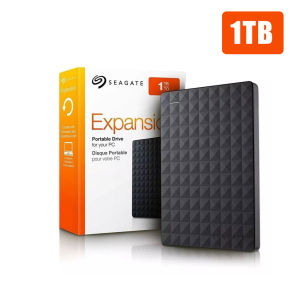
The Seagate Expansion 1TB & 2TB USB 3.0 Portable External Hard Drive is a top-of-the-line storage solution that offers both convenience and reliability. Designed for seamless integration with Mac and Windows systems, this portable external hard drive provides users with ample storage capacity and super-fast data transfer speeds. This article will guide you through choosing the right capacity, setting up your new device, maximizing performance, and enhancing data security.
Key Features
- 1TB and 2TB storage capacities available
- USB 3.0 interface for fast data transfer speeds
- Compact and portable design
- Compatible with Mac and Windows systems
- Robust data encryption and backup capabilities
Compatibility with Mac & Windows
The Seagate Expansion Portable Hard Drive is designed to work seamlessly with both Mac and Windows systems. Its USB 3.0 interface ensures compatibility with a wide range of devices, making it easy to transfer files between different operating systems.
How to Choose the Right Capacity for Your Needs
When selecting the right storage capacity for your needs, consider the types of files you plan to store and how much space they will require. For example, high-resolution photos and videos can quickly fill up even large-capacity drives.
Understanding Storage Requirements
To determine your storage requirements, take inventory of the files you plan to store on your external hard drive. Consider the size of each file type and estimate how much space you will need to accommodate them.
Benefits of 1TB vs 2TB
While both the 1TB and 2TB versions of the Seagate Expansion Portable Hard Drive offer ample storage capacity, the 2TB version provides double the space, making it ideal for users who require more extensive storage solutions.
Setting Up Your New Portable External Hard Drive
Once you've chosen the right capacity for your needs, it's time to set up your new Seagate Expansion Portable Hard Drive. This section will guide you through connecting your device to Mac or Windows systems, transferring files, and formatting and partitioning your drive.
Connecting to Mac or Windows
To connect your Seagate Expansion Portable Hard Drive to a Mac or Windows system, simply plug the USB 3.0 cable into the appropriate port on your computer. The device will automatically detect and install any necessary drivers.
Transferring Files
Transferring files to your new external hard drive is as simple as dragging and dropping them into the designated folder on your computer. For more advanced file management, consider using third-party software to streamline the process.
Formatting and Partitioning
If you need to format or partition your Seagate Expansion Portable Hard Drive, refer to the manufacturer's documentation for step-by-step instructions. This process may vary depending on your operating system and specific needs.
Maximizing Performance with Super Speed Storage
One of the standout features of the Seagate Expansion Portable Hard Drive is its super-fast data transfer speeds, thanks to the USB 3.0 interface. This section will explore how to leverage this technology to enhance your overall experience.
Leveraging USB 3.0 Technology
To take full advantage of the USB 3.0 interface, ensure that your computer has a compatible port. Additionally, consider using third-party software to optimize data transfer speeds and improve overall performance.
Enhancing Data Transfer Speeds
In addition to leveraging USB 3.0 technology, there are several other ways to enhance data transfer speeds. For example, minimizing background processes and closing unnecessary applications can help free up system resources and improve performance.
Enhancing Data Security and Backup
Data security and backup are crucial aspects of any storage solution. This section will explore how to implement data encryption and create robust backup strategies using your Seagate Expansion Portable Hard Drive.
Implementing Data Encryption
To protect your data from unauthorized access, consider implementing data encryption on your Seagate Expansion Portable Hard Drive. Many modern operating systems offer built-in encryption tools, or you can use third-party software to encrypt your files.
Creating Robust Backup Strategies
In addition to data encryption, creating robust backup strategies is essential for protecting your valuable files. Consider using third-party software to automate the backup process and ensure that your data is always safe and secure.

BOVE HDD
Review
You May Also Like

Yoobao A-L01 USB-A Female to Lightning Male OTG Adapter High Quality with Lanyard For Apple Devices

Transcend ESD310C 512GB Portable SSD USB Type-C USB 10Gbps 1050MB/s Read and 900MB/s Write
Original & Authentic Samsung Memory Cards: A Comprehensive Guide
ORICO 2.5 Inch HDD Case SATA to USB 3.0 5Gbps 4TB SSD HDD Enclosure Support UASP External HD Case Hard Drive Box for 7-9.5mm HDD
ORICO For M4 External SSD Storage Expansion 10Gbps 4TB 2TB 1TB for Ma Mini Portable SSD Storage
Micro/Type C To USB 2.0 Mini OTG Converter Adapter For Android Smart Phone Tablet PC OTG Devices Cameras High Speed

80s Music Video Set 2 (1982 & 1983) MP4 Music Videos File Collection in 32GB Flash Drive Plus Free Surprise Gift Plus Free Android OTG Connector. Watch your favorite music videos anywhere you like.
External USB Hard Disk Drive 500GB 1TB with Games Batocera Bootable 2.5inch 3.5inch
ORICO 560MB/S Extreme Portable SSD External Solid State Drive 2TB 1TB 512GB USB 3.2 Gen2 Type C PSSD for Laptop Business

Sandisk Nintendo®-Licensed Memory Card For Nintendo Switch™ Fortnite Edition ~ 128GB & 256GB
100% Original Samsung PRO Plus Storage Card: High-Speed Read Speed & Refurbished Options