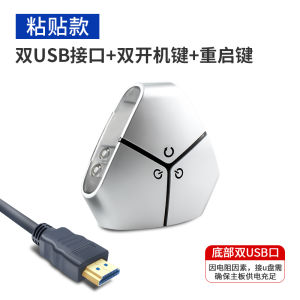
XiangHai Desktop Switch Dual Power Button with Reboot Case External Power Button Extended Out-of-case Power Button
XiangHai Desktop Switch Dual Power Button with Reboot Case External Power Button Extended Out-of-case Power Button
What is XiangHai Dual Power Button Desktop Switch?
The XiangHai Dual Power Button Desktop Switch is a versatile power management device designed to enhance your PC experience. This innovative device features two power buttons – one for powering on/off and another for rebooting – providing you with greater control over your computer's functions.
Key Features
- Dual Power Buttons: With separate buttons for power and reboot, the XiangHai switch offers easy access to essential functions.
- Extended Out-of-case Power Button: The extended cable allows you to place the power button outside your computer case, making it more convenient to use.
- Compatibility: Compatible with most modern motherboards, ensuring seamless integration with your existing system.
Benefits of Using the Device
By incorporating the XiangHai Dual Power Button Desktop Switch into your setup, you can enjoy numerous benefits:
- Improved Accessibility: Place the power button outside your computer case for easy access.
- Enhanced Control: Utilize both power and reboot buttons to streamline your workflow.
- Time-Saving: Quickly reboot your system without needing to open the case or press multiple keys.
How to Install XiangHai Extended Out-of-case Power Button
Installing the XiangHai Extended Out-of-case Power Button is a straightforward process. Follow these steps to ensure a successful installation:
- Turn off your computer and unplug it from the power source.
- Open your computer case and locate the motherboard's power button connector.
- Disconnect the existing power button wires from the motherboard.
- Connect the XiangHai switch's power button wires to the motherboard connector.
- Route the extended cable outside your computer case and secure it in place.
- Reassemble your computer case and plug it back in.
- Test the power button to ensure proper functionality.
Troubleshooting Common Issues
If you encounter any problems during installation or use, refer to the following troubleshooting tips:
- Power Button Not Working: Check the connections between the XiangHai switch and the motherboard. Ensure they are securely attached.
- Computer Not Responding: Verify that the power supply is functioning correctly and that there are no issues with the motherboard.
- Reboot Button Not Working: Double-check the connections and consult the user manual for further guidance.
How to Use XiangHai Reboot Case Power Button
The XiangHai Reboot Case Power Button offers several key functions to enhance your PC experience:
- Power On/Off: Press the power button to turn your computer on or off.
- Reboot: Press the reboot button to restart your system quickly.
- Customization: Some models may allow you to customize the behavior of the buttons through software settings.
Key Functions & Usage Tips
To make the most out of your XiangHai power management device, consider the following usage tips:
- Familiarize Yourself with the Buttons: Understand the purpose of each button and how they interact with your computer.
- Experiment with Customization: Explore any available customization options to tailor the device to your needs.
- Keep the Device Clean: Regularly clean the buttons and surrounding area to maintain optimal performance.
Enhancing Your PC Experience with the Device
By incorporating the XiangHai Dual Power Button Desktop Switch into your setup, you can enjoy numerous benefits:
- Improved Accessibility: Place the power button outside your computer case for easy access.
- Enhanced Control: Utilize both power and reboot buttons to streamline your workflow.
- Time-Saving: Quickly reboot your system without needing to open the case or press multiple keys.
XiangHai External Power Button Case: A Closer Look
The XiangHai External Power Button Case is designed to provide users with a convenient and efficient power management solution. Let's take a closer look at its key specifications:
- Compatibility: Compatible with most modern motherboards.
- Cable Length: The extended cable allows for flexible placement outside the computer case.
- Durability: Built to withstand daily use and last for years.
Comparing with Other Power Management Devices
When comparing the XiangHai Dual Power Button Desktop Switch with other power management devices, consider the following factors:
- Ease of Installation: The XiangHai switch is designed for simple installation, requiring minimal technical expertise.
- Customization Options: Some models offer software customization, allowing users to tailor the device to their needs.
- Price: The XiangHai switch is competitively priced, offering excellent value for its features.
Conclusion: Why XiangHai Power Management Device is Worth It
In conclusion, the XiangHai Dual Power Button Desktop Switch is a valuable addition to any PC setup. Its dual power buttons, extended cable, and compatibility with most modern motherboards make it an excellent choice for users seeking improved accessibility and control over their systems. By enhancing your PC experience, the XiangHai power management device is well worth the investment.

TB supermarket store
You May Also Like

(Fast Delivery)Woodworking Chisel Wood Chisel 10MM-32MM Plastic Handle Woodworking Carving Chisel

8pcs Clear Ring Size Adjusters For Loose Rings Invisible Spirals Design Silicone Resizer Guard Ring Adjuster Inserts
Glossy White Stickers: A Comprehensive Guide

180 Degree Stainless Steel Protractor: A Comprehensive Guide
3pcs Gravity-Induction Floor Drain-Core Toilet Deodorant Anti-Odor No Smell Bathroom Toilet Sewer Shower Drain for Bathtub Kitchen

YESPERY 1/2pcs Toilet Sticker Deodorant Pad: A Cute & Practical Solution for Your Bathroom
SHAHE Digital Inclinometer: A Professional Digital Level & Plastic Angle Finder
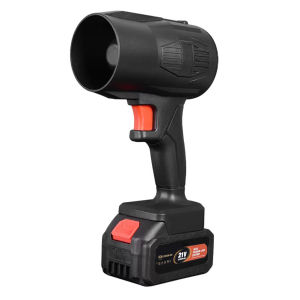
Violent Fan Handheld Air Dryer Lithium Battery Turbo Blower for Computer Keyboard Outdoor

BL-1003 SLIDING GLASS DOOR LOCK W. KEYS

Electric Soldering Bit Mouth Cleaner: Soldering Iron Welding Assistance Tool Cleaning Ball Fast Removal of Solder Ball Soldering Iron Solder Tip Cleaner with Base

10-Pack Disposable Shower Drain Hair Catcher - Clog-Free Bathroom Accessory Easy to Use & Replace