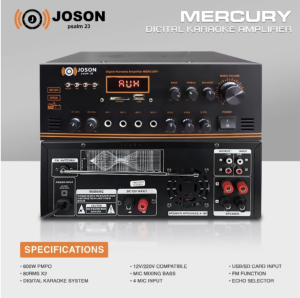
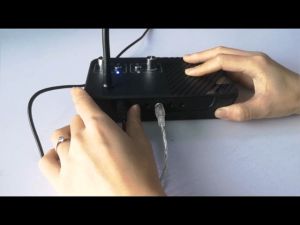
JOSON MERCURY 80Wx2 - AC / DC Professional Digital KARAOKE AMPLIFIER - USB / BT Function

Introduction to JOSON MERCURY 80Wx2
JOSON MERCURY 80Wx2 is a versatile AC/DC professional digital karaoke amplifier designed to enhance your karaoke experience. This powerful amplifier offers a wide range of features, making it suitable for various venues, from home setups to professional karaoke bars. In this comprehensive guide, we will explore the key features and specifications, compare it with other amplifiers, and provide step-by-step instructions on how to set up and optimize your JOSON MERCURY 80Wx2.
Key Features & Specifications
The JOSON MERCURY 80Wx2 is equipped with an impressive 80Wx2 output power, making it capable of driving high-quality karaoke speakers. Its USB and Bluetooth functions allow for seamless connectivity, while its AC/DC compatibility ensures it can be used in various environments. Some of the key features include:
- 80Wx2 Output Power: Provides ample power to drive high-quality karaoke speakers.
- USB & Bluetooth Connectivity: Connects to external devices effortlessly.
- AC/DC Compatibility: Can be powered by both AC and DC sources.
- Professional Digital Processing: Ensures high-quality sound reproduction.
- Compact Design: Portable and easy to transport.
Comparison with Other Amplifiers
When compared to other amplifiers in the market, the JOSON MERCURY 80Wx2 stands out due to its combination of power, connectivity options, and compact design. While some amplifiers may offer higher output power, they often lack the USB and Bluetooth connectivity features that make the JOSON MERCURY 80Wx2 so versatile. Additionally, its AC/DC compatibility ensures it can be used in various environments, making it an ideal choice for both home and professional settings.
How to Set Up Your JOSON MERCURY 80Wx2
Setting up your JOSON MERCURY 80Wx2 is a straightforward process that can be completed in just a few steps. In this section, we will guide you through connecting speakers, using USB and Bluetooth functions, and powering up your amplifier.
Connecting Speakers
To connect speakers to your JOSON MERCURY 80Wx2, follow these steps:
- Locate the speaker output jacks on the back of the amplifier.
- Connect the positive and negative wires from your speakers to the corresponding jacks on the amplifier.
- Ensure the connections are secure and properly insulated.
Using USB & Bluetooth Functions
The JOSON MERCURY 80Wx2 offers both USB and Bluetooth connectivity options, allowing you to easily connect external devices. To use the USB function, simply plug in a compatible device via the USB port. For Bluetooth connectivity, pair your device with the amplifier using the provided instructions.
Powering Up Your Amplifier
To power up your JOSON MERCURY 80Wx2, connect it to a power source using either AC or DC power. Once powered on, adjust the volume and other settings as needed to optimize your karaoke experience.
Enhancing Your Karaoke Experience
In this final section, we will explore ways to enhance your karaoke experience by optimizing sound quality, troubleshooting common issues, and customizing settings for different venues.
Optimizing Sound Quality
To ensure the best possible sound quality, follow these tips:
- Adjust the EQ Settings: Experiment with different equalizer settings to find the perfect balance for your voice and music.
- Use High-Quality Speakers: Invest in high-quality karaoke speakers to get the most out of your amplifier.
- Position the Amplifier Correctly: Place the amplifier in a location that minimizes interference and maximizes sound quality.
Troubleshooting Common Issues
If you encounter any issues while using your JOSON MERCURY 80Wx2, refer to the troubleshooting guide provided in the user manual. Some common issues include:
- No Sound: Check all connections and ensure the volume is turned up.
- Distorted Sound: Adjust the EQ settings or reduce the volume.
- Interference: Move the amplifier away from other electronic devices.
Customizing Settings for Different Venues
To adapt your JOSON MERCURY 80Wx2 to different venues, consider the following tips:
- Adjust the Volume: Increase or decrease the volume based on the size of the venue.
- Use Appropriate EQ Settings: Choose EQ settings that complement the acoustics of the room.
- Optimize Connectivity Options: Use USB or Bluetooth connectivity based on the availability of external devices.
In conclusion, the JOSON MERCURY 80Wx2 is a powerful and versatile AC/DC professional digital karaoke amplifier that offers a wide range of features and benefits. By following the guidelines provided in this guide, you can optimize your karaoke experience and enjoy high-quality sound reproduction in various environments.

Cimment .ph
Review

You May Also Like

E90 TWS Bluetooth 5.3 Headset Dual Earphones in-Ear Mini Touch Sports Wireless Bluetooth Noise Reduction Macaron Headset

Kuksy C01 Mini Portable Voice Amplifier: A Comprehensive Guide

New Dois pares de fones de ouvido sem fio bluetooth 5.4 jogos sono 2-em-1 fones de ouvido mini ultra pequenos com cancelamento de ru for all smartphone

K-12 Mini High End Wireless Audio Mini Home With 1 or 2 Microphones Professional Karaoke Speaker

Karaoke Sound Mixer With Dual Mic Interface Audio System Machine home outdoor Echo / Tone / Volume Adjustment RAC JACK Output to active speakers power amplifiers mixers

Subwoofer Gaming Headsets 360° Surround Sound Wireless Bluetooth Headphones Noise Reduction Sports Gamer Earphones With HD Mic

BASS-30 TWS Portable Bluetooth V5.3 RGB Colorful Heavy Surging Bass with TF Card USB AUX In & FM Radio Function

Portable SpeakerJBL GO 4 Wireless Powerful Bass Smart Audio Waterproof Outdoor Musicplayer with Microphone Supprot Android/IOS/PC with USB and TF Card Slots

Traditional Music Player with Slot Easy to Use for Seniors Enjoy Nostalgic Tune

2pcs Silicone Earplugs for Travel Sleeping Comfortable Ear Plugs Sleep Snoring Loud Noise

COMICA VM30 2.4G Super Cardioid Condenser Wireless Shotgun Microphone for Camera Smartphone Computer Professional 3.5mm&USB On-camera Mic for Live Streaming Reporting PodcastingInterviewing