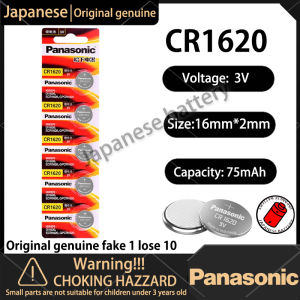
5PCS 100% Original PANASONIC CR1620 CR 1620 3V Lithium Battery For Watch Calculator Clock Remote
5PCS 100% Original PANASONIC CR1620 CR 1620 3V Lithium Battery For Watch Calculator Clock Remote
Product Overview
The 5PCS 100% Original PANASONIC CR1620 CR 1620 3V Lithium Battery is designed specifically for watches, calculators, clocks, and remote controls. These batteries offer a long shelf life of up to five years, making them an ideal choice for everyday use.
Key Features
- Equivalent Battery Numbers: CR1620
- Dimensions: 16 x 2.0 mm
- Capacity: 70 mAh
- Voltage: 3V
- Type: Lithium
Specifications
The 5PCS PANASONIC CR1620 lithium battery has been rigorously tested to ensure its reliability and performance. The following specifications highlight its capabilities:
- Shelf Life: Up to five years
- Quality: 2PCS/5PCS
- Equivalent Battery Numbers: CR1620
- Dimensions: 16 x 2.0 mm
- Capacity: 70 mAh
- Voltage: 3V
- Type: Lithium
Applications
These batteries are suitable for use in various devices, including watches, calculators, clocks, and remote controls. They are perfect for everyday use and provide reliable power to keep your devices running smoothly.
How to Choose the Right Battery
Choosing the right battery for your device can be a daunting task. However, by understanding your device's battery needs, specifications, and comparing different batteries, you can make an informed decision.
Identifying Your Device's Battery Needs
The first step in choosing the right battery is to identify your device's battery requirements. Consider factors such as voltage, capacity, and dimensions.
Understanding Battery Specifications
Understanding battery specifications is crucial in choosing the right battery. Consider factors such as voltage, capacity, and dimensions when selecting a battery.
Comparing Batteries
Comparing different batteries can help you determine which one is the best fit for your device. Consider factors such as voltage, capacity, and dimensions when comparing batteries.
Installation & Usage Tips
Proper installation and usage of your PANASONIC CR1620 lithium battery can help extend its lifespan and ensure optimal performance.
Preparing Your Device
Before installing the battery, ensure that your device is clean and free of any debris. This will help prevent damage to the battery and ensure proper installation.
Installing the Battery
To install the battery, follow these steps:
- Open the battery compartment of your device.
- Insert the battery according to the polarity markings.
- Close the battery compartment.
Proper Usage
To ensure proper usage of your PANASONIC CR1620 lithium battery, avoid exposing it to extreme temperatures, moisture, or physical damage. Store the battery in a cool, dry place when not in use.
FAQ & Troubleshooting
Common Questions
Q: Can I use this battery in my remote control? A: Yes, the PANASONIC CR1620 lithium battery is suitable for use in remote controls.
Q: Is this battery rechargeable? A: No, the PANASONIC CR1620 lithium battery is not rechargeable.
Troubleshooting Tips
If your device is not functioning properly after installing the PANASONIC CR1620 lithium battery, try the following troubleshooting steps:
- Check the polarity markings on the battery and ensure that it is inserted correctly.
- Check the battery compartment for any debris or damage.
- If the problem persists, try replacing the battery with a new one.

Japanese battery
Review
You May Also Like

DeWALT 88V Original Brushless Impact Wrench: A Comprehensive Guide
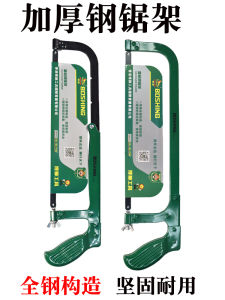
Thickened Adjustable Metal Saw Frame: A Comprehensive Guide
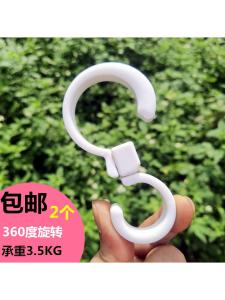
Japanese-Style Foldable S Hook & Children's Car Hook: Enhance Your Driving Experience

Thick Gypsum Board Lift - Hand Crank Ceiling Hoist for Solo Workers Woodwork Tool

Ready Stock Safety Shoes: Lightweight & Breathable Anti-Slip Work Shoes
15pcs 60w 220v Soldering Iron Set Heavy Duty Electronic Iron Kit 200-450°C Adjustable Temperature Repair Tools

Hyreto Portable High Pressure Washers: A Comprehensive Guide

Cherry Maruko Seamless Sticky Hook Wall Storage Seamless Hole-Free Net Red Bedroom Young Adult Heart Cute
10 Inch Heavy Duty Gate Barrel Bolt Barrel Bolt Latch Hardware Sliding Bolt Gate Latch
(50 PCS) Titanium Coated Drill Bits Set 1mm 1.5mm 2mm 2.5mm 3mm HSS Drill Bits Kit JuanHardware

A-PLUS/APLUS CONCRETE BOND CEMENTITIOUS WATERPROOFING 4LITERS (1GALLON)