NerdWares Solutions: AMD Ryzen 7 7700X 8 Cores & 16 Threads Processor with Radeon Vega Graphics
NerdWares Solutions: AMD Ryzen 7 7700X 8 Cores & 16 Threads Processor with Radeon Vega Graphics
Introduction to AMD Ryzen 7 7700X
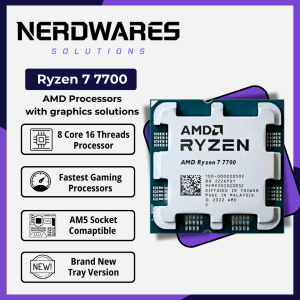
The AMD Ryzen 7 7700X processor, part of the NerdWares Solutions lineup, is a powerful 8-core, 16-thread CPU designed for high-performance computing. With its cutting-edge architecture, this processor offers top-notch performance for gaming, multimedia, and professional applications. In this article, we will delve into the key features, installation process, performance optimization, and compatibility with the AM5 CPU socket.
Key Features
- 8 Cores 16 Threads: The AMD Ryzen 7 7700X processor provides an impressive 8 cores and 16 threads, delivering outstanding multi-threaded performance.
- AM5 CPU Socket: This processor is compatible with the AM5 CPU socket, ensuring seamless integration with modern motherboards and supporting future upgrades.
- Radeon Vega Graphics: The AMD Ryzen 7 7700X comes equipped with Radeon Vega graphics, providing integrated graphics capabilities for everyday tasks and low-to-moderate gaming.
High Performance Processor Overview
The AMD Ryzen 7 7700X processor is built on the latest Zen architecture, offering exceptional performance and efficiency. With its high clock speeds and advanced cache design, this processor excels in gaming, content creation, and productivity tasks. The 8 cores and 16 threads enable smooth multitasking and efficient handling of demanding workloads.
Radeon Vega Graphics Support
Graphics Capabilities
The AMD Ryzen 7 7700X processor integrates Radeon Vega graphics, which offers solid performance for everyday tasks and low-to-moderate gaming. Whether you're browsing the web, editing documents, or playing casual games, the integrated graphics provide a seamless experience without the need for a dedicated GPU.
Compatibility with AM5 CPU Socket
The AMD Ryzen 7 7700X processor is designed to work with the AM5 CPU socket, ensuring compatibility with a wide range of modern motherboards. This compatibility allows users to easily integrate the processor into their existing systems or build new setups with confidence.
Installation and Setup
Step-by-step Guide
To install the AMD Ryzen 7 7700X processor, follow these steps:
- Power off your computer and unplug all cables.
- Open the case and locate the AM5 CPU socket.
- Carefully remove the old processor, if applicable.
- Align the AMD Ryzen 7 7700X processor with the AM5 CPU socket and gently place it into position.
- Secure the processor using the retention mechanism.
- Connect the power and data cables to the motherboard.
- Reassemble the case and plug in all cables.
- Power on the computer and enter the BIOS/UEFI settings to configure the processor and other components.
Troubleshooting Common Issues
If you encounter any issues during installation or setup, refer to the following troubleshooting tips:
- Processor Not Detected: Ensure the processor is properly seated in the AM5 CPU socket and the retention mechanism is securely fastened.
- System Not Booting: Check all power and data cables are properly connected and try resetting the BIOS/UEFI settings.
- Overheating: Verify proper airflow and cooling solutions are in place, and consider upgrading to a more powerful cooling system if necessary.
Performance Optimization
Maximizing Efficiency
To maximize the performance and efficiency of the AMD Ryzen 7 7700X processor, consider the following tips:
- Optimize BIOS/UEFI Settings: Configure the BIOS/UEFI settings to optimize the processor's performance, such as adjusting power profiles and enabling features like XMP (Extreme Memory Profile).
- Monitor Temperatures: Keep an eye on the processor's temperatures using monitoring software or hardware sensors, and adjust cooling solutions as needed.
- Update Drivers and Firmware: Regularly update drivers and firmware to ensure compatibility and optimal performance.
Overclocking and Tuning
For users seeking even higher performance, overclocking and tuning the AMD Ryzen 7 7700X processor can be a viable option. However, it's important to proceed with caution and ensure proper cooling solutions are in place to prevent damage to the processor.
Conclusion
The AMD Ryzen 7 7700X processor, part of the NerdWares Solutions lineup, offers exceptional performance and efficiency for gaming, multimedia, and professional applications. With its 8 cores, 16 threads, Radeon Vega graphics, and compatibility with the AM5 CPU socket, this processor is a top choice for enthusiasts and professionals alike. Follow the installation and setup guide, optimize performance, and enjoy the benefits of this powerful processor.

NerdWares Solutions
Review
You May Also Like
Customizable Sensitivity Touch Sensors Board For Microcontroller Projects Stable Performances Touch Switching Button Module
Computer Motherboard Front USB 2.0 9Pin Extension Cable for Desktops and Laptops Mainboard (20cm/30cm/50cm)

Lenovo Thinkpad Yoga 11e I INTEL I5 5TH GEN 4GB RAM 500GB I 3 MONTHS WARRANTY I REFURBISHED LAPTOP
Miniature 14500 Protections Module For 3.7V Cells For Electronic Devices Charging

Jungle Leopard Star S30 Magnetic Building Block CPU Fan 12030 Desktop Computer ARGB Splicing Fan 120mm Motherboard Lighting Sync 4PIN PWM 30mm Thickness

Samsung DDR3 DDR3L PC3-12800S 4GB 8GB 1333/1600MHz RAM Laptop SODIMM Memory 1066MHz PC3L
AC 220V 4000W High Power SCR Speed Controller Electronic Voltage Regulator Gover

PC Tech 14.0" Laptop LED Screen Slim Type 14.0" inches 30 Pins Dell Laptop 1366 x 768 HD LTN140AT31 N140BGE-E33

New HY510 30gram Thermal Paste for PC PROCESSOR
TX18 Intel Core i5-1235U 10.95inch 3000mAh tablet Laptop 2-in-1 DDR4 3200MHz 1920x1200 Support PD fast charging Face recognition Dual Type-C ports Windows
PCIeX8 Gen4x4 to 2 Port Oculink SFF 8611 8612 Expansion Adapter Need Support PCIE X4X4 for Fast Data Exchange