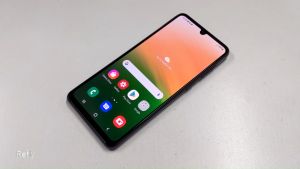
HOTWAV Cyber 13 Pro Rugged Smartphone Android 13 20GB+256GB 150LM Flashlight 6.6 Inch FHD+ 10800mAh 20W 64MP Cellphones On Sale
10800 mAh 6 6 inches. Built-in GPS: YES. Wi-fi: YES. IP68/IP69K: YES. Charging Power: 20W. Touch Screen: Yes. Bluetooth Version: YSE. Memory Card Type: Shared with SIM slot. Battery Capacity Range: 7500 mAh. Rear Camera Quantity: 3. Wireless Charging: no. NFC: YES. Biometrics Technology: Side-mounted, Face Recognition. Charging Interface Type: TYPE-C. Front Camera Quantity: 1.3. 5mm Headphone Port: no. Fast Charging: Adaptive Fast Charge. Screen Type: Water Drop Screen. Rear Camera Pixel: 64MP. Front Camera Pixel: 16MP. Battery Capacity(mAh: 10800. CPU Model: Unisoc. Battery Type: Not Detachable. Display Resolution: 2408x1080 FHD+. SIM Card Quantity: 2 SIM Card. Language: English, Russian, german, FRENCH, Spanish, POLISH, Portuguese, Italian, Turkish, Norwegian, KOREAN, japanese, Arabic. Display Size: 6.6. Cellular: 3G, 2G, 4G. Operation System: Android. Item Condition: New. Design: BAR. Brand Name: UNIWA. Origin: Mainland China. Certification: CE, FCC. HOTWAV Cyber 13 Pro Rugged Smart

Smart electronic shop

Review

You May Also Like
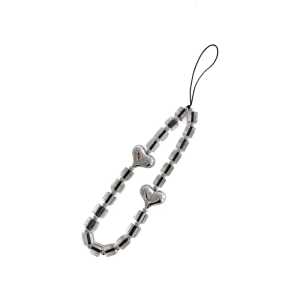
Elegant Handmade Beaded Keychain Pendant Mobile Phone Chain Strap Fashion Cellphone Rope Women Telephone Lanyard

Lightweight Colorful Fish and Star Phone Holder Handmade Keychain Pendant Mobile Strap Decoration for Everyday Use
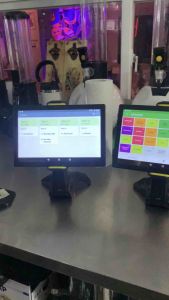
POS Kitchen Display for Loyverse POS 10\\\" (Tablet only w/stand)\\n\\nLoyverse POS Tablet is a powerful and versatile point-of-sale system designed to streamline operations in various retail and restaurant environments. This comprehensive guide will provide you with essential information about the Loyverse POS Tablet, its key features, benefits, and how to set up and use the POS Kitchen Display system effectively.\\n\\n What is Loyverse POS Tablet?\\n\\nLoyverse POS Tablet is a tablet-based point-of-sale system that combines a sleek design with advanced features to help businesses manage their sales, inventory, and customer data efficiently. With a 10-inch screen and a sturdy stand, this tablet is perfect for countertop or tabletop use, providing a convenient and intuitive interface for employees and customers alike.\\n\\n Key Features\\n\\nThe Loyverse POS Tablet offers a range of features that make it a valuable asset for any business:\\n\\n* **User-friendly interface**: The tablet's intuitive design allows even non-technical staff to operate the system with ease.\\n* **Mobile payments**: Accept credit cards, debit cards, and mobile payments such as Apple Pay and Google Pay.\\n* **Inventory management**: Track stock levels, set reorder points, and generate reports to help optimize inventory levels.\\n* **Customer management**: Store customer data, manage loyalty programs, and send targeted promotions to increase sales.\\n* **Reporting and analytics**: Generate real-time reports and insights to make informed business decisions.\\n\\n Benefits of Using Loyverse POS Tablet\\n\\nLoyverse POS Tablet offers several benefits that can help businesses improve their operations and increase profitability:\\n\\n* **Increased efficiency**: Streamline sales processes, reduce errors, and save time with automated features.\\n* **Improved customer experience**: Provide a seamless checkout experience with fast and secure mobile payments.\\n* **Enhanced inventory management**: Reduce stockouts and overstock situations by monitoring inventory levels in real-time.\\n* **Better decision-making**: Access valuable data and insights to make informed business decisions.\\n\\n Setting Up Your Loyverse POS Tablet\\n\\nTo get started with Loyverse POS Tablet, follow these steps:\\n\\n Installing Loyverse POS App\\n\\n1. Download the Loyverse POS app from the App Store or Google Play Store.\\n2. Follow the on-screen instructions to set up your account and configure the system settings.\\n3. Customize the app according to your business needs.\\n\\n Connecting Your Tablet to Loyverse POS\\n\\n1. Connect your tablet to the internet using Wi-Fi or cellular data.\\n2. Sign in to your Loyverse POS account.\\n3. Configure the system settings, including payment gateways, inventory management, and customer management.\\n\\n Using the POS Kitchen Display\\n\\nThe POS Kitchen Display system is an essential component of Loyverse POS Tablet, providing real-time order updates and streamlining kitchen operations.\\n\\n Setting Up the Kitchen Display System\\n\\n1. Connect the Kitchen Display to your network using Wi-Fi or Ethernet.\\n2. Install the Loyverse POS app on the Kitchen Display.\\n3. Configure the Kitchen Display settings, including order display preferences and layout.\\n\\n Customizing the Kitchen Display Layout\\n\\nCustomize the Kitchen Display layout to suit your kitchen's workflow and preferences. This may include adjusting font size, color scheme, and order display order.\\n\\n Best Practices for Using Loyverse POS Tablet & Kitchen Display\\n\\nTo maximize the benefits of Loyverse POS Tablet and Kitchen Display, follow these best practices:\\n\\n Optimizing Your Workflow\\n\\n* Train staff on how to use the system effectively.\\n* Customize the app and Kitchen Display settings to fit your business needs.\\n* Regularly update the system to ensure optimal performance.\\n\\n Maximizing Efficiency with Loyverse POS Tablet & Kitchen Display\\n\\n* Monitor inventory levels and adjust reorder points to avoid stockouts and overstock situations.\\n* Utilize reporting and analytics features to make informed business decisions.\\n* Provide fast and secure mobile payments to enhance the customer experience.\\n\\nIn conclusion, Loyverse POS Tablet and Kitchen Display offer a powerful combination of features and benefits that can help businesses streamline their operations and increase profitability. By following these best practices and customizing the system to fit your business needs, you can optimize your workflow and maximize efficiency.\n}
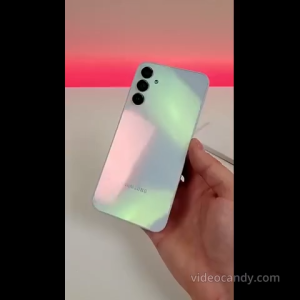
Samsung Galaxy A15 5G | 6GB RAM + 128GB ROM | MediaTek Helio G80 Max Processor | 6.6" FHD+ Display | 50MP Triple Camera | Galaxy AI Features | 5000mAh Battery | Side Fingerprint | Android 13 | Global Version
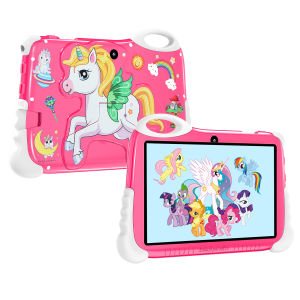
Good Quality Rainbow Horse Children's Learning Tablet 7.0-inch Ultra Clear Screen Memory 8GB RAM +128GB ROM Support 2.4GHz WiFi

Samsung Tablet S10 5G: A Classroom Learning Tablet with 12GB+512GB Storage
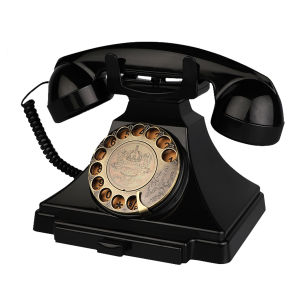
Retro Landline Telephone Corded Antique Phone Vintage 1930s Rotary Dial Home Decor Phone Old Fashion Decorative House Phones

Y2K Phone Charm Pendant Star KeyChain for Bag Phone Bowknot Charm Bowknot Heart Women Bear Phone Strap Lanyard Chain

BOOX Nova Air 7.8 Inch Ink Screen E-Reader 32G

Oukitel WP30 Pro 5G Rugged Smartphones Octa Core 12GB+512GB 6.78Inch FHD Android 13 Mobile Phone 108MP 11000mAh 120W Fast Charge

Unique Vintage Dices Shaped Phone Bag Charm For Fashion Enthusiasts And Trendsetters Seeking Individualized Style