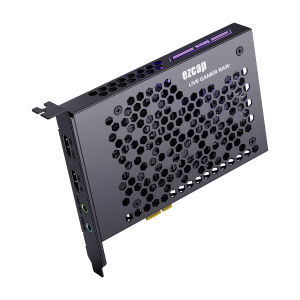
ezcap324B Live Gamer Raw PCIE 4K Video Game Capture Card: Record & Live Stream for Gaming Systems Camcorders
ezcap324B Live Gamer Raw PCIE 4K Video Game Capture Card: Record & Live Stream for Gaming Systems Camcorders
What is a 4K Video Game Capture Card?
A 4K video game capture card is a device designed specifically for capturing high-resolution gameplay footage from gaming systems. These devices provide exceptional image quality and are perfect for gamers who want to record and share their gameplay experiences with others.
Introduction to High-Performance Capture Cards
High-performance capture cards like the ezcap324B offer superior performance and reliability compared to lower-end options. They are built to handle the demands of modern gaming systems and provide seamless integration with popular streaming platforms like Twitch and YouTube.
Live Gamer Camcorder: An Overview
The ezcap324B Live Gamer Camcorder is a top-of-the-line 4K video game capture card that offers exceptional performance and ease of use. With its PCIe interface, it provides lightning-fast data transfer rates, allowing you to capture and stream gameplay footage with minimal lag or latency.
How to Choose the Right Gaming System Recording Device
When selecting a gaming system recording device, there are several factors to consider, including compatibility, resolution, frame rate, and ease of use.
Key Features of the ezcap324B
The ezcap324B offers several key features that set it apart from other gaming capture devices, including:
- Support for 4K resolution at 60 frames per second
- PCIe interface for fast data transfer rates
- Easy-to-use software for configuring and fine-tuning capture settings
- Compatibility with a wide range of gaming systems and streaming platforms
Comparing the ezcap324B with Other PCIE Gaming Capture Devices
Compared to other PCIe gaming capture devices on the market, the ezcap324B offers superior performance and reliability. Its support for 4K resolution at 60 frames per second sets it apart from lower-end options, and its PCIe interface ensures fast data transfer rates for seamless gameplay recording and streaming.
Setting Up Your Gaming System for Optimal Recording
To get the most out of your ezcap324B Live Gamer Camcorder, it's important to properly set up your gaming system for optimal recording.
Connecting the ezcap324B to Your Gaming Setup
Connecting the ezcap324B to your gaming setup is simple and straightforward. First, insert the card into an available PCIe slot on your computer. Then, connect the necessary cables to your gaming system, such as HDMI or DisplayPort, depending on your specific setup.
Configuring the ezcap324B for High-Quality Output
Once connected, you'll need to configure the ezcap324B for high-quality output. This involves adjusting settings such as resolution, frame rate, and audio input/output. The ezcap324B comes with easy-to-use software that guides you through the configuration process, ensuring you get the best possible results.
Maximizing Performance: Tips & Tricks for Using the ezcap324B
To get the most out of your ezcap324B Live Gamer Camcorder, here are some tips and tricks for maximizing performance:
Fine-Tuning Your Capture Settings
Fine-tuning your capture settings is essential for achieving the best possible results. Experiment with different resolutions, frame rates, and audio settings to find the optimal configuration for your specific setup.
Troubleshooting Common Issues
If you experience issues with your ezcap324B, there are several troubleshooting steps you can take. First, check that all cables are securely connected and that the card is properly seated in the PCIe slot. Next, make sure your computer meets the minimum system requirements for using the ezcap324B. Finally, consult the user manual or online support forums for additional troubleshooting tips.

Global Merch Park
You May Also Like

Smart TV Buying Guide: 43 Inch & 50 Inch 4K Options
CHERRY Aqua Smart TV 32\": High-Performance TV Specifications & Features
Q1 Smart TV Box Android 14 8GB 128GB Streaming Media Player Allwinner H313 Bluetooth 5.4 Netflix Google Assistant Set Top Box
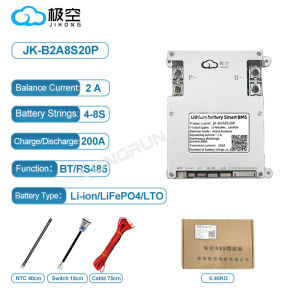
Jikong BMS 4S 5S 6S 7S 8S 12V 24V Smart BT JK BMS Active Balance Smart Bms 100A 200A 300A Lifepo4

32\"-50\" Non Touch Floor Standing Vertical Screen 1080 HD LCD Advertizer Facial Recognition Schedule System
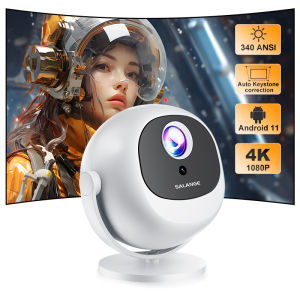
Salange P360 Projector 4K Support 1080P Native Android Dual Band Wifi 6 Auto Keystone Office Smart Home Theater Video Projector
60-150 inches high-definition 16:9 projection screen foldable lightweight and portable design - extended version
【BOSR】(SF-HD850/ SF-HD870) DVD Lens for Platinum Players / Hyundai Players / megapro Players (w/ Lock)

Full-color Removable Stage Screen / LED Electronic Display Screen / Large Screen P2 Point Pitch / Indoor and Outdoor Temporary Installation of Large Screens / Gift Aviation Case / Performance / Wedding / 1 Box of 6 0.5 m * 1 m Modules
TV Stick 4K bfire stick smart tv non smart tvbox stick TVs smart tv box disney disney plus TV Stick 4K HDR Android 10.0 HDMI Wifi Smart Media Player Google Netflix/Youtube/Disney Tv Boxes
Universal Replacement Remote Control for RP017F RP016F HCP-320X 3250 R001 Projector Models And More Black