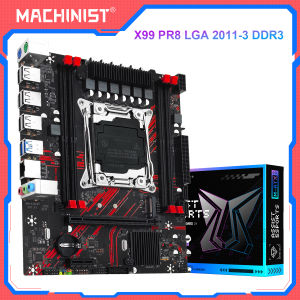
MACHINIST X99 PR8 Motherboard LGA 2011-3 Supports Intel Xeon Processor Double Channel DDR3 RAM NVME M.2/SATA 3.0
MACHINIST X99 PR8 Motherboard LGA 2011-3 Supports Intel Xeon Processor Double Channel DDR3 RAM NVME M.2/SATA 3.0
What is the MACHINIST X99 PR8 Motherboard?
The MACHINIST X99 PR8 Motherboard is a high-performance server motherboard designed to support Intel Xeon processors with the LGA 2011-3 socket. This motherboard offers robust performance and compatibility, making it an ideal choice for data centers, enterprise environments, and high-end workstations.
Overview of the MACHINIST X99 PR8 Motherboard
The MACHINIST X99 PR8 Motherboard is built around the Intel X99 chipset, providing exceptional stability and reliability. It features multiple expansion slots, including PCIe x16 slots, which allow for easy integration of graphics cards, network adapters, and other peripheral devices. Additionally, the motherboard supports dual-channel DDR3 RAM, ensuring optimal memory performance and capacity.
Key Features and Benefits
The MACHINIST X99 PR8 Motherboard offers numerous benefits, including:
- High-performance server motherboard: Designed to handle demanding workloads, this motherboard provides reliable performance and stability.
- LGA 2011-3 Intel Xeon processor support: Compatible with the latest Intel Xeon processors, ensuring optimal performance and efficiency.
- NVME M.2/SATA 3.0 storage options: Supports both NVMe M.2 and SATA 3.0 storage devices, providing flexible storage solutions.
- Double channel DDR3 RAM: Offers dual-channel memory support, ensuring maximum memory bandwidth and capacity.
How to Choose the Right High-performance Server Motherboard?
Selecting the right high-performance server motherboard depends on your specific needs and requirements. Consider the following factors when making your decision:
Understanding Your Needs
Identify the primary use case for your server motherboard. Will it be used for data center operations, enterprise applications, or high-end workstations? Understanding your needs will help you choose the appropriate motherboard that meets your performance and compatibility requirements.
Evaluating Performance and Compatibility
Evaluate the performance and compatibility of different motherboards by considering factors such as processor support, memory capacity, storage options, and expansion capabilities. The MACHINIST X99 PR8 Motherboard is a great choice for those seeking a high-performance server motherboard with robust features and flexibility.
Configuring the MACHINIST X99 PR8 Motherboard
Configuring the MACHINIST X99 PR8 Motherboard involves several steps, including installing the processor, setting up storage, and configuring memory. Follow these guidelines to ensure a smooth configuration process:
Installing LGA 2011-3 Intel Xeon Processor
To install the Intel Xeon processor, follow these steps:
- Carefully remove the CPU socket cover.
- Align the processor with the socket and gently place it into position.
- Secure the processor by lowering the retention lever.
- Connect the CPU power supply cables.
Setting Up NVME M.2/SATA 3.0 Storage
The MACHINIST X99 PR8 Motherboard supports both NVMe M.2 and SATA 3.0 storage devices. To set up storage, follow these steps:
- Install the desired storage device(s) in the appropriate slots.
- Connect the storage device(s) to the motherboard using the provided cables.
- Configure the BIOS settings to recognize the new storage devices.
Configuring Double Channel DDR3 RAM
To configure double channel DDR3 RAM, follow these steps:
- Install the memory modules in the appropriate slots, following the color-coded pattern on the motherboard.
- Ensure that the memory modules are securely seated and aligned with the slots.
- Configure the BIOS settings to enable dual-channel memory support.
Maintaining and Optimizing Your MACHINIST X99 PR8 Motherboard
Regular maintenance and optimization are essential to ensure the longevity and performance of your MACHINIST X99 PR8 Motherboard. Follow these guidelines to keep your motherboard running smoothly:
Regular Maintenance Tasks
Regular maintenance tasks include:
- Cleaning dust and debris: Keep the motherboard clean and free from dust to prevent overheating and improve airflow.
- Updating firmware: Keep the motherboard firmware up-to-date to ensure optimal performance and compatibility.
- Monitoring system temperatures: Monitor system temperatures to prevent overheating and potential damage to components.
Optimizing Performance and Efficiency
Optimize performance and efficiency by:
- Adjusting BIOS settings: Customize BIOS settings to optimize system performance and power consumption.
- Monitoring system resources: Monitor CPU, memory, and storage usage to identify potential bottlenecks and optimize resource allocation.
- Using cooling solutions: Implement effective cooling solutions, such as liquid cooling or high-performance fans, to maintain optimal operating temperatures.

GlobalLifestyle
You May Also Like
Upgrades DB25 Female/Male PCB Mount Connectors with Right Angles Designs Electronic Connector for Connection
15.6 “ B156XW02 V.6 fit B156XW02 V.7 B156XTN02 CLAA156WB11A N156B6-L04 N156B6-L0B BT156GW01 N156BGE-L21 LCD
Tridonic Ruigao Power Supply 24V Constant Pressure DALI Dimming LED Light Belt Drive LCA18W60W100W150
Lenovo Rescue R70002021 Pressure Strip R7000P2021 Y70002021 Small Cover Shell Compatible Laptop Computer Parts And Accessories
DRV8833 Double H Bridge DCMotor Controller 2.7 10.8V Input High Current Drive Module Compatible for Projects

Eyoyo Portable Digital Magnifier Reading Aid: 3.5 Inch LCD Screen for Low Vision 2x-25x Zoom Foldable Handle
16 Inch 165Hz Laptop LCD Screen NV160WUM NX3 NV160WUM-NX3 Display Matrix Panel Replacement 1920x1200 IPS 100% sRGB eDP 40 Pins
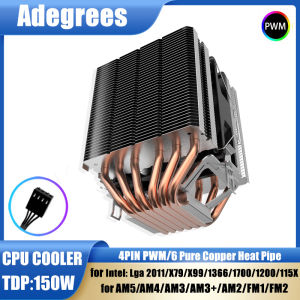
CPU Air Cooler 4Pin 6Heatpipes ventilador PC for Intel LGA 1700 2011 1200 1366 115X X79 X99 AMD AM3 AM5 AM4 Cooler Processador
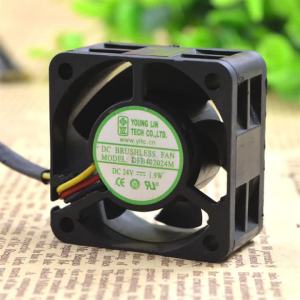
40mm DFB402024M 24V 1.9W 3-Wire Converter Fan High Efficiency Cooling for Servers Electronics

IPASON | Titan Army C30SK PRO 29.5“ QHD 2560*1080 200Hz VA 1800R Gaming Monitor
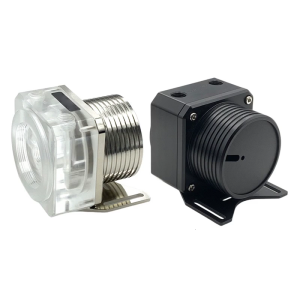
Acrylic Water Pump Heat Dissipation Clear Pump Cover Maintenance Pump Cover Replacement For D5 Water Cooling