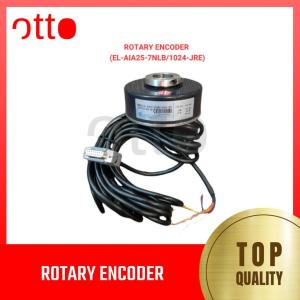
Rotary Encoder - EL-AIA25-7NLB/1024-JRE
Rotary Encoder - EL-AIA25-7NLB/1024-JRE
What is a Rotary Encoder?
A rotary encoder is a device used to measure angular position, speed, and direction of rotation. It is widely used in various applications, including robotics, manufacturing, and automotive industries. The EL-AIA25-7NLB/1024-JRE, also known as the JRE Encoder, is a high precision encoder designed for demanding applications.
High Precision Encoder Overview
The JRE Encoder offers exceptional accuracy and reliability, making it an ideal choice for applications requiring precise measurements. This encoder features a robust design, enabling it to withstand harsh environmental conditions and mechanical stress.
Key Features of JRE Encoder
- High resolution (up to 1024 lines per revolution)
- Low profile design
- High-speed operation
- Robust mechanical construction
- Wide operating temperature range
How to Choose the Right Rotary Encoder
Selecting the appropriate rotary encoder depends on understanding your application requirements. Consider factors such as resolution, speed, environmental conditions, and mechanical stress.
Identifying Your Application Needs
To determine the right rotary encoder for your application, consider the following:
- Resolution: The number of lines per revolution required for accurate measurements.
- Speed: The maximum rotational speed that the encoder must handle.
- Environmental Conditions: The operating temperature range, humidity, and vibration levels.
- Mechanical Stress: The level of mechanical stress the encoder will experience during operation.
Comparing 7NLB Rotary Encoder Models
When comparing different rotary encoder models, consider the following specifications:
- Resolution: Higher resolution encoders offer better accuracy.
- Speed: Faster encoders can handle higher rotational speeds.
- Environmental Conditions: Encoders designed for harsh environments may have additional protective features.
- Mechanical Stress: Encoders with robust designs can withstand higher mechanical stress.
How to Install and Configure the EL-AIA25-7NLB/1024 Encoder
Proper installation and configuration are essential for optimal performance of the JRE Encoder.
Step-by-Step Installation Guide
- Mount the encoder on the rotating shaft using the appropriate mounting kit.
- Connect the encoder to the control system using the specified wiring diagram.
- Power on the control system and verify proper communication with the encoder.
Configuring the Encoder for Optimal Performance
To configure the EL-AIA25-7NLB/1024 Encoder for optimal performance:
- Set the resolution according to your application requirements.
- Adjust the output signal type (e.g., quadrature, analog, or serial) based on your control system.
- Calibrate the encoder to ensure accurate measurements.
Troubleshooting Common Rotary Encoder Issues
Identifying and resolving common rotary encoder issues can help maintain optimal performance.
Identifying and Resolving Connection Problems
Connection problems can cause incorrect readings or loss of communication between the encoder and control system. To resolve these issues:
- Verify proper wiring connections.
- Check for loose or damaged connectors.
- Ensure the encoder is powered correctly.
Addressing Accuracy and Precision Concerns
Accuracy and precision concerns can arise due to various factors such as mechanical wear, environmental conditions, or improper calibration. To address these issues:
- Perform regular calibration checks.
- Monitor environmental conditions and adjust the encoder accordingly.
- Inspect the encoder for signs of mechanical wear or damage.
Best Practices for Maintaining Your Rotary Encoder
Regular maintenance and proper handling can extend the lifespan of your rotary encoder.
Regular Maintenance Tips
- Clean the encoder regularly to remove dirt and debris.
- Check for loose connections and tighten them if necessary.
- Inspect the encoder for signs of mechanical wear or damage.
Extending the Lifespan of Your Encoder
To extend the lifespan of your rotary encoder:
- Follow the manufacturer's guidelines for proper installation and maintenance.
- Store the encoder in a clean, dry environment when not in use.
- Avoid exposing the encoder to extreme temperatures or humidity levels.

Otto Electric PH
Review

You May Also Like

RF Printing Supplies - HP-4 10MM Eyelet Machine w/ Rolling Stand & Flower Mold
Two-color Silk PLA Filament Dimensional Accuracy +/- 0.03 mm 250g Spool(0.55lbs) 1.75 mm Bronze Black
Sui Cai Applies to Dell B1160 Chip 1160 116x 1163 1165 Toner Cartridge Counting Chip
Hotend 3D Printer Nozzle Upgraded 0.2/0.4/0.6/0.8mm Hardened Steel Nozzle Hotend Kit for H2D Hotend 3D Printer Extruder
ETQ Compatible Toner Cartridge for Kyocera TK 4109 TaskAlfa 1800/1801/2200/2201

Soonpos 6G+64GB Android 13 Handheld PDA Scanner with 2D Mobile Data Collector Terminal Hot-swappable Rugged PDA Device 4G Network NFC Google GMS 5200mah Battery

Sunlu Silk PLA+ (PLA Plus) Tri-Color Filament 1.75mm for 3D Printing (1kg per spool)
PrinTEE - CUYI High Quality DTF Ink 1000ml Black | Cyan | Yellow | Magenta | White

Phomemo A4 Thermal Paper Quick-dry Continuous Thermal Printing Paper Compatible with M08F/M832/M833/M834 MT810 and Other Portable Thermal Printer 8.5\"x11\" Documents Study Notes 2 Rolls
ETQ Compatible Upper Roller for DCP-L2700 series
![[minnan] Universal Ink Bottle For Printer L3110 L4160 L6190 L3150 ET-8550 L8160 L8180 L8050 101 103 105 502 522 544 T552](https://img.lazcdn.com/g/p/017ff73b7c6900e459691e5848b108a9.jpg_300x300q80.jpg)
[minnan] Universal Ink Bottle For Printer L3110 L4160 L6190 L3150 ET-8550 L8160 L8180 L8050 101 103 105 502 522 544 T552