600W Modular Power Supply: A Comprehensive Guide

600W Modular Power Supply: A Comprehensive Guide

What is a 600W Modular Power Supply?

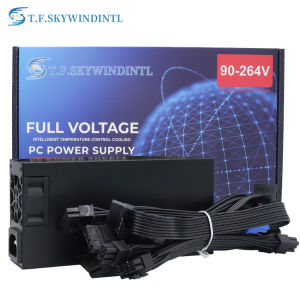
A 600W modular power supply is a high-performance energy source designed for modern computers, including Flex-ATX and ITX mini PCs. This power supply offers a flexible and efficient solution for powering various computer components, ensuring reliable performance and energy efficiency.

Key Features

  • High capacity: 600W output ensures sufficient power for demanding applications
  • Modular design: Detachable cables reduce clutter and improve airflow within the computer case
  • Active Power Factor Correction (PFC): Ensures efficient energy usage and minimizes power loss
  • Compatibility: Supports both 110V and 220V voltage inputs, making it suitable for global use

Benefits of Modular Design

The modular design of this power supply provides numerous advantages:

  • Improved cable management: Reduces clutter and enhances airflow within the computer case
  • Enhanced aesthetics: Neatly organized cables contribute to a clean and professional-looking build
  • Cost-effective: Only purchase the necessary cables, reducing overall expenses

Compatibility with Flex-ATX and ITX Mini PCs

The 600W modular power supply is compatible with Flex-ATX and ITX mini PCs, making it an excellent choice for small-form-factor computers. Its compact size and efficient design ensure optimal performance in these limited spaces.

How to Choose the Right 600W PSU for Your Needs

When selecting a 600W power supply unit (PSU), consider the following factors:

Active PFC PSU Considerations

Active Power Factor Correction (PFC) ensures efficient energy usage and minimizes power loss. Look for a PSU with active PFC to maximize performance and reduce electricity costs.

Voltage Input (110V & 220V) and Its Impact

A PSU that supports both 110V and 220V voltage inputs is essential for global use. This flexibility allows you to easily switch between different voltage standards, ensuring compatibility with various regions and power outlets.

Power Supply Form Factor: 1U Computer PSU

A 1U computer PSU is a compact, space-saving power supply unit suitable for small-form-factor computers. This form factor is ideal for Flex-ATX and ITX mini PCs, providing reliable power in a limited space.

Installation and Setup Guide

Follow these steps to install and set up your 600W modular power supply:

Preparing for Installation

  • Ensure you have all necessary tools and components, including the PSU, cables, and mounting hardware
  • Verify that your computer case and components are compatible with the PSU
  • Familiarize yourself with the installation process and safety guidelines

Connecting Components

  • Mount the PSU in the designated space within your computer case
  • Connect the necessary cables to your motherboard, CPU, GPU, and other components
  • Secure all connections and cables to prevent accidental disconnection or damage

Testing and Troubleshooting

  • Power on your computer and verify that all components are functioning correctly
  • Monitor the PSU's performance and address any issues or errors that may arise
  • Consult the manufacturer's documentation or support resources for assistance with troubleshooting

Applications and Use Cases

The 600W modular power supply is suitable for various applications and use cases:

  • POS Systems: Provides reliable power for point-of-sale systems, ensuring uninterrupted operation
  • AIO Desktops: Supports all-in-one desktop computers, delivering efficient energy usage and performance
  • Future-Proofing Your Setup: Offers ample power capacity for future upgrades and expansions, ensuring long-term compatibility
Global Merch Park

Global Merch Park

Seller ratings 97%

You May Also Like

HP S5 IPS 100Hz FHD  1920x1080 VGA/*HDMI Monitor 5ms VESA Mount HDM I| HP Monitor| Pc Monitor | Desktop Monitor
00:10

HP S5 IPS 100Hz FHD 1920x1080 VGA/*HDMI Monitor 5ms VESA Mount HDM I| HP Monitor| Pc Monitor | Desktop Monitor

For Delta Electronics DPS-500AB-9 A D E  Server - Power Supply 500W
00:19

For Delta Electronics DPS-500AB-9 A D E Server - Power Supply 500W

Dell ReadyRails - Rack Rail Kit - 2U - for PowerEdge Servers
00:14

Dell ReadyRails - Rack Rail Kit - 2U - for PowerEdge Servers

Nightstands Desk Edges Power Strips with USB C and 3AC Outlets Clamp Mount for Office and Dormitory
00:16

Nightstands Desk Edges Power Strips with USB C and 3AC Outlets Clamp Mount for Office and Dormitory

Advanced X3Pro Violent Fan Set Feature Strong ABS Build Ideal for Improved Air Movement and Cooling Solution
00:29

Advanced X3Pro Violent Fan Set Feature Strong ABS Build Ideal for Improved Air Movement and Cooling Solution

V380 PRO 12V 1.5A Power Cut Uninterruptible Monitor TV Power Supply UPS Battery WiFi Router Modem
00:38

V380 PRO 12V 1.5A Power Cut Uninterruptible Monitor TV Power Supply UPS Battery WiFi Router Modem

AM5 Motherboard DDR5 96GB GAMING AMD B650 Chipset WiFi 6 PCIe 4.0 3x M.2 USB 3.2 Type-C 9000MHz for AMD Ryzen 7 9700X Mirco ATX
00:35

AM5 Motherboard DDR5 96GB GAMING AMD B650 Chipset WiFi 6 PCIe 4.0 3x M.2 USB 3.2 Type-C 9000MHz for AMD Ryzen 7 9700X Mirco ATX

Type C to 3.5mm Headphone Sound Adapter with PD60W Fast Charging and 90° Angle for Phone Devices
00:20

Type C to 3.5mm Headphone Sound Adapter with PD60W Fast Charging and 90° Angle for Phone Devices

Waterproof Holder For Gaming Enthusiasts Simple PVC Packing Box Organizing Case for Collection
00:26

Waterproof Holder For Gaming Enthusiasts Simple PVC Packing Box Organizing Case for Collection

Crucial 8GB & 4GB DDR3 1866Mhz RAM: A Comprehensive Guide\\n\\n What is Crucial DDR3 Laptop RAM?\\n\\nCrucial DDR3 Laptop RAM is a type of Random Access Memory (RAM) designed specifically for laptops and notebooks. This particular RAM module is available in two capacities - 8GB and 4GB - and operates at various speeds including 1866MHz, 1600MHz, 1333MHz, and 1066MHz. It supports PC3-14900, PC3-12800, PC3-10600, and PC3-8500 speed ratings, making it compatible with a wide range of notebook models.\\n\\n Key Features of Crucial DDR3 RAM\\n\\n- **Capacity**: Available in 8GB and 4GB configurations\\n- **Speed**: Supports 1866MHz, 1600MHz, 1333MHz, and 1066MHz speeds\\n- **Voltage**: 1.5V 204pin SO-DIMM memory\\n- **Compatibility**: PC3-14900, PC3-12800, PC3-10600, and PC3-8500 speed ratings\\n\\n Compatibility with Various Notebooks\\n\\nCrucial DDR3 Laptop RAM is compatible with a wide range of notebook models, including those from popular manufacturers like Dell, HP, Lenovo, and Acer. To ensure compatibility with your specific laptop model, refer to the manufacturer's specifications or consult Crucial's compatibility checker.\\n\\n How to Choose the Right Crucial RAM for Your Notebook\\n\\nChoosing the right Crucial DDR3 Laptop RAM for your notebook involves understanding your laptop's RAM requirements and identifying the appropriate speed rating.\\n\\n Understanding PC3-14900 & Other Speed Ratings\\n\\nThe speed ratings of Crucial DDR3 Laptop RAM include PC3-14900, PC3-12800, PC3-10600, and PC3-8500. These ratings represent the theoretical peak transfer rate of the memory module, measured in megabytes per second (MB/s).\\n\\n- **PC3-14900**: 1866MHz speed, 14,900 MB/s transfer rate\\n- **PC3-12800**: 1600MHz speed, 12,800 MB/s transfer rate\\n- **PC3-10600**: 1333MHz speed, 10,600 MB/s transfer rate\\n- **PC3-8500**: 1066MHz speed, 8,500 MB/s transfer rate\\n\\n Identifying Your Laptop's RAM Requirements\\n\\nTo determine the appropriate Crucial DDR3 Laptop RAM for your notebook, consult the manufacturer's specifications or use Crucial's compatibility checker. Consider factors such as the maximum supported capacity, voltage, and speed rating when selecting the right RAM module for your laptop.\\n\\n Installing Crucial DDR3 RAM: A Step-by-Step Guide\\n\\nInstalling Crucial DDR3 Laptop RAM is a straightforward process that involves preparing for installation, inserting the RAM module into your notebook, and verifying installation success.\\n\\n Preparing for Installation\\n\\nBefore installing Crucial DDR3 Laptop RAM, ensure that your laptop is powered off and unplugged from any power sources. Gather necessary tools, such as a screwdriver, and prepare a clean, static-free workspace.\\n\\n Inserting the RAM Module into Your Notebook\\n\\n1. Open your laptop's RAM compartment by removing the screws securing the panel.\\n2. Align the notches on the Crucial DDR3 Laptop RAM module with the slots on your notebook's motherboard.\\n3. Gently press the RAM module into place until it clicks.\\n4. Replace the screws securing the RAM compartment panel.\\n\\n Verifying Installation Success\\n\\nAfter installing Crucial DDR3 Laptop RAM, power on your laptop and enter the BIOS/UEFI settings to verify that the new RAM module is recognized. Check your operating system's system information to confirm that the correct amount of RAM is installed.\\n\\n Maximizing Performance with Crucial DDR3 RAM\\n\\nTo maximize performance with Crucial DDR3 Laptop RAM, optimize your laptop's settings and enhance system stability and speed.\\n\\n Optimizing Your Laptop's Settings\\n\\nAdjust your laptop's power settings, disable unnecessary startup programs, and configure the operating system's virtual memory settings to improve overall performance.\\n\\n Enhancing System Stability & Speed\\n\\nRegularly update your operating system and drivers, defragment your hard drive, and run system maintenance tasks to maintain optimal system stability and speed.\\n\\n Conclusion: Upgrade Your Notebook with Crucial DDR3 RAM\\n\\nUpgrading your notebook with Crucial DDR3 Laptop RAM can significantly enhance performance and stability. By understanding your laptop's RAM requirements, choosing the right Crucial DDR3 Laptop RAM, and following the installation process, you can enjoy faster system speeds and improved overall performance.\"
00:40

Crucial 8GB & 4GB DDR3 1866Mhz RAM: A Comprehensive Guide\\n\\n What is Crucial DDR3 Laptop RAM?\\n\\nCrucial DDR3 Laptop RAM is a type of Random Access Memory (RAM) designed specifically for laptops and notebooks. This particular RAM module is available in two capacities - 8GB and 4GB - and operates at various speeds including 1866MHz, 1600MHz, 1333MHz, and 1066MHz. It supports PC3-14900, PC3-12800, PC3-10600, and PC3-8500 speed ratings, making it compatible with a wide range of notebook models.\\n\\n Key Features of Crucial DDR3 RAM\\n\\n- **Capacity**: Available in 8GB and 4GB configurations\\n- **Speed**: Supports 1866MHz, 1600MHz, 1333MHz, and 1066MHz speeds\\n- **Voltage**: 1.5V 204pin SO-DIMM memory\\n- **Compatibility**: PC3-14900, PC3-12800, PC3-10600, and PC3-8500 speed ratings\\n\\n Compatibility with Various Notebooks\\n\\nCrucial DDR3 Laptop RAM is compatible with a wide range of notebook models, including those from popular manufacturers like Dell, HP, Lenovo, and Acer. To ensure compatibility with your specific laptop model, refer to the manufacturer's specifications or consult Crucial's compatibility checker.\\n\\n How to Choose the Right Crucial RAM for Your Notebook\\n\\nChoosing the right Crucial DDR3 Laptop RAM for your notebook involves understanding your laptop's RAM requirements and identifying the appropriate speed rating.\\n\\n Understanding PC3-14900 & Other Speed Ratings\\n\\nThe speed ratings of Crucial DDR3 Laptop RAM include PC3-14900, PC3-12800, PC3-10600, and PC3-8500. These ratings represent the theoretical peak transfer rate of the memory module, measured in megabytes per second (MB/s).\\n\\n- **PC3-14900**: 1866MHz speed, 14,900 MB/s transfer rate\\n- **PC3-12800**: 1600MHz speed, 12,800 MB/s transfer rate\\n- **PC3-10600**: 1333MHz speed, 10,600 MB/s transfer rate\\n- **PC3-8500**: 1066MHz speed, 8,500 MB/s transfer rate\\n\\n Identifying Your Laptop's RAM Requirements\\n\\nTo determine the appropriate Crucial DDR3 Laptop RAM for your notebook, consult the manufacturer's specifications or use Crucial's compatibility checker. Consider factors such as the maximum supported capacity, voltage, and speed rating when selecting the right RAM module for your laptop.\\n\\n Installing Crucial DDR3 RAM: A Step-by-Step Guide\\n\\nInstalling Crucial DDR3 Laptop RAM is a straightforward process that involves preparing for installation, inserting the RAM module into your notebook, and verifying installation success.\\n\\n Preparing for Installation\\n\\nBefore installing Crucial DDR3 Laptop RAM, ensure that your laptop is powered off and unplugged from any power sources. Gather necessary tools, such as a screwdriver, and prepare a clean, static-free workspace.\\n\\n Inserting the RAM Module into Your Notebook\\n\\n1. Open your laptop's RAM compartment by removing the screws securing the panel.\\n2. Align the notches on the Crucial DDR3 Laptop RAM module with the slots on your notebook's motherboard.\\n3. Gently press the RAM module into place until it clicks.\\n4. Replace the screws securing the RAM compartment panel.\\n\\n Verifying Installation Success\\n\\nAfter installing Crucial DDR3 Laptop RAM, power on your laptop and enter the BIOS/UEFI settings to verify that the new RAM module is recognized. Check your operating system's system information to confirm that the correct amount of RAM is installed.\\n\\n Maximizing Performance with Crucial DDR3 RAM\\n\\nTo maximize performance with Crucial DDR3 Laptop RAM, optimize your laptop's settings and enhance system stability and speed.\\n\\n Optimizing Your Laptop's Settings\\n\\nAdjust your laptop's power settings, disable unnecessary startup programs, and configure the operating system's virtual memory settings to improve overall performance.\\n\\n Enhancing System Stability & Speed\\n\\nRegularly update your operating system and drivers, defragment your hard drive, and run system maintenance tasks to maintain optimal system stability and speed.\\n\\n Conclusion: Upgrade Your Notebook with Crucial DDR3 RAM\\n\\nUpgrading your notebook with Crucial DDR3 Laptop RAM can significantly enhance performance and stability. By understanding your laptop's RAM requirements, choosing the right Crucial DDR3 Laptop RAM, and following the installation process, you can enjoy faster system speeds and improved overall performance.\"

Eyoyo 7 Inch Compact CCTV Monitor: Built-in Dual Speakers & Remote Control
01:03

Eyoyo 7 Inch Compact CCTV Monitor: Built-in Dual Speakers & Remote Control

Glorimemo DDR4 RAM 16GB: High Performance RAM for Your Desktop
00:27

Glorimemo DDR4 RAM 16GB: High Performance RAM for Your Desktop