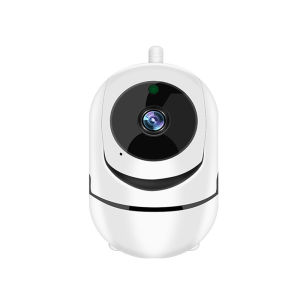
IP Camera Wifi YCC365 Plus: Smart Home 1620P HD Surveillance Camera Auto Tracking Night Vision Wireless Indoor Security Camera

IP Camera Wifi YCC365 Plus: Smart Home 1620P HD Surveillance Camera Auto Tracking Night Vision Wireless Indoor Security Camera

Introduction to YCC365 Plus Smart Home Surveillance System

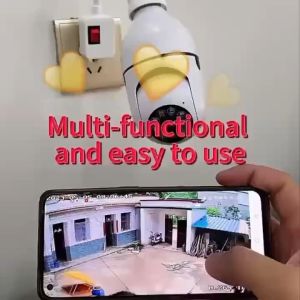
The YCC365 Plus IP Camera is a cutting-edge wireless indoor camera that offers a robust solution for home security. With its advanced features such as 1620P HD surveillance, auto tracking, night vision, and wireless connectivity, this smart home security system is designed to provide reliable protection for your home and loved ones.

Key Features of YCC365 Plus IP Camera

The YCC365 Plus offers several key features that make it stand out from other security cameras in the market. Here are some of the most notable ones:

  • 1620P HD Surveillance: This camera provides ultra-high-definition video quality, allowing you to capture every detail in your home.

  • Auto Tracking: With its intelligent tracking system, the YCC365 Plus can automatically follow moving objects within its field of view, ensuring no suspicious activity goes unnoticed.

  • Night Vision: Equipped with infrared LEDs, this camera offers clear visibility even in low-light conditions, making it an excellent choice for nighttime surveillance.

  • Wireless Connectivity: The YCC365 Plus supports Wi-Fi connectivity, allowing you to easily set up and monitor your camera from anywhere in your home.

  • Mobile App Integration: With a dedicated mobile app, you can access live video feeds, receive alerts, and manage your camera settings from your smartphone or tablet.

Why Choose YCC365 Plus for Your Home Security Needs

When it comes to choosing a security camera for your home, there are several factors to consider. Here are some reasons why the YCC365 Plus stands out:

  • High-Quality Video: With its 1620P HD resolution, the YCC365 Plus provides crystal-clear video quality that captures every detail in your home.

  • Intelligent Tracking: The camera's auto tracking feature allows it to automatically follow moving objects, ensuring no suspicious activity goes unnoticed.

  • Reliable Night Vision: The YCC365 Plus offers clear visibility even in low-light conditions, thanks to its infrared LEDs.

  • Easy Installation: With its wireless connectivity, the YCC365 Plus is easy to install and set up, making it a convenient choice for busy homeowners.

  • Remote Monitoring: With the dedicated mobile app, you can access live video feeds and manage your camera settings from anywhere in the world.

Setting Up Your YCC365 Plus IP Camera

Setting up your YCC365 Plus IP Camera is a straightforward process. Here's a step-by-step guide to help you get started:

  1. Unpack Your Camera: Remove the camera from its packaging and locate the power adapter and Wi-Fi antenna.

  2. Connect the Antenna: Attach the Wi-Fi antenna to the camera's designated port.

  3. Plug in Power: Connect the power adapter to the camera and plug it into a nearby electrical outlet.

  4. Download the App: Download the YCC365 Plus mobile app from the App Store or Google Play Store.

  5. Connect to Wi-Fi: Follow the app's instructions to connect your camera to your home Wi-Fi network.

  6. Configure Settings: Customize your camera's settings according to your preferences, such as motion detection sensitivity and alert notifications.

  7. Start Monitoring: Once everything is set up, you can start monitoring your home using the mobile app.

Maximizing YCC365 Plus Camera Performance

To get the most out of your YCC365 Plus IP Camera, here are some tips and best practices:

  • Auto Tracking: Enable the auto tracking feature to automatically follow moving objects within the camera's field of view.

  • Night Vision: Take advantage of the camera's infrared LEDs to ensure clear visibility even in low-light conditions.

  • Placement & Coverage: Position your camera strategically to cover the areas of your home that require the most attention.

  • Regular Maintenance: Clean the camera lens regularly to maintain optimal video quality.

  • Firmware Updates: Keep your camera's firmware up-to-date to ensure you have access to the latest features and security updates.

Conclusion: YCC365 Plus – A Reliable Choice for Home Security

The YCC365 Plus IP Camera is a reliable choice for homeowners looking for a high-quality, intelligent security solution. With its advanced features such as 1620P HD surveillance, auto tracking, night vision, and wireless connectivity, this smart home security system provides peace of mind and protection for your home and loved ones.

Global Merch Park
Global Merch Park

Seller ratings 97%

You May Also Like

DJI Mic 2 Camera Adapter
00:53

DJI Mic 2 Camera Adapter

12V DC Male & Female Power Balun plug Connector 5.5*2.1 DC Jack Connector CCTV Camera
00:22

12V DC Male & Female Power Balun plug Connector 5.5*2.1 DC Jack Connector CCTV Camera

E88/E99 Drone Dual Camera with big Screen Remote & 360° LED Lighting - No Phone Real-Time FPV Optical Flow Positioning Quadcopter
00:58

E88/E99 Drone Dual Camera with big Screen Remote & 360° LED Lighting - No Phone Real-Time FPV Optical Flow Positioning Quadcopter

BekinTek Night Vision Monocular  NVG Goggles Rechargeable Camcorder Telescope Full Dark Observe   Adjustment 8x Digital Zoom 2.5K Video 40M Photo 2 Inches HD Screen for Low Light Bd Watching Camping Outdoor
00:40

BekinTek Night Vision Monocular NVG Goggles Rechargeable Camcorder Telescope Full Dark Observe Adjustment 8x Digital Zoom 2.5K Video 40M Photo 2 Inches HD Screen for Low Light Bd Watching Camping Outdoor

ICSEE Official Store 2K 4MP Indoor 360 Degrees Pan and Tilt WiFi IP Security Home Cctv Sale Spy Camera Connect to Cellphone with Mic and Speaker
00:30

ICSEE Official Store 2K 4MP Indoor 360 Degrees Pan and Tilt WiFi IP Security Home Cctv Sale Spy Camera Connect to Cellphone with Mic and Speaker

Endura Power Surge Protection Device for Security Surveillance Camera
00:10

Endura Power Surge Protection Device for Security Surveillance Camera

Waterproof Hunting Camera Trail Camera 1080P HD Infrared Camera Night Vision Device 58MP Powerful Folding Long-Distance Vision Outdoor Search for Wildlife Monitoring
00:54

Waterproof Hunting Camera Trail Camera 1080P HD Infrared Camera Night Vision Device 58MP Powerful Folding Long-Distance Vision Outdoor Search for Wildlife Monitoring

Extension Cable TP-Link TAPO IP CCTV CAMERA C500 C320WS C310 C225 C210 C200 C110 C100 DC 12V DC power extension cable DC extension cable DC male connector CCTV  Power Cord CCTV  tplink CCTV  cable connector cctv power cord cctv cord extension
00:17

Extension Cable TP-Link TAPO IP CCTV CAMERA C500 C320WS C310 C225 C210 C200 C110 C100 DC 12V DC power extension cable DC extension cable DC male connector CCTV Power Cord CCTV tplink CCTV cable connector cctv power cord cctv cord extension

V380 PRO CAMVIEW CCTV Bulb Camera 360 Rotation Wifi Connect Cellphone 1080P HD Night Vision Security Camera
00:49

V380 PRO CAMVIEW CCTV Bulb Camera 360 Rotation Wifi Connect Cellphone 1080P HD Night Vision Security Camera

V380 Pro CCTV Bulb Camera Connect To Cellphone 360 Rotation 8MP HD No Wifi Needed Two-Way Audio Full Color Night Vision Auto Tracking IP Security Camera Human Detection
00:27

V380 Pro CCTV Bulb Camera Connect To Cellphone 360 Rotation 8MP HD No Wifi Needed Two-Way Audio Full Color Night Vision Auto Tracking IP Security Camera Human Detection

YOOSEE Y30 Cctv Camera  3 Lens 3 Screens Outdoor Waterproof Wireless Wifi Full Color Night Vision Two Way Audio And Speaker Security Camera 360 Panoramic Connect to Cellphone  IP Camera
00:26

YOOSEE Y30 Cctv Camera 3 Lens 3 Screens Outdoor Waterproof Wireless Wifi Full Color Night Vision Two Way Audio And Speaker Security Camera 360 Panoramic Connect to Cellphone IP Camera

BOKEWU E27 2MP HD 1080P IP Camera Wireless Panoramic Home Security WiFi CCTV Smart Bulb Camera Two Audio Night Vision Camera\\n\\n What is BOKEWU E27 2MP HD IP Camera?\\n\\nThe BOKEWU E27 2MP HD IP Camera is a cutting-edge surveillance device designed to provide high-quality video monitoring for homes and small businesses. With its advanced features and sleek design, this camera is perfect for anyone looking to enhance their home security system.\\n\\n Key Features & Specifications\\n\\n- **Resolution**: 2MP HD (1080P)\\n- **Camera Type**: IP Camera\\n- **Connection**: WiFi\\n- **Storage**: Cloud Storage/Micro SD Card Storage\\n- **Night Vision**: Smart IR\\n- **Motion Detection**: Yes\\n- **Audio**: Two-Way Audio\\n- **Pan and Tilt**: Yes\\n- **Smart Features**: AI Human Auto Tracking, Panoramic Surveillance Camera\\n\\n Comparison with Other Models\\n\\nCompared to other models in the market, the BOKEWU E27 2MP HD IP Camera stands out due to its advanced features such as AI Human Auto Tracking, Smart IR, and Panoramic Surveillance. Additionally, the camera offers a smooth two-way audio experience, making it ideal for both home and business security needs.\\n\\n How to Install BOKEWU E27 2MP HD IP Camera?\\n\\nInstalling the BOKEWU E27 2MP HD IP Camera is a straightforward process that can be completed in just a few simple steps.\\n\\n Step-by-Step Installation Process\\n\\n1. Unpack the camera and its accessories.\\n2. Connect the camera to power.\\n3. Download the BOKEWU app from the App Store or Google Play.\\n4. Follow the on-screen instructions to connect the camera to your WiFi network.\\n5. Set up your account and configure the camera settings.\\n\\n Troubleshooting Common Issues\\n\\nIf you encounter any issues during installation, refer to the troubleshooting guide provided in the BOKEWU app or visit their support website for further assistance.\\n\\n How to Optimize BOKEWU E27 2MP HD IP Camera Performance?\\n\\nTo get the most out of your BOKEWU E27 2MP HD IP Camera, it's essential to optimize its performance by enhancing night vision, maximizing motion detection, and customizing audio settings.\\n\\n Enhancing Night Vision\\n\\nThe BOKEWU E27 2MP HD IP Camera features Smart IR technology, which automatically adjusts the camera's night vision based on the surrounding light conditions. To further enhance night vision, adjust the camera's sensitivity settings within the BOKEWU app.\\n\\n Maximizing Motion Detection\\n\\nTo maximize motion detection, configure the camera's motion detection settings within the BOKEWU app. This includes adjusting the sensitivity, setting up custom zones, and enabling or disabling specific features such as sound detection.\\n\\n Customizing Audio Settings\\n\\nThe BOKEWU E27 2MP HD IP Camera offers a smooth two-way audio experience, allowing you to communicate with individuals within the camera's range. To customize audio settings, adjust the volume levels and enable or disable specific features such as sound detection within the BOKEWU app.\\n\\n BOKEWU E27 2MP HD IP Camera Security & Privacy Considerations\\n\\nWhen using the BOKEWU E27 2MP HD IP Camera, it's essential to consider security and privacy concerns.\\n\\n Ensuring Data Encryption\\n\\nThe BOKEWU E27 2MP HD IP Camera uses advanced encryption technology to protect your data and ensure that your videos and images remain secure. To further enhance security, enable two-factor authentication within the BOKEWU app.\\n\\n Setting Up User Access Controls\\n\\nTo control who has access to your camera, set up user access controls within the BOKEWU app. This includes creating unique usernames and passwords, assigning roles and permissions, and monitoring user activity.\\n\\n Regular Software Updates\\n\\nTo ensure your BOKEWU E27 2MP HD IP Camera remains up-to-date and secure, regularly check for software updates within the BOKEWU app. These updates often include bug fixes, performance improvements, and new features.\n}
01:04

BOKEWU E27 2MP HD 1080P IP Camera Wireless Panoramic Home Security WiFi CCTV Smart Bulb Camera Two Audio Night Vision Camera\\n\\n What is BOKEWU E27 2MP HD IP Camera?\\n\\nThe BOKEWU E27 2MP HD IP Camera is a cutting-edge surveillance device designed to provide high-quality video monitoring for homes and small businesses. With its advanced features and sleek design, this camera is perfect for anyone looking to enhance their home security system.\\n\\n Key Features & Specifications\\n\\n- **Resolution**: 2MP HD (1080P)\\n- **Camera Type**: IP Camera\\n- **Connection**: WiFi\\n- **Storage**: Cloud Storage/Micro SD Card Storage\\n- **Night Vision**: Smart IR\\n- **Motion Detection**: Yes\\n- **Audio**: Two-Way Audio\\n- **Pan and Tilt**: Yes\\n- **Smart Features**: AI Human Auto Tracking, Panoramic Surveillance Camera\\n\\n Comparison with Other Models\\n\\nCompared to other models in the market, the BOKEWU E27 2MP HD IP Camera stands out due to its advanced features such as AI Human Auto Tracking, Smart IR, and Panoramic Surveillance. Additionally, the camera offers a smooth two-way audio experience, making it ideal for both home and business security needs.\\n\\n How to Install BOKEWU E27 2MP HD IP Camera?\\n\\nInstalling the BOKEWU E27 2MP HD IP Camera is a straightforward process that can be completed in just a few simple steps.\\n\\n Step-by-Step Installation Process\\n\\n1. Unpack the camera and its accessories.\\n2. Connect the camera to power.\\n3. Download the BOKEWU app from the App Store or Google Play.\\n4. Follow the on-screen instructions to connect the camera to your WiFi network.\\n5. Set up your account and configure the camera settings.\\n\\n Troubleshooting Common Issues\\n\\nIf you encounter any issues during installation, refer to the troubleshooting guide provided in the BOKEWU app or visit their support website for further assistance.\\n\\n How to Optimize BOKEWU E27 2MP HD IP Camera Performance?\\n\\nTo get the most out of your BOKEWU E27 2MP HD IP Camera, it's essential to optimize its performance by enhancing night vision, maximizing motion detection, and customizing audio settings.\\n\\n Enhancing Night Vision\\n\\nThe BOKEWU E27 2MP HD IP Camera features Smart IR technology, which automatically adjusts the camera's night vision based on the surrounding light conditions. To further enhance night vision, adjust the camera's sensitivity settings within the BOKEWU app.\\n\\n Maximizing Motion Detection\\n\\nTo maximize motion detection, configure the camera's motion detection settings within the BOKEWU app. This includes adjusting the sensitivity, setting up custom zones, and enabling or disabling specific features such as sound detection.\\n\\n Customizing Audio Settings\\n\\nThe BOKEWU E27 2MP HD IP Camera offers a smooth two-way audio experience, allowing you to communicate with individuals within the camera's range. To customize audio settings, adjust the volume levels and enable or disable specific features such as sound detection within the BOKEWU app.\\n\\n BOKEWU E27 2MP HD IP Camera Security & Privacy Considerations\\n\\nWhen using the BOKEWU E27 2MP HD IP Camera, it's essential to consider security and privacy concerns.\\n\\n Ensuring Data Encryption\\n\\nThe BOKEWU E27 2MP HD IP Camera uses advanced encryption technology to protect your data and ensure that your videos and images remain secure. To further enhance security, enable two-factor authentication within the BOKEWU app.\\n\\n Setting Up User Access Controls\\n\\nTo control who has access to your camera, set up user access controls within the BOKEWU app. This includes creating unique usernames and passwords, assigning roles and permissions, and monitoring user activity.\\n\\n Regular Software Updates\\n\\nTo ensure your BOKEWU E27 2MP HD IP Camera remains up-to-date and secure, regularly check for software updates within the BOKEWU app. These updates often include bug fixes, performance improvements, and new features.\n}