TECHZONE YF-600 4K HD Projector: Gaming & Entertainment Made Easy
TECHZONE YF-600 4K HD Projector: Gaming & Entertainment Made Easy
What is the TECHZONE YF-600 4K HD Projector?
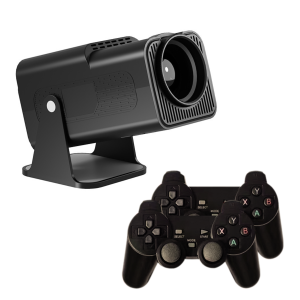
The TECHZONE YF-600 4K HD Projector is a state-of-the-art gaming and entertainment device designed to provide an immersive experience for users. This projector features high-definition 4K resolution, making it perfect for gaming enthusiasts and movie buffs alike. With Bluetooth and Wi-Fi connectivity, the YF-600 allows for seamless integration with various devices.
Key Features & Specifications
- Resolution: 4K Ultra HD (3840 x 2160 pixels)
- Brightness: 3000 ANSI lumens
- Contrast Ratio: 1500:1
- Connectivity: HDMI, USB, Bluetooth, Wi-Fi
- Sound: Built-in 20W speaker
- Emulator Games: Over 100 classic games built-in
- Wireless Gamepad Controller: Compatible with Bluetooth
Compatibility & Connectivity Options
The TECHZONE YF-600 4K HD Projector is compatible with a wide range of devices, including computers, laptops, smartphones, tablets, and gaming consoles. It supports HDMI, USB, Bluetooth, and Wi-Fi connectivity, allowing for easy connection and sharing of media files. The projector also comes with a built-in wireless gamepad controller for enhanced gaming experience.
How to Set Up Your TECHZONE YF-600 4K HD Projector
Setting up the TECHZONE YF-600 4K HD Projector is simple and straightforward. Follow these steps to get started:
Step-by-Step Installation Guide
- Unpack the projector and locate all the components, including the power cord, remote control, and wireless gamepad controller.
- Connect the power cord to the projector and plug it into a power outlet.
- Turn on the projector using the power button or the remote control.
- Connect your desired device to the projector via HDMI, USB, Bluetooth, or Wi-Fi.
- Adjust the projector settings according to your preferences.
Connecting Devices via Bluetooth & Wi-Fi
To connect your device to the TECHZONE YF-600 4K HD Projector via Bluetooth or Wi-Fi, follow these steps:
- Ensure that your device is within range of the projector.
- Press the Bluetooth/Wi-Fi button on the remote control to initiate pairing.
- Select your device from the list of available devices.
- Follow the on-screen instructions to complete the pairing process.
Exploring Built-In Emulator Games
The TECHZONE YF-600 4K HD Projector comes with over 100 classic emulator games built-in, providing hours of entertainment for gamers of all ages. These games can be accessed through the projector's menu system.
Available Emulator Games & Controls
The projector features a wide range of classic games from various gaming systems, including NES, SNES, Sega Genesis, and more. To play these games, simply connect the wireless gamepad controller via Bluetooth and select your desired game from the menu.
Enhancing Gameplay Experience with Wireless Gamepad Controller
The wireless gamepad controller included with the TECHZONE YF-600 4K HD Projector provides an enhanced gaming experience by allowing players to control their favorite games with ease. The controller is compatible with Bluetooth, making it easy to connect and use.
Tips & Tricks for Optimal Performance
To get the most out of your TECHZONE YF-600 4K HD Projector, follow these tips and tricks:
Maximizing Image Quality & Sound Output
- Adjust the projector's zoom and focus settings to achieve optimal image clarity.
- Position the projector at the appropriate distance from the projection surface to ensure a clear and sharp image.
- Adjust the sound settings to match your listening preferences.
Troubleshooting Common Issues
- If the projector does not turn on, ensure that the power cord is properly connected and the power outlet is functioning.
- If the projector is not displaying an image, check the connections between the projector and your device.
- If the sound is not working, check the volume settings and ensure that the sound output is set to the correct source.
Enjoy your TECHZONE YF-600 4K HD Projector and the endless entertainment possibilities it offers!

X-Tech.zone
Review

You May Also Like

MXQ PRO TV 4K 5G Andriod Smart TV Media Player 2.4GHz Touchpad With To Connect Wifi
DQ06 ATV Mini TV Stick Android12 Allwinner H618 Quad Core Cortex A53 Support 8K Video 4K Wifi6 BT Voice Remote Smart TV Box
TS-6 Portable Mini Movie Projector Hidden lift Gimbal Laser Beamer Suitable For Outdoor Camping Drive-in Home Theater Android 11 1080P 4K Dual Wifi Phone Mirroring
Smart Projector 4K HD Home Theater Beamer Android13.0 WiFi BT5.0 Portable Mini LED Projector Correction Support Netflix YouTube

Projection Screen 60/100 inch 16:9 HD Foldable Portable Movies Screen Home Theater Outdoor Office
Projectors Lens Protections Cover Avoid Dusts Lens Protectors Special for Projectors
Smartifact MXQ Pro TV98 ATV Plus Ultra HD 8K Smart TV Box Support 2.4G / 5G Dual WiFi Bluetooth 5.0 Android 13 Smart TV BOX 8+128GB Allwinner H313 Quad Core Media Player Set Support DLNA Airplay Miracast TV Receivers
Advanced HDTV-Compatible EDID Management: 4K 60Hz Emulator & 18G Bandwidth
Smartifact TV98 ATV PRO+ Android 14.0 8K Ultra HD Set Top Box Support 2.4G / 5G Dual WiFi Bluetooth 5.0 Smart Media Player Support Youtube

Yaber Entertainment Projector L1 Mini Projector 720P with Wi-Fi 6 Bluetooth 5.2 Smart System and Built-in Apps | Yaber PH
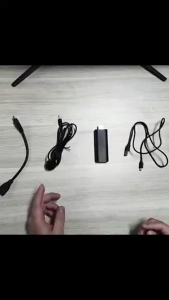
TV Stick 4K HD Android 13.0 Smart TV Stick Boxes 8+128GB Network Media Player Wifi Smart TV Media Mini TV Box