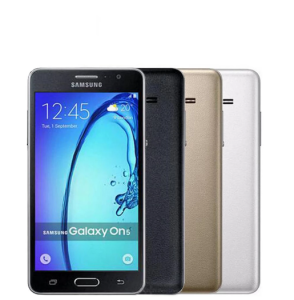
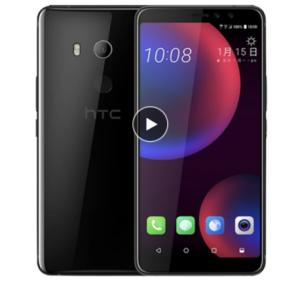
Samsung Galaxy On5 G5500 4G LTE 8GB Quad core Dual Sim 5.0 \" Unlocked Original Android Mobile Phone
Samsung Galaxy On5 G5500 4G LTE 8GB Quad core Dual Sim 5.0 " Unlocked Original Android Mobile Phone
What is the Samsung Galaxy On5 G5500?
The Samsung Galaxy On5 G5500 is a feature-packed smartphone designed for users who value performance and functionality. This 5.0 inch unlocked phone is equipped with a powerful 8GB quad core Android mobile processor, providing a seamless user experience. It supports 4G LTE dual SIM connectivity, making it an ideal choice for users who require multiple lines or need to switch between networks easily.
Key Features & Specifications
- Display: 5.0 inch Super AMOLED display with a resolution of 720 x 1280 pixels
- Processor: Quad-core 1.4 GHz Cortex-A53
- Memory: 1.5 GB RAM, 8 GB internal storage (expandable up to 128 GB via microSD)
- Camera: 13 MP rear camera with LED flash, 5 MP front-facing camera
- Connectivity: 4G LTE, dual SIM, Wi-Fi 802.11 b/g/n, Bluetooth 4.1, GPS, GLONASS, NFC
- Battery: 3,100 mAh Li-ion battery
Unlocked Original Mobile Phone
The Samsung Galaxy On5 G5500 is an unlocked original mobile phone, allowing users to enjoy maximum flexibility and freedom. This means you can use it with any carrier, making it perfect for travelers or those who want to switch carriers easily.
How to Use Your New Samsung Galaxy On5 G5500
Now that you have your new Samsung Galaxy On5 G5500, let's explore how to set it up and get started.
Setting Up Your Phone
- Insert the SIM card(s) into the designated slots.
- Connect the charger to the phone and plug it into a power source to charge the battery.
- Turn on the phone by pressing and holding the power button until the Samsung logo appears.
- Follow the on-screen instructions to complete the initial setup process, including language selection, network connection, and Google account setup.
4G LTE Dual SIM Connectivity
The Samsung Galaxy On5 G5500 supports 4G LTE dual SIM connectivity, allowing you to connect to two different networks simultaneously. To enable this feature:
- Go to Settings > Connections > SIM cards & mobile networks.
- Select the SIM card you want to configure and adjust the settings as needed.
Samsung Galaxy On5 G5500 Package Contents
Your Samsung Galaxy On5 G5500 comes with a comprehensive package that includes everything you need to start using your new device.
Full Set Contents
- 1 x Samsung Galaxy On5 G5500 smartphone
- 1 x USB charging cable
- 1 x 5V/1A charger
- 1 x MicroSD card adapter
- 1 x User manual
Charger & Battery
Your Samsung Galaxy On5 G5500 comes with a 5V/1A charger and a 3,100 mAh Li-ion battery. To ensure optimal performance and longevity, make sure to charge the battery regularly and avoid exposing it to extreme temperatures.
Earphone & Retail Box
The package also includes a pair of earphones and a retail box for safe storage and transportation of your new device.
In conclusion, the Samsung Galaxy On5 G5500 is a versatile and powerful smartphone that offers a great balance of performance, functionality, and affordability. With its 5.0 inch unlocked phone design, 8GB quad core Android mobile processor, and 4G LTE dual SIM connectivity, it's an excellent choice for users who want a reliable and feature-packed device.

Mobile Collection Hobby Store
Review

You May Also Like
RJ9 RJ11 4P4C Telephone Handset Cord Coiled Fix Landline Phone Wire For Clear Calls And Durability 200cm 300cm

Global Version DOOGEE Blade20 Play 5G Rugged Phone 6.6” HD+ 90Hz 8GB 256GB 10300mAh Battery 50MP Camera Android 15 Mobile phone

Note13 Pro+ NEW 4G/5G Smartphone 6.8inch Ultra-Clear Screen 12+512 GB Large Memory Android 13.0

Original LG G7 ThinQ G710N 6.1 Inches Octa Core 4GB RAM 64GB/128GB ROM LTE 4G 16MP Dual Rear Camera Android Unlocked Cellphone

Google Pixel 3XL XL3 Pixel3XL 6.3" 4GB RAM 64G/128G ROM NFC Snapdragon Original Unlocked 4G LTE Phones

Unlocked Motorola RAZR2 V8 GSM 2MP Camera 512MB/2GB ROM Cellphone 100% Original Bluetooth Flip Mobile Phone

🔥Christmas Sales🔥 Redmi 15C Smartphone 8GB+256GB | 5000mAh Battery | 50MP AI Camera | Global Version | Android 13 | 5 Year Warranty

🔥 Special Offer Now! POCO M7 5G Smartphone 6.88" FHD+ 120Hz LCD Display 5000mAh Battery for Long-lasting Use

Original Sony Z4(Z3+) E6553/E6533 Z3 Plus Octa Core 5.2Inches 3GB RAM 32GB ROM 20.7MP Camera Dual SIM card GSM Android Unlocked Mobile Phone

POS Kitchen Display for Loyverse POS 10\\\" (Tablet only w/stand)\\n\\nLoyverse POS Tablet is a powerful and versatile point-of-sale system designed to streamline operations in various retail and restaurant environments. This comprehensive guide will provide you with essential information about the Loyverse POS Tablet, its key features, benefits, and how to set up and use the POS Kitchen Display system effectively.\\n\\n What is Loyverse POS Tablet?\\n\\nLoyverse POS Tablet is a tablet-based point-of-sale system that combines a sleek design with advanced features to help businesses manage their sales, inventory, and customer data efficiently. With a 10-inch screen and a sturdy stand, this tablet is perfect for countertop or tabletop use, providing a convenient and intuitive interface for employees and customers alike.\\n\\n Key Features\\n\\nThe Loyverse POS Tablet offers a range of features that make it a valuable asset for any business:\\n\\n* **User-friendly interface**: The tablet's intuitive design allows even non-technical staff to operate the system with ease.\\n* **Mobile payments**: Accept credit cards, debit cards, and mobile payments such as Apple Pay and Google Pay.\\n* **Inventory management**: Track stock levels, set reorder points, and generate reports to help optimize inventory levels.\\n* **Customer management**: Store customer data, manage loyalty programs, and send targeted promotions to increase sales.\\n* **Reporting and analytics**: Generate real-time reports and insights to make informed business decisions.\\n\\n Benefits of Using Loyverse POS Tablet\\n\\nLoyverse POS Tablet offers several benefits that can help businesses improve their operations and increase profitability:\\n\\n* **Increased efficiency**: Streamline sales processes, reduce errors, and save time with automated features.\\n* **Improved customer experience**: Provide a seamless checkout experience with fast and secure mobile payments.\\n* **Enhanced inventory management**: Reduce stockouts and overstock situations by monitoring inventory levels in real-time.\\n* **Better decision-making**: Access valuable data and insights to make informed business decisions.\\n\\n Setting Up Your Loyverse POS Tablet\\n\\nTo get started with Loyverse POS Tablet, follow these steps:\\n\\n Installing Loyverse POS App\\n\\n1. Download the Loyverse POS app from the App Store or Google Play Store.\\n2. Follow the on-screen instructions to set up your account and configure the system settings.\\n3. Customize the app according to your business needs.\\n\\n Connecting Your Tablet to Loyverse POS\\n\\n1. Connect your tablet to the internet using Wi-Fi or cellular data.\\n2. Sign in to your Loyverse POS account.\\n3. Configure the system settings, including payment gateways, inventory management, and customer management.\\n\\n Using the POS Kitchen Display\\n\\nThe POS Kitchen Display system is an essential component of Loyverse POS Tablet, providing real-time order updates and streamlining kitchen operations.\\n\\n Setting Up the Kitchen Display System\\n\\n1. Connect the Kitchen Display to your network using Wi-Fi or Ethernet.\\n2. Install the Loyverse POS app on the Kitchen Display.\\n3. Configure the Kitchen Display settings, including order display preferences and layout.\\n\\n Customizing the Kitchen Display Layout\\n\\nCustomize the Kitchen Display layout to suit your kitchen's workflow and preferences. This may include adjusting font size, color scheme, and order display order.\\n\\n Best Practices for Using Loyverse POS Tablet & Kitchen Display\\n\\nTo maximize the benefits of Loyverse POS Tablet and Kitchen Display, follow these best practices:\\n\\n Optimizing Your Workflow\\n\\n* Train staff on how to use the system effectively.\\n* Customize the app and Kitchen Display settings to fit your business needs.\\n* Regularly update the system to ensure optimal performance.\\n\\n Maximizing Efficiency with Loyverse POS Tablet & Kitchen Display\\n\\n* Monitor inventory levels and adjust reorder points to avoid stockouts and overstock situations.\\n* Utilize reporting and analytics features to make informed business decisions.\\n* Provide fast and secure mobile payments to enhance the customer experience.\\n\\nIn conclusion, Loyverse POS Tablet and Kitchen Display offer a powerful combination of features and benefits that can help businesses streamline their operations and increase profitability. By following these best practices and customizing the system to fit your business needs, you can optimize your workflow and maximize efficiency.\n}

Samsung G9298 Quad Core 4.2Inches 4GB RAM 64GB ROM 12MP Camera Dual SIM Dual Screen LTE 1080P Flip Unlocked Phone