



Unlocked Nokia 5800 XpressMusic: A Comprehensive Guide
Unlocked Nokia 5800 XpressMusic: A Comprehensive Guide
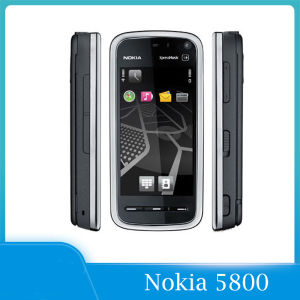
The Nokia 5800 XpressMusic is a compact yet powerful mobile device that combines a sleek design with a range of features, making it an excellent choice for users looking for an Original Nokia Phone. This guide will walk you through everything you need to know about this device, including its features, specifications, package contents, and how to get started with your new mobile device.
What is the Nokia 5800 XpressMusic?
The Nokia 5800 XpressMusic is a smartphone that was released in 2008, known for its impressive multimedia capabilities, including FM radio, GPS, Wi-Fi, and a 3.2 MP camera. This Unlocked GPS WIFI Phone offers a wide range of features, making it an ideal choice for users who want a versatile mobile device.
Features & Specifications
- Screen: 3.2-inch OLED display
- Camera: 3.2 MP camera with video recording capabilities
- Connectivity: FM radio, GPS, Wi-Fi, Bluetooth, and USB connectivity
- Storage: 128 MB internal memory, expandable up to 16 GB via microSD card
- Battery: 1200 mAh battery
Package Contents
Your Nokia 5800 XpressMusic comes with a Full Set, including:
- 1* Mobile phone
- 1* Charger
- 1* Battery
- 1* Retail box
How to Get Started with Your New Mobile Device
Now that you have your Nokia 5800 XpressMusic, let's dive into how to charge it, set it up, and configure it for optimal performance.
Charging & Battery Life
To charge your Nokia 5800 XpressMusic, simply connect the charger to the USB port at the bottom of the device and plug it into a power outlet. The battery life of this device is approximately 6 hours of talk time and 250 hours of standby time.
Basic Setup & Configuration
To set up your Nokia 5800 XpressMusic, follow these steps:
- Power on the device by pressing and holding the power button.
- Follow the on-screen instructions to set up your preferred language, time zone, and date.
- Connect to a Wi-Fi network or enable mobile data to access the internet.
- Customize your home screen by adding widgets and apps.
Maximizing Your FM Radio Experience
The Nokia 5800 XpressMusic features an FM radio that allows you to listen to your favorite stations on the go. Here's how to get the most out of this feature:
FM Radio Capabilities
The FM radio on the Nokia 5800 XpressMusic supports stereo sound and has a built-in antenna. You can also connect external speakers to enhance your listening experience.
Connecting to External Speakers
To connect external speakers to your Nokia 5800 XpressMusic, follow these steps:
- Connect the speaker to the device using a 3.5 mm audio cable.
- Adjust the volume settings on the device and speaker to achieve the desired sound level.
Making the Most of Your 3.2 MP Camera
The Nokia 5800 XpressMusic comes equipped with a 3.2 MP camera that allows you to capture high-quality photos and videos. Here's how to make the most of this feature:
Taking Photos & Videos
To take photos and videos on your Nokia 5800 XpressMusic, follow these steps:
- Open the camera app from the home screen.
- Switch between photo and video modes using the camera icon at the bottom of the screen.
- Tap the shutter button to capture photos or videos.
Editing & Sharing Media
To edit and share media on your Nokia 5800 XpressMusic, follow these steps:
- Open the media app from the home screen.
- Select the photo or video you want to edit or share.
- Use the built-in editing tools to crop, rotate, or adjust the brightness and contrast of your media.
- Share your media via email, messaging, or social media platforms.
Unleashing GPS & Wi-Fi Functionality
The Nokia 5800 XpressMusic features GPS and Wi-Fi connectivity, allowing you to navigate and stay connected on the go. Here's how to make the most of these features:
Navigation & Location Services
To use GPS on your Nokia 5800 XpressMusic, follow these steps:
- Open the maps app from the home screen.
- Enable GPS by tapping the satellite icon at the top of the screen.
- Enter your destination to receive turn-by-turn directions.
Wi-Fi Connectivity & Data Usage
To connect to a Wi-Fi network on your Nokia 5800 XpressMusic, follow these steps:
- Open the settings app from the home screen.
- Tap the Wi-Fi icon to enable Wi-Fi connectivity.
- Select the desired network and enter the password if required.
- Monitor your data usage by checking the mobile data settings in the settings app.
With this comprehensive guide, you now have everything you need to know about the Nokia 5800 XpressMusic. Enjoy exploring its features and capabilities, and don't hesitate to reach out if you have any further questions or concerns.

Mobile Collection Hobby Store
Review

You May Also Like
Unlocked Motorola RAZR2 V8 GSM 2MP Camera 512MB/2GB ROM Cellphone 100% Original Bluetooth Flip Mobile Phone

Realistic Fish and Star Shaped Mobile Phone Lanyard Handmade Keychain Pendant Mobile Accessories for Men and Women

Eye Catching Mobile Phone Chain Handmade Beaded Cellphone Lanyard For Women Girls Telephone Strap Drop-resistant
Samsung E2232: A Comprehensive Guide to the Original Dual SIM Mobile Phone
5G Android Tablet 7-inch MXS SPARK SKY Android 14 12GB+512GB 3800mAh Dual Camera Dual SIM Kids Tablet
![]C idea Kids Tablets 10.1 inchUpgraded Android 13 Tablet for KidsRealist 4GB RAM+64GB ROM(1TB TF) FHD IPS Screen 6000mAh large Battery5G WiFiGreat Gift for Toddler](https://img.lazcdn.com/g/ff/kf/Sf1b2363692224526920eec242b6283f1l.jpg_300x300q80.jpg)
]C idea Kids Tablets 10.1 inchUpgraded Android 13 Tablet for KidsRealist 4GB RAM+64GB ROM(1TB TF) FHD IPS Screen 6000mAh large Battery5G WiFiGreat Gift for Toddler
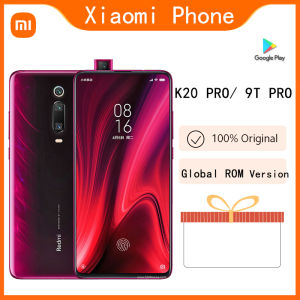
Refurbished Phone Original Xiaomi Mi 9T/ 9T PRO K20 PRO Global ROM 6.39 inches 1080 x 2340 pixels Qualcomm Snapdragon 855 98% new used 48 MP 4000 mAh
Original HOSWN H11 2G Big Icon Big Keyboard Elder Loud Speaker Cellular Cenior Mobile Phone GSM Powerful Flashlight Cellphon
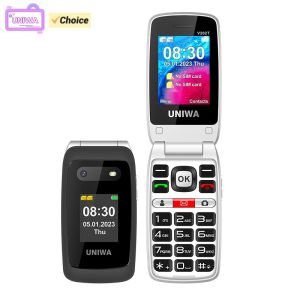
NEW UNIWA V202T Flip Phone Dual Screen Large Button Dual SIM Cards 4G Network Mobile Phone Support Charging Dock For Elderly
Sony Ericsson W980 W980i Mobile Phone 8GB ROM 3.15MP Unlocked Original 3G
Dual 4G LTE Network ONEMYTH S26 Pro Mini Smartphone Dual SIM 4.0 HD Full Screen 2000mAh 2GB+16GB Play Store Gift For Girls



















