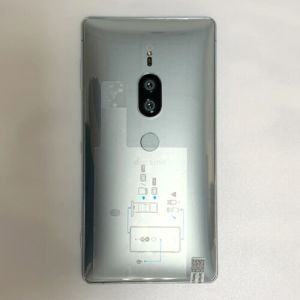
Sony Xperia XZ2 Premium Japan SO-04K 4G Phone Original 5.8\" 64GB ROM Single SIM
Sony Xperia XZ2 Premium Japan SO-04K 4G Phone Original 5.8" 64GB ROM Single SIM
Key Features of Sony Xperia XZ2 Premium
The Sony Xperia XZ2 Premium is a high-end smartphone with impressive features, making it a top choice for users who demand quality performance. This device boasts a powerful processor, a large display, ample storage, and advanced connectivity options.
Processor & Display
The Sony Xperia XZ2 Premium is equipped with a Quad-core processor, providing smooth and responsive performance for various tasks. Its 5.8-inch display offers a large screen real estate, making it perfect for watching videos, browsing the web, and gaming.
Storage & Connectivity
With 64GB of internal storage, users can store their favorite apps, music, photos, and videos without worrying about running out of space. Additionally, this device supports microSDXC memory cards, allowing users to expand their storage capacity further. The Sony Xperia XZ2 Premium also comes with Dual SIM slots, enabling users to switch between two different SIM cards seamlessly.
Camera & Operating System
The Sony Xperia XZ2 Premium is equipped with a high-resolution camera system, featuring a 19MP primary camera and a secondary 19MP camera. This combination allows users to capture stunning photos and videos with ease. The device runs on the Android operating system, offering a familiar and intuitive user interface.
How to Unlock Network on Sony Xperia XZ2 Premium
Unlocking the network on your Sony Xperia XZ2 Premium is essential if you plan to use it with different carriers. Here are two methods to unlock your device:
Using Sony's Official Unlock Tool
Sony provides an official unlock tool that can be used to unlock your device. Simply visit the Sony website, locate the unlock tool, and follow the instructions to unlock your device.
Manual Unlock Methods
Alternatively, you can use manual methods to unlock your Sony Xperia XZ2 Premium. This may involve entering a specific code or using third-party software. However, it is important to note that using unauthorized methods may void your warranty.
Comparing Sony Xperia XZ2 Premium with Other 4G Phones
When choosing a 4G phone, it is essential to consider the features and performance of different devices. Here are some advantages of the Sony Xperia XZ2 Premium:
Advantages of Sony Xperia XZ2 Premium
- Powerful Quad-core processor
- Large 5.8-inch display
- 64GB internal storage
- Dual SIM slots
- High-resolution camera system
Considerations When Choosing a 4G Phone
When selecting a 4G phone, consider factors such as processor speed, display size, storage capacity, camera quality, and connectivity options. It is also important to choose a device that fits your budget and meets your specific needs.
Tips for Maximizing Sony Xperia XZ2 Premium Performance
To get the most out of your Sony Xperia XZ2 Premium, consider the following tips:
Battery Life & Usage Tips
- Charge your device regularly to maintain optimal battery life
- Disable unnecessary apps and features to conserve battery power
- Adjust screen brightness and other settings to extend battery life
Software Updates & Security
- Keep your device's software up-to-date to ensure optimal performance and security
- Enable automatic updates to receive the latest software patches and features
- Install security apps to protect your device from malware and other threats
Conclusion
The Sony Xperia XZ2 Premium is a powerful and versatile smartphone that offers impressive features and performance. With its large display, ample storage, dual SIM slots, and high-resolution camera system, it is a top choice for users who demand quality performance. By following the tips outlined above, you can maximize the performance of your Sony Xperia XZ2 Premium and enjoy a seamless user experience.

Mobile Collection Hobby Store
Review

You May Also Like

🔥Hot Sale! NEW C75 5G | 8+256GB | 50MP Camera | 6000mAh Battery | 90Hz FHD Display
S26 Ultra 5G Android Tablet 12+512GB storage 6000mAh Capacity Dual Sim with WIFI Gaming Tablet
SOYES S23 Pro Mini Smartphone: A Comprehensive Guide
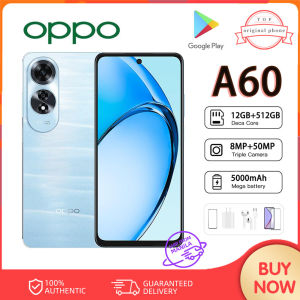
Original A60 5G Smartphone 12GB+512GB cellphone Android phone Screen 6.67-inch Gaming phone COD

Earphone Notes Star Guitar Pendant Phone Charm Hanging Rope Phone Chain Strap Bag Decoration Lanyards Keychain Accessory
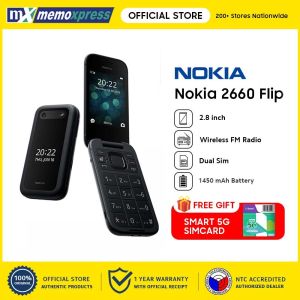
Original flip mobile Phone 2G version GSM quad-band mobile phone dual card screen 2.8 inch button feature phone for Nokia2660
❄️Christmas Mega Sales❄️ POCO C85 Smartphone 8GB+256GB | 6000mAh Battery | 6.9 Inch HD Display | 50MP AI Camera | Android 13 | 5-Year Warranty

ROYAL GEM LABUBU 7 Inch Smart Kids Tablet: The Ultimate Online Class Companion

POCO C75 Smartphone Helio G81-Ultra Processor Smartphone With 50MP Camera | 8GB RAM + 256GB ROM |🤖 AI Camera Big Display. Bigger Possibilities 🤖\\n\\n Discover the POCO C75 Smartphone\\n\\nIntroducing the POCO C75 smartphone, the latest addition to the POCO family of smartphones. This device comes equipped with a Helio G81-Ultra processor, 8GB RAM, and 256GB ROM, making it a perfect choice for users who demand high performance and storage capacity. Additionally, it features a 50MP AI camera and a big display, providing an immersive experience for photography enthusiasts and smartphone users alike.\\n\\n Key Features\\n\\n- **Helio G81-Ultra Processor**: Enjoy smooth and seamless performance with this powerful processor that delivers exceptional gaming and multitasking capabilities.\\n\\n- **8GB RAM & 256GB ROM**: With ample memory, the POCO C75 allows you to store all your favorite apps, games, photos, and videos without worrying about running out of space.\\n\\n- **50MP AI Camera**: Capture stunning photos and videos with the 50MP AI camera that offers superior image quality and advanced features such as portrait mode, night mode, and more.\\n\\n- **Big Display**: Experience vibrant visuals with the large display that provides an immersive viewing experience for movies, gaming, and browsing.\\n\\n Target Audience\\n\\nThe POCO C75 is designed for smartphone users who value performance, storage, and a great camera. It caters to a wide range of users, including students, professionals, gamers, and photography enthusiasts. Whether you're looking for a reliable device for everyday use or a powerful tool for creative pursuits, the POCO C75 has got you covered.\\n\\n Performance & Specifications\\n\\n Helio G81-Ultra Processor\\n\\nThe POCO C75 is powered by the Helio G81-Ultra processor, which delivers exceptional performance and efficiency. This processor is specifically designed for gaming and multitasking, allowing you to enjoy lag-free gameplay and smooth app switching. It also supports advanced features such as AI acceleration, making it an ideal choice for users who want a powerful and versatile smartphone.\\n\\n 8GB RAM & 256GB ROM\\n\\nWith 8GB of RAM and 256GB of internal storage, the POCO C75 offers ample memory for all your needs. You can easily run multiple apps and games simultaneously without experiencing any slowdowns or crashes. Additionally, the large storage capacity allows you to store all your favorite media files, documents, and apps without worrying about running out of space.\\n\\n Camera & Display\\n\\n 50MP AI Camera\\n\\nThe POCO C75 features a 50MP AI camera that captures stunning photos and videos with ease. This camera is equipped with advanced features such as portrait mode, night mode, and more, allowing you to take professional-grade photos and videos. The AI capabilities of the camera also help to enhance the overall image quality and provide a more immersive experience.\\n\\n Big Display\\n\\nExperience vibrant visuals with the large display of the POCO C75. This display provides an immersive viewing experience for movies, gaming, and browsing. The high-resolution display ensures that every detail is sharp and clear, making it perfect for watching your favorite shows and playing games.\\n\\n Bigger Possibilities with POCO C75\\n\\n Enhance Your Photography Skills\\n\\nThe POCO C75's 50MP AI camera offers endless possibilities for photography enthusiasts. With its advanced features and AI capabilities, you can capture stunning photos and videos that rival those taken with professional cameras. Whether you're a beginner or an experienced photographer, the POCO C75 has everything you need to enhance your photography skills.\\n\\n Maximize Your Smartphone Experience\\n\\nThe POCO C75 is designed to maximize your smartphone experience. With its powerful processor, ample memory, and large display, it offers a seamless and immersive experience for all your needs. Whether you're browsing the web, watching videos, playing games, or taking photos, the POCO C75 delivers exceptional performance and functionality.\\n\\nIn conclusion, the POCO C75 smartphone is a great choice for users who demand high performance, storage, and a great camera. Its Helio G81-Ultra processor, 8GB RAM, 256GB ROM, 50MP AI camera, and big display make it a versatile and reliable device for all your needs. So why wait? Upgrade to the POCO C75 today and experience bigger possibilities!\"
LG V30 Original Unlocked 4GB RAM 64GB ROM 6.0 Inches 16.0MP LTE Cellphone

🔥Christmas Promo🔥 Poco C75 5G Smartphone | 8GB RAM + 256GB ROM | 6.88” 120Hz Ultra Smooth Display | Helio G81 Gaming Processor | 50MP AI Camera | 5160mAh Long Battery + Fast Charging | 5-Year Warranty