USB Printer Sharing Device 4 In 1 Out Printer Sharing Device 4-Port Manual KVM Switching Splitter Hub Converter 4 In 1 Out HUB USB Splitter Box Automatic Switcher Adapter for Computer Scanner Printer

USB Printer Sharing Device 4 In 1 Out Printer Sharing Device 4-Port Manual KVM Switching Splitter Hub Converter 4 In 1 Out HUB USB Splitter Box Automatic Switcher Adapter for Computer Scanner Printer

What is a USB Printer Sharing Device?

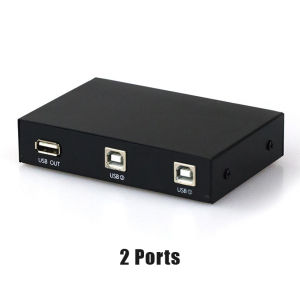
A USB Printer Sharing Device is a versatile accessory designed to enable multiple devices to share a single printer, scanner, or computer. This device acts as a hub that connects up to four devices to a single USB port, allowing users to switch between them effortlessly. With its 4-Port KVM Switching feature, users can easily manage multiple devices using a single keyboard, monitor, and mouse.

Key Features of USB Printer Sharing Device

The USB Printer Sharing Device comes with several key features that make it an ideal choice for businesses and individuals looking to streamline their workflow:

  • 4-Port KVM Switching: Allows users to switch between up to four devices using a single keyboard, monitor, and mouse.
  • Automatic Switcher Adapter: Automatically detects connected devices and switches between them seamlessly.
  • Manual Splitter Hub: Offers manual switching options for added flexibility.
  • Compatibility: Works with a variety of devices, including computers, scanners, and printers.

How Does It Work?

The USB Printer Sharing Device works by connecting multiple devices to its ports, which are then connected to a single USB port on the host device. Users can switch between connected devices using either the automatic switcher adapter or manual splitter hub. This allows users to easily manage multiple devices and share resources efficiently.

Benefits of Using USB Printer Sharing Device

Using a USB Printer Sharing Device offers numerous benefits, including cost savings, ease of setup and maintenance, and improved efficiency and productivity.

Cost-Effective Solution

By allowing multiple devices to share a single printer, scanner, or computer, users can save money on purchasing additional equipment. Additionally, the USB Printer Sharing Device eliminates the need for separate cables and adapters, further reducing costs.

Easy Setup and Maintenance

Setting up a USB Printer Sharing Device is simple and straightforward. Users can connect their devices to the hub and configure settings through the included software. Maintenance is minimal, as the device requires no special care or attention beyond regular cleaning.

Improved Efficiency and Productivity

By streamlining resource sharing and management, the USB Printer Sharing Device helps users work more efficiently and productively. With the ability to switch between devices quickly and easily, users can focus on their tasks rather than managing equipment.

How to Choose the Right USB Printer Sharing Device

When selecting a USB Printer Sharing Device, consider your needs and requirements, evaluate compatibility and connectivity options, and check for additional features and customization.

Consider Your Needs and Requirements

Determine the number of devices you need to connect and the types of devices you plan to use. This will help you choose a device with the appropriate number of ports and compatibility.

Evaluate Compatibility and Connectivity Options

Check the device's compatibility with your existing equipment and ensure it supports the types of devices you plan to connect. Additionally, consider connectivity options such as USB-C or Thunderbolt ports.

Check for Additional Features and Customization

Look for devices with additional features such as automatic switching, manual splitter hub, and compatibility with various operating systems. Consider customization options such as software configuration and firmware updates.

Installation and Configuration Guide

Follow these steps to install and configure your USB Printer Sharing Device:

Connecting Devices to the USB Printer Sharing Device

Connect your devices to the hub using the provided cables. Ensure each device is properly connected and powered on.

Configuring Settings and Preferences

Configure settings and preferences through the included software. Follow the on-screen instructions to set up automatic switching, manual splitter hub, and other features.

Troubleshooting Common Issues

If you encounter issues during setup or use, consult the device's user manual or contact customer support for assistance. Common issues include incorrect cable connections, incompatible devices, and software configuration errors.

Conclusion

In conclusion, the USB Printer Sharing Device is a valuable accessory for businesses and individuals looking to streamline their workflow and improve efficiency. With its 4-Port KVM Switching feature, automatic switcher adapter, and manual splitter hub, users can easily manage multiple devices and share resources efficiently. By considering your needs and requirements, evaluating compatibility and connectivity options, and checking for additional features and customization, you can choose the right USB Printer Sharing Device for your needs. Follow the installation and configuration guide to get started, and don't hesitate to reach out for assistance if needed.

G Mart

G Mart

Seller ratings 97%

Review

Oops
This video has no reviews.