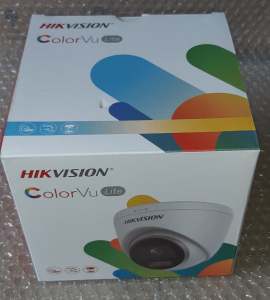
Hikvision Dome Colorvu Mic DS-2CD1327G2-LUF / DS-2CD1347G2-LUF: A Comprehensive Guide
Hikvision Dome Colorvu Mic DS-2CD1327G2-LUF / DS-2CD1347G2-LUF: A Comprehensive Guide
Key Features & Specifications
Image Sensor & Low Light Performance
The Hikvision Dome Colorvu Mic DS-2CD1327G2-LUF and DS-2CD1347G2-LUF are equipped with a 1/2.8\" progressive scan CMOS image sensor, providing exceptional low light performance. With a minimum illumination of 0.001 Lux at F1.0 and AGC ON, these cameras can capture clear images even in extremely dim environments. Additionally, the cameras feature a slow shutter speed range of 1/3 s to 1/100,000 s, allowing for better image quality in low light conditions.
Lens & Field of View
Both models come with a fixed aperture lens, offering a wide horizontal field of view (FOV) of 107° for the 2.8 mm lens and 84° for the 4 mm lens. The vertical FOV is 56° and 45° respectively, while the diagonal FOV measures 127° and 99°. This makes them ideal for monitoring large areas with minimal blind spots. Furthermore, the cameras have a depth of focus ranging from 1.7 m to ∞ for the 2.8 mm lens and 2.1 m to ∞ for the 4 mm lens.
Illuminator & Supplement Light
Equipped with smart supplement light technology, these cameras can automatically adjust their white light range up to 30 meters, ensuring optimal illumination in low-light environments. The white light helps to enhance image quality and visibility during nighttime surveillance.
Installation & Setup
Choosing the Right Mounting Position
When installing the Hikvision Dome Colorvu Mic DS-2CD1327G2-LUF / DS-2CD1347G2-LUF, it's essential to choose a mounting position that provides a clear view of the area you want to monitor. Ideally, the camera should be placed at a height that minimizes potential obstructions and ensures a wide field of view. Consider factors like weather conditions, lighting, and potential interference when selecting the mounting position.
Connecting to Network & Power Supply
To connect the camera to your network, simply plug in the Ethernet cable and power supply. Follow the manufacturer's instructions to configure the camera settings, including IP address, username, and password. Once connected, you can access the camera remotely using a web browser or mobile app.
Configuring Camera Settings
After connecting the camera to your network, log in to the web interface or mobile app to configure various settings, such as image quality, motion detection, and privacy zones. You can also adjust the camera's angle of view using the pan, tilt, and rotate functions, which allow for a range of 0° to 360°.
Troubleshooting & Maintenance
Common Issues & Solutions
If you experience issues with your Hikvision Dome Colorvu Mic DS-2CD1327G2-LUF / DS-2CD1347G2-LUF, refer to the troubleshooting guide provided by the manufacturer. Common problems include connectivity issues, image quality problems, and incorrect settings. In most cases, these issues can be resolved by resetting the camera, updating firmware, or adjusting settings.
Cleaning & Maintenance Tips
To ensure optimal performance, it's important to clean and maintain your camera regularly. Use a soft, dry cloth to wipe away dust and debris from the lens and housing. Avoid using harsh chemicals or abrasive materials that could damage the camera. Additionally, check the mounting position periodically to ensure it remains secure and free from obstructions.
In conclusion, the Hikvision Dome Colorvu Mic DS-2CD1327G2-LUF / DS-2CD1347G2-LUF is a versatile and reliable network camera that offers excellent low light performance, wide field of view, and smart supplement light technology. With proper installation, configuration, and maintenance, these cameras can provide high-quality surveillance footage for any application." }

Metadish Cable Installation and Trading
You May Also Like
SVBONY 1.25" Telescope Collimator 2" Adapter Newtonian Reflector Telescope for Astrophotography 7 Brightness Level
TTArtisan 50mm F/0.95 APS-C Format Portrait Prime Lens for Sony E | Nikon Z | M43 | Leica L | FUJIFILM X | Canon RF Mount Mirrorless Cameras Large Aperture MF Manual Focus Full Metal Body for Dreamy Bokeh & Low Light Photography | JG Superstore
Bundle 4 Supremo Ace 4K Dual Display + Monopod
EZVIZ H6C 2MP 360° Pan & Tilt CCTV Camera Connect Cellphone Night Vision Smart Home Security Camera Two-way Audio High Definition Night Vision Motion Detection
CCTV Bulb Camera with Night Vision 360° Panoramic Wireless Outdoor Camera Smart wifi Security Camera
EZVIZ H6C Pro 2MP 1080p Pan & Tilt Smart Home CCTV Camera Color Night Vision Noise Detection Auto-Tracking Two Way Calling
Mini Spy Camera HD Micro WiFi Small Camera with Infrared Night Vision Connect to Phone via App Secret Home Security Indoor DV Recorder
V380 PRO Q30S cctv camera dual lens wifi connect 360 surveillance camera 4K 6MP HD cctv dual camera security wireless outdoor waterproof AI motion dection alarm ip camera HD night vision cctv with two ways audio and speaker PTZ control by smart phone

Rover Systems 25.0 cm x 6.9 cm x 4.8 cm I-type Pendant Mount Metal CCTV Camera Bracket
LS VISION UBOX 4K 20X Optical Zoom WIFI/4G Dual Lens Solar CCTV Camera
V380 Pro HD 1080p CCTV Camera: A Comprehensive Guide