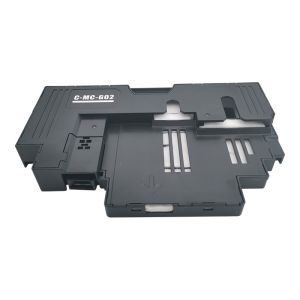
Canon MC-G02 Repair Ink Cartridge Canon G2820 G3020 G1820 G386 0 Waste Ink Bin
Canon MC-G02 Repair Ink Cartridge Canon G2820 G3020 G1820 G386 0 Waste Ink Bin
Introduction to Canon MC-G02 Repair Ink Cartridge
The Canon MC-G02 Repair Ink Cartridge is a compatible ink cartridge designed for Canon G Series printers, including the Canon G2820, G3020, G1820, and G386 models. These printers feature a waste ink bin system, which makes the MC-G02 repair ink cartridge an ideal replacement option. Compatible ink cartridges offer cost savings and comparable performance to original Canon ink cartridges, making them a popular choice among users.
Overview of Canon MC-G02 Repair Ink Cartridge
The Canon MC-G02 repair ink cartridge is designed to fit seamlessly into Canon G Series printers, providing users with a reliable and cost-effective alternative to original Canon ink cartridges. This compatible ink cartridge offers high-quality printing results, ensuring that your documents and images look their best.
Benefits of Using Compatible Ink Cartridges
Compatible ink cartridges, such as the Canon MC-G02 repair ink cartridge, offer several advantages over original Canon ink cartridges:
- Cost savings: Compatible ink cartridges are typically less expensive than original Canon ink cartridges, helping you save money on printing costs.
- Performance: Compatible ink cartridges offer comparable print quality and page yield to original Canon ink cartridges, ensuring that your documents and images look their best.
- Environmentally friendly: Using compatible ink cartridges can help reduce waste and lower your environmental impact.
How to Install the Canon MC-G02 Repair Ink Cartridge
Installing the Canon MC-G02 repair ink cartridge is a straightforward process. Follow these steps to ensure a smooth installation:
Preparing the Printer for Installation
- Turn off your Canon G Series printer and unplug it from the power source.
- Remove any original Canon ink cartridges from the printer.
- Clean the printer's ink cartridge slots with a soft, lint-free cloth.
Step-by-Step Guide to Installing the Ink Cartridge
- Open the printer's front cover and locate the ink cartridge slots.
- Remove the protective tape from the Canon MC-G02 repair ink cartridge.
- Insert the ink cartridge into the appropriate slot, ensuring that it locks into place.
- Close the printer's front cover and plug it back into the power source.
- Turn on the printer and follow the on-screen instructions to initialize the new ink cartridge.
Troubleshooting Common Issues with Canon MC-G02 Repair Ink Cartridge
Even with a compatible ink cartridge like the Canon MC-G02 repair ink cartridge, you may encounter some issues. Here are some common problems and their solutions:
Identifying Common Problems
- Print quality issues: If your prints appear faded or have streaks, there may be an issue with the ink cartridge.
- Printer errors: If your printer displays error messages related to the ink cartridge, it may need to be replaced or reinstalled.
Solutions to Troubleshoot Issues
- Clean the ink cartridge slots: Use a soft, lint-free cloth to clean the ink cartridge slots and ensure proper installation.
- Reinstall the ink cartridge: Remove the ink cartridge, clean the slots, and reinstall the cartridge to ensure proper connection.
- Contact customer support: If you continue to experience issues, contact Canon customer support for further assistance.
Advantages of Using the Canon MC-G02 Repair Ink Cartridge
Using the Canon MC-G02 repair ink cartridge offers several advantages over original Canon ink cartridges:
Cost Savings with Compatible Ink Cartridges
Compatible ink cartridges, such as the Canon MC-G02 repair ink cartridge, are typically less expensive than original Canon ink cartridges. This can help you save money on printing costs, especially if you print frequently.
Performance Comparison with Original Canon Ink Cartridges
Compatible ink cartridges offer comparable print quality and page yield to original Canon ink cartridges. This means that you can enjoy high-quality prints without sacrificing performance.
Conclusion
In conclusion, the Canon MC-G02 repair ink cartridge is a cost-effective and reliable alternative to original Canon ink cartridges for Canon G Series printers. By following the installation steps and troubleshooting tips provided in this article, you can ensure a smooth and successful experience with your compatible ink cartridge.
Summary of Key Points
- The Canon MC-G02 repair ink cartridge is a compatible ink cartridge designed for Canon G Series printers.
- Compatible ink cartridges offer cost savings and comparable performance to original Canon ink cartridges.
- Installing the Canon MC-G02 repair ink cartridge is a straightforward process.
- Troubleshooting common issues can help you resolve any problems you may encounter.
Final Thoughts on Using the Canon MC-G02 Repair Ink Cartridge
Using the Canon MC-G02 repair ink cartridge can help you save money on printing costs while maintaining high-quality print results. By choosing a compatible ink cartridge, you can enjoy the benefits of cost savings and environmental friendliness without compromising on performance.

sk-cmall
Review

You May Also Like
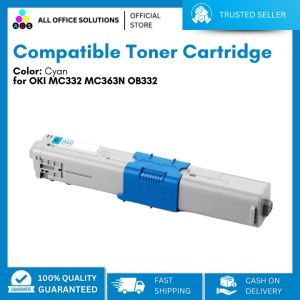
AOS Compatible Toner Cartridge for OKI MC332 MC363N OB332 Black Cyan Yellow Magenta
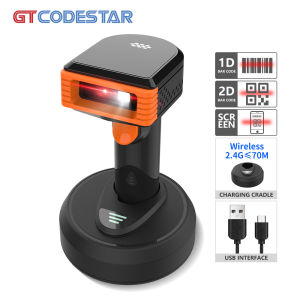
GTCODESTAR GT-3303H Supermarket Handheld Wired Wireless 2.4G 1D 2D Barcode Scanner with Charing Base Laser Price Bar code Qr code Reader Scanners
Brandnew Genuine Ink EP 188 black or 188 cmy
Compatible TN1000 TN-1000 Toner Cartridge for Brother Printers
How to Choose the Right Price Tag & Hangtag Machine for Your Business
Brother BTD60BK / BT5000 Ink Bottles – Guaranteed Original & Authentic
24"*50m High glossy inkjet photo paper for dye inkjet printer
HID Fargo 045500 YMCKO 5 Panel Colored Ribbon: A Comprehensive Guide
Original HP 57A LaserJet Imaging Drum: A Comprehensive Guide

MK4105 DRUM Unit Reset Chip Compatible with Kyocera Taskalfa 1800 1801 2200 2210 2211

Bisofice Film & Slide Scanner: A Comprehensive Guide