WOMIER 135 Keys Side Print Backlit Spider Web 5 Side Dye-Sub PBT Keycap RGB Cherry Profile For Cherry MX Gamer Mechanical Keyboard
WOMIER 135 Keys Side Print Backlit Spider Web 5 Side Dye-Sub PBT Keycap RGB Cherry Profile For Cherry MX Gamer Mechanical Keyboard
Introduction
Mechanical keyboards have gained immense popularity among gamers and professionals alike due to their superior tactile feedback and durability. One such keyboard that has caught the attention of many is the WOMIER 135 Keys Mechanical Keyboard. In this article, we will delve into the details of this remarkable keyboard, focusing on its key features, keycap options, setup process, and how it enhances your gaming experience.
What is a WOMIER 135 Keys Mechanical Keyboard?
The WOMIER 135 Keys Mechanical Keyboard is a high-quality gaming keyboard designed for Cherry MX switches. It features a 135-key layout, making it suitable for both gaming and productivity tasks. The keyboard boasts a robust build, durable keycaps, and customizable RGB lighting.
Key Features of the WOMIER Keyboard
- 135-Key Layout: Offers a wide range of keys, including media controls and function keys.
- Cherry MX Switches: Compatible with Cherry MX switches, ensuring reliable performance.
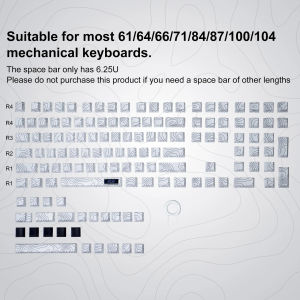
- Backlit Spider Web Keycaps: Provides a unique aesthetic with its spider web pattern and RGB lighting.
- 5 Side Dye-Sub PBT Keycaps: Durable and high-quality keycaps that offer excellent tactile feedback.
- Side Print Cherry Profile Keycaps: Adds to the keyboard's overall appeal with its sleek design.
Choosing the Right Keycaps
Selecting the right keycaps for your WOMIER Mechanical Keyboard is crucial to enhance its appearance and performance. Let's explore two popular options: 5 Side Dye-Sub PBT Keycaps and Side Print Cherry Profile Keycaps.
Understanding 5 Side Dye-Sub PBT Keycaps
5 Side Dye-Sub PBT Keycaps are made from high-quality PBT material, which is known for its durability and resistance to wear and tear. These keycaps are printed on five sides, giving them a professional look and feel. They are also resistant to fading and discoloration, ensuring that your keyboard maintains its appearance over time.
Comparing Side Print Cherry Profile Keycaps
Side Print Cherry Profile Keycaps are another popular option for mechanical keyboards. These keycaps feature a side-printed design that adds a unique touch to your keyboard. They are compatible with Cherry MX switches and provide a comfortable typing experience. While they may not be as durable as 5 Side Dye-Sub PBT Keycaps, they still offer excellent value for money.
Setting Up Your Keyboard
Now that you have chosen the right keycaps for your WOMIER Mechanical Keyboard, let's dive into the setup process. We will cover installing the backlit spider web keycaps and configuring RGB lighting.
Installing the Backlit Spider Web Keycaps
Installing the backlit spider web keycaps is a straightforward process. First, remove the existing keycaps from your keyboard. Then, carefully insert the new keycaps into the appropriate slots. Make sure to align them correctly to avoid any damage. Once installed, connect your keyboard to your computer and enjoy the unique aesthetic of the backlit spider web keycaps.
Configuring RGB Lighting
Customizing the RGB lighting on your WOMIER Mechanical Keyboard adds another layer of personalization to your setup. To configure the RGB lighting, download the software provided by WOMIER. This software allows you to adjust the brightness, color, and effects of the RGB lighting. Experiment with different settings to find the perfect look for your gaming setup.
Enhancing Your Gaming Experience
Now that your WOMIER Mechanical Keyboard is set up, let's explore how it can enhance your gaming experience. We will cover customizing keycap layouts and optimizing keyboard performance.
Customizing Keycap Layouts
Customizing your keycap layout allows you to tailor your keyboard to your specific gaming needs. You can rearrange the keys to create a layout that suits your preferred gaming style. For example, you can move certain keys closer together to improve reaction times or add additional keys for convenience.
Optimizing Keyboard Performance
To get the most out of your WOMIER Mechanical Keyboard, it's essential to optimize its performance. Ensure that your keyboard is properly connected to your computer and that all drivers are up to date. Additionally, consider using software such as AutoHotkey to create custom macros and hotkeys that enhance your gaming experience.
Conclusion
In conclusion, the WOMIER 135 Keys Mechanical Keyboard is a top-notch gaming keyboard that offers a wide range of features and customization options. From its 135-key layout to its backlit spider web keycaps and customizable RGB lighting, this keyboard has everything you need to elevate your gaming experience. By following the tips provided in this article, you can make the most of your WOMIER Mechanical Keyboard and enjoy a superior gaming setup.
Final Thoughts on WOMIER Mechanical Keyboard
The WOMIER 135 Keys Mechanical Keyboard is a must-have for any serious gamer or professional looking for a reliable and customizable keyboard. Its robust build, durable keycaps, and customizable RGB lighting make it a top choice in the market. Don't miss out on the opportunity to enhance your gaming experience with this remarkable keyboard.
Tips for Long-Term Use
To ensure long-term use of your WOMIER Mechanical Keyboard, follow these tips:
- Keep your keyboard clean and free from dust.
- Store your keyboard in a safe place when not in use.
- Regularly update drivers and software to maintain optimal performance.
- Experiment with different keycap layouts and RGB lighting settings to find the perfect setup for your needs.

Womier Factory Store
Review
You May Also Like
Mi 11/Mi 11 PRO/Mi 11 Lite/Mi 11 Ultra Case Xundd Beatle Series Shockproof Case
Super Fast Charge 55W Charger for IQOOZ3 Original Fast Charging Data Cable Flash Charge Set Mobile Phone Charging Head Quick Charge

Quick Release Woven Camera Wrist Strap for Fujifilm Sony Nikon Canon Digital Photography Accessories Camera Hand Strap
Redmi Watch 2 Lite Watch Strap + Full Coverage TPU Screen Protector Case Cover For Xiaomi Mi Watch 2 Lite Replacement Silicone Strap mi watch lite / redmi watch 2 Bracelet Protective Shell
Vivo X300Pro Phone Case Full Cover Protection Anti-Fingerprint Leather Shell Camera Lens Protection Durable Cover SIMW Brand
Sport Strap for Huawei Watch Fit Silicone Band Women Men Waterproof Wristband for Huawei Smartwatch Fit Accessories (Not Compatible for Huawei Watch Fit 2
USB2.0 A Male to PS2s with Mouse and Keyboards Support for Scanning PS2s to USB Adapter Adapter Cable
SHARP Universal TV/LED/LCD Remote Control Replacement GB217WJN1 & RM-L1046
Print Digital 10mm HP-16 Mini Grommet Machine Flower Mold with 100pcs Single Eyelet
Camera Bracket with Enhanced Desk Jaw Clamp Flexible Gooseneck Stand for Webcam Brio 4K C925e C922x C922 C930e C930 C920
Original Pink Pearl Chain Phone Case Full Cover Protection for Apple 15 Huawei Mate60 Honor 50 pro iPhone 14 pro Max 7/8 plus Small Fragrance Style