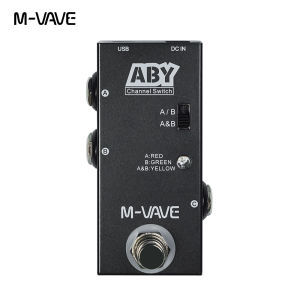
M-VAVE ABY Line Selector: A Comprehensive Guide

M-VAVE ABY Line Selector: A Comprehensive Guide

What is the M-VAVE ABY Line Selector?

The M-VAVE ABY Line Selector is a professional-grade AB switch guitar pedal designed to provide guitarists and bassists with a versatile and reliable channel switching solution. This compact and durable pedal seamlessly integrates into any setup, allowing musicians to effortlessly switch between two separate effect chains or amplifier channels.

Key Features & Benefits

The M-VAVE ABY Line Selector boasts several features that set it apart from other AB switches on the market. Firstly, its True Bypass technology ensures that your tone remains pristine, even when the pedal is not engaged. Additionally, its robust construction guarantees long-lasting performance, making it a valuable addition to any musician's arsenal.

How It Compares to Other AB Switches

Compared to other AB switches, the M-VAVE ABY Line Selector offers superior durability, reliability, and customization options. Its True Bypass technology ensures that your tone remains unaffected by the pedal, while its compact size makes it easy to integrate into any setup. Furthermore, its ability to switch between two channels allows for greater flexibility and creativity in your playing.

How to Use the M-VAVE ABY Line Selector

Using the M-VAVE ABY Line Selector is simple and straightforward. Follow these steps to get started:

Connecting Your Guitar and Pedals

  1. Connect your guitar to the input jack on the M-VAVE ABY Line Selector.
  2. Connect the output jacks to your desired pedals or amplifiers.
  3. Power the pedal using a standard 9V DC adapter (not included).

Switching Between Channels

To switch between channels, simply press the footswitch on the M-VAVE ABY Line Selector. This will toggle between the two channels, allowing you to seamlessly transition between different effect chains or amplifier settings.

Troubleshooting Common Issues

If you experience any issues with the M-VAVE ABY Line Selector, consult the troubleshooting guide provided in the user manual. Common issues include incorrect power supply voltage, faulty cables, or incorrect pedal placement within your setup. By addressing these potential problems, you can ensure optimal performance from your M-VAVE ABY Line Selector.

Why Choose the M-VAVE ABY Line Selector?

The M-VAVE ABY Line Selector offers several compelling reasons to choose it over other AB switches:

True Bypass Technology

True Bypass technology ensures that your tone remains unaffected by the pedal, even when it is not engaged. This guarantees that your guitar or bass sound stays pure and untouched, allowing you to focus on your playing.

Durability & Reliability

The M-VAVE ABY Line Selector is built to last, with a robust construction that can withstand the rigors of live performances and studio sessions. Its durable design ensures that you can rely on it for years to come.

Versatility & Customization

With the ability to switch between two channels, the M-VAVE ABY Line Selector offers unparalleled versatility and customization options. Whether you want to switch between different effect chains or amplifier settings, this pedal has got you covered.

In conclusion, the M-VAVE ABY Line Selector is a must-have accessory for any guitarist or bassist looking to expand their tonal palette and enhance their playing experience. Its True Bypass technology, durability, reliability, and versatility make it a valuable addition to any setup. So why wait? Get your M-VAVE ABY Line Selector today and take your playing to the next level!

Yisunder.sun
Yisunder.sun

Seller ratings 96%

Review

Oops
This video has no reviews.

You May Also Like

[COD] Donglon Brass Shaft Potentiometer For Electric Guitar Bass A250K/B250K/A500K/B500K
00:30

[COD] Donglon Brass Shaft Potentiometer For Electric Guitar Bass A250K/B250K/A500K/B500K

Noise-reduction Electric Guitar Audio Cable Braided Guitar Cable 1/4 Inch Instrument Cable
00:33

Noise-reduction Electric Guitar Audio Cable Braided Guitar Cable 1/4 Inch Instrument Cable

PopuMusic Portable Music Keyboard: A Comprehensive Guide for Children & Adults
01:00

PopuMusic Portable Music Keyboard: A Comprehensive Guide for Children & Adults

Oderous Traditional 6 Hole Bamboo Flute Clarinet Student Musical Instrument Wood AU
00:27

Oderous Traditional 6 Hole Bamboo Flute Clarinet Student Musical Instrument Wood AU

ESC Stainless Steel Keycaps Vinyls Record 3D Keycaps for Mechanical Keyboards Enthusiasts
00:20

ESC Stainless Steel Keycaps Vinyls Record 3D Keycaps for Mechanical Keyboards Enthusiasts

Universal Floor Standing Mic Stand For Musical Instrument Wireless Microphones Heavy Duty Base Quick Folding Detail
00:12

Universal Floor Standing Mic Stand For Musical Instrument Wireless Microphones Heavy Duty Base Quick Folding Detail

Acoustic Guitar Pickup & Banjo Accessories: A Comprehensive Guide
00:29

Acoustic Guitar Pickup & Banjo Accessories: A Comprehensive Guide

Ukulele Bag
00:49

Ukulele Bag

Aspire GA-60 Electric Guitar Amplifier 60 Watts
01:00

Aspire GA-60 Electric Guitar Amplifier 60 Watts

PCBS 2026 Notebook Planner – Elegant Christian Planner with Inspirational Bible Verses
00:21

PCBS 2026 Notebook Planner – Elegant Christian Planner with Inspirational Bible Verses

NANWEI 700W RGB Fog Machine: A Comprehensive Guide\\n\\n Introduction to NANWEI 700W RGB Fog Machine\\n\\nThe NANWEI 700W RGB Fog Machine is a top-of-the-line stage smoke machine designed specifically for DJs and live performances. This powerful fog machine offers a wide range of features and benefits, making it an ideal choice for any event or venue.\\n\\n Key Features & Benefits\\n\\nThe NANWEI 700W RGB Fog Machine boasts several key features and benefits, including:\\n\\n- **High Power Output**: With a powerful 700W output, this fog machine can produce thick, dense fog that fills up any space quickly.\\n\\n- **13 Colorful LED Modes**: Choose from 13 different LED modes to create unique and dynamic effects that match your music and lighting.\\n\\n- **Wireless Remote Control**: Easily control the fog machine from up to 50 meters away using the included wireless remote control.\\n\\n- **Compatibility with Other DJ Equipment**: This fog machine is compatible with a wide range of other DJ equipment, making it easy to integrate into your existing setup.\\n\\n Compatibility with Other DJ Equipment\\n\\nThe NANWEI 700W RGB Fog Machine is designed to work seamlessly with a variety of DJ equipment, including mixers, controllers, and lighting systems. Its compact size and lightweight design make it easy to transport and set up, while its robust construction ensures reliable performance even in the most demanding environments.\\n\\n How to Set Up Your NANWEI 700W RGB Fog Machine\\n\\nSetting up your NANWEI 700W RGB Fog Machine is easy and straightforward. Follow these steps to get started:\\n\\n1. **Unbox Your Fog Machine**: Carefully remove all components from the box, including the fog machine, wireless remote control, and power cord.\\n\\n2. **Connect the Power Cord**: Plug the power cord into the back of the fog machine and then plug it into a power outlet.\\n\\n3. **Fill the Fog Machine**: Fill the fog machine with the appropriate fog fluid according to the manufacturer's instructions.\\n\\n4. **Connect the Wireless Remote Control**: Turn on the fog machine and then turn on the wireless remote control. The two devices will automatically sync within seconds.\\n\\n5. **Configure the LED Modes**: Use the wireless remote control to select your desired LED mode and adjust the settings to your liking.\\n\\n Connecting the Wireless Remote Control Smoke Machine\\n\\nThe wireless remote control included with the NANWEI 700W RGB Fog Machine allows you to control the fog machine from up to 50 meters away. To connect the remote control, simply turn on both the fog machine and the remote control. The two devices will automatically sync within seconds.\\n\\n Configuring the Stage Smoke Machine with LED\\n\\nThe NANWEI 700W RGB Fog Machine features 13 different LED modes that can be easily configured using the wireless remote control. Choose from a variety of effects, including strobe, fade, and chase, to create unique and dynamic lighting effects that match your music and performance.\\n\\n Using NANWEI 700W RGB Fog Machine for DJ Shows\\n\\nThe NANWEI 700W RGB Fog Machine is perfect for any DJ show or live performance. Its powerful output and wide range of LED modes make it easy to create unique and dynamic effects that enhance the overall atmosphere of any event.\\n\\n How to Operate the 700W LED Fog Machine\\n\\nOperating the NANWEI 700W RGB Fog Machine is simple and straightforward. To start producing fog, simply press the \"On\" button on the wireless remote control. To adjust the LED settings, use the buttons on the remote control to select your desired mode and adjust the settings to your liking.\\n\\n Creating Unique Effects with 13 Colorful LED Modes\\n\\nThe NANWEI 700W RGB Fog Machine features 13 different LED modes that can be easily configured using the wireless remote control. Choose from a variety of effects, including strobe, fade, and chase, to create unique and dynamic lighting effects that match your music and performance.\\n\\n Tips for Maintaining Your NANWEI 700W RGB Fog Machine\\n\\nTo ensure long-term reliability and optimal performance, it's important to properly maintain your NANWEI 700W RGB Fog Machine. Here are some tips for cleaning and maintaining your fog machine:\\n\\n- **Clean the Fog Machine Regularly**: Clean the fog machine after each use to remove any debris or residue that may have accumulated during operation.\\n\\n- **Replace the Filter**: Replace the filter regularly to ensure optimal performance and prevent damage to the fog machine.\\n\\n- **Store Properly**: Store the fog machine in a cool, dry place when not in use to prevent damage or degradation.\\n\\n Cleaning and Maintenance\\n\\nTo clean your NANWEI 700W RGB Fog Machine, follow these steps:\\n\\n1. **Turn Off the Fog Machine**: Turn off the fog machine and unplug it from the power outlet.\\n\\n2. **Remove the Filter**: Remove the filter and wash it with soap and water. Allow it to dry completely before reinserting it into the fog machine.\\n\\n3. **Wipe Down the Fog Machine**: Use a soft cloth to wipe down the exterior of the fog machine, removing any debris or residue that may have accumulated during operation.\\n\\n4. **Store Properly**: Store the fog machine in a cool, dry place when not in use to prevent damage or degradation.\\n\\n Troubleshooting Common Issues\\n\\nIf you encounter any issues with your NANWEI 700W RGB Fog Machine, here are some common troubleshooting tips:\\n\\n- **Check the Power Cord**: Ensure that the power cord is securely connected to both the fog machine and the power outlet.\\n\\n- **Check the Filter**: Ensure that the filter is clean and properly installed.\\n\\n- **Contact Customer Support**: If you continue to experience issues, contact NANWEI customer support for assistance.\n}
00:58

NANWEI 700W RGB Fog Machine: A Comprehensive Guide\\n\\n Introduction to NANWEI 700W RGB Fog Machine\\n\\nThe NANWEI 700W RGB Fog Machine is a top-of-the-line stage smoke machine designed specifically for DJs and live performances. This powerful fog machine offers a wide range of features and benefits, making it an ideal choice for any event or venue.\\n\\n Key Features & Benefits\\n\\nThe NANWEI 700W RGB Fog Machine boasts several key features and benefits, including:\\n\\n- **High Power Output**: With a powerful 700W output, this fog machine can produce thick, dense fog that fills up any space quickly.\\n\\n- **13 Colorful LED Modes**: Choose from 13 different LED modes to create unique and dynamic effects that match your music and lighting.\\n\\n- **Wireless Remote Control**: Easily control the fog machine from up to 50 meters away using the included wireless remote control.\\n\\n- **Compatibility with Other DJ Equipment**: This fog machine is compatible with a wide range of other DJ equipment, making it easy to integrate into your existing setup.\\n\\n Compatibility with Other DJ Equipment\\n\\nThe NANWEI 700W RGB Fog Machine is designed to work seamlessly with a variety of DJ equipment, including mixers, controllers, and lighting systems. Its compact size and lightweight design make it easy to transport and set up, while its robust construction ensures reliable performance even in the most demanding environments.\\n\\n How to Set Up Your NANWEI 700W RGB Fog Machine\\n\\nSetting up your NANWEI 700W RGB Fog Machine is easy and straightforward. Follow these steps to get started:\\n\\n1. **Unbox Your Fog Machine**: Carefully remove all components from the box, including the fog machine, wireless remote control, and power cord.\\n\\n2. **Connect the Power Cord**: Plug the power cord into the back of the fog machine and then plug it into a power outlet.\\n\\n3. **Fill the Fog Machine**: Fill the fog machine with the appropriate fog fluid according to the manufacturer's instructions.\\n\\n4. **Connect the Wireless Remote Control**: Turn on the fog machine and then turn on the wireless remote control. The two devices will automatically sync within seconds.\\n\\n5. **Configure the LED Modes**: Use the wireless remote control to select your desired LED mode and adjust the settings to your liking.\\n\\n Connecting the Wireless Remote Control Smoke Machine\\n\\nThe wireless remote control included with the NANWEI 700W RGB Fog Machine allows you to control the fog machine from up to 50 meters away. To connect the remote control, simply turn on both the fog machine and the remote control. The two devices will automatically sync within seconds.\\n\\n Configuring the Stage Smoke Machine with LED\\n\\nThe NANWEI 700W RGB Fog Machine features 13 different LED modes that can be easily configured using the wireless remote control. Choose from a variety of effects, including strobe, fade, and chase, to create unique and dynamic lighting effects that match your music and performance.\\n\\n Using NANWEI 700W RGB Fog Machine for DJ Shows\\n\\nThe NANWEI 700W RGB Fog Machine is perfect for any DJ show or live performance. Its powerful output and wide range of LED modes make it easy to create unique and dynamic effects that enhance the overall atmosphere of any event.\\n\\n How to Operate the 700W LED Fog Machine\\n\\nOperating the NANWEI 700W RGB Fog Machine is simple and straightforward. To start producing fog, simply press the \"On\" button on the wireless remote control. To adjust the LED settings, use the buttons on the remote control to select your desired mode and adjust the settings to your liking.\\n\\n Creating Unique Effects with 13 Colorful LED Modes\\n\\nThe NANWEI 700W RGB Fog Machine features 13 different LED modes that can be easily configured using the wireless remote control. Choose from a variety of effects, including strobe, fade, and chase, to create unique and dynamic lighting effects that match your music and performance.\\n\\n Tips for Maintaining Your NANWEI 700W RGB Fog Machine\\n\\nTo ensure long-term reliability and optimal performance, it's important to properly maintain your NANWEI 700W RGB Fog Machine. Here are some tips for cleaning and maintaining your fog machine:\\n\\n- **Clean the Fog Machine Regularly**: Clean the fog machine after each use to remove any debris or residue that may have accumulated during operation.\\n\\n- **Replace the Filter**: Replace the filter regularly to ensure optimal performance and prevent damage to the fog machine.\\n\\n- **Store Properly**: Store the fog machine in a cool, dry place when not in use to prevent damage or degradation.\\n\\n Cleaning and Maintenance\\n\\nTo clean your NANWEI 700W RGB Fog Machine, follow these steps:\\n\\n1. **Turn Off the Fog Machine**: Turn off the fog machine and unplug it from the power outlet.\\n\\n2. **Remove the Filter**: Remove the filter and wash it with soap and water. Allow it to dry completely before reinserting it into the fog machine.\\n\\n3. **Wipe Down the Fog Machine**: Use a soft cloth to wipe down the exterior of the fog machine, removing any debris or residue that may have accumulated during operation.\\n\\n4. **Store Properly**: Store the fog machine in a cool, dry place when not in use to prevent damage or degradation.\\n\\n Troubleshooting Common Issues\\n\\nIf you encounter any issues with your NANWEI 700W RGB Fog Machine, here are some common troubleshooting tips:\\n\\n- **Check the Power Cord**: Ensure that the power cord is securely connected to both the fog machine and the power outlet.\\n\\n- **Check the Filter**: Ensure that the filter is clean and properly installed.\\n\\n- **Contact Customer Support**: If you continue to experience issues, contact NANWEI customer support for assistance.\n}

Fast Shipping Guitar Tool: A Comprehensive Guide
00:24

Fast Shipping Guitar Tool: A Comprehensive Guide