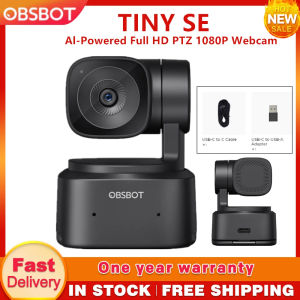
OBSBOT TINY SE 1080P Al-Powered Full HD PTZ Webcam Built-in Microphone Zone Tracking Gesture Control 2.0
OBSBOT TINY SE 1080P Al-Powered Full HD PTZ Webcam Built-in Microphone Zone Tracking Gesture Control 2.0
The OBSBOT TINY SE is a cutting-edge webcam designed specifically for streaming and video conferencing. With its built-in microphone, zone tracking, gesture control, and 1080p resolution, it offers a comprehensive solution for users looking to enhance their online interactions. In this article, we will explore the features, setup process, performance optimization, and advantages of using the OBSBOT TINY SE over other webcams.
What is OBSBOT TINY SE
Key Features
The OBSBOT TINY SE is a 1080p PTZ (Pan-Tilt-Zoom) webcam equipped with a built-in microphone, zone tracking, and gesture control. It allows users to enjoy a seamless and immersive experience while streaming or participating in video conferences.
- Built-in Microphone: This feature eliminates the need for external microphones, making the OBSBOT TINY SE a one-stop solution for capturing both audio and video.
- Zone Tracking: Users can set up specific zones within the camera's field of view, enabling the camera to automatically focus on the desired area.
- Gesture Control: The OBSBOT TINY SE supports gesture control, allowing users to perform actions like zooming or panning by simply waving their hands.
Technical Specifications
- Resolution: 1080p (Full HD)
- Field of View: 75°
- Frame Rate: 30fps
- Audio: Built-in microphone with noise cancellation
- Connectivity: USB 3.0
How to Set Up OBSBOT TINY SE
Setting up the OBSBOT TINY SE is straightforward and can be done in a few simple steps.
Connecting to Your Computer
- Connect the OBSBOT TINY SE to your computer using the included USB 3.0 cable.
- Install the OBSBOT software from the official website.
- Launch the OBSBOT software and follow the on-screen instructions to complete the setup process.
Configuring Settings
Once connected, you can customize various settings to suit your preferences.
- Zoom Level: Adjust the zoom level to capture the desired area within the frame.
- Pan/Tilt: Use the pan/tilt controls to position the camera at the optimal angle.
- Zone Tracking: Set up specific zones within the camera's field of view for automatic focusing.
Maximizing OBSBOT TINY SE Performance
To get the most out of your OBSBOT TINY SE, consider these tips for optimizing its performance.
Using Zone Tracking & Gesture Control
Leverage the zone tracking and gesture control features to streamline your streaming or video conferencing experience.
- Zone Tracking: Define specific zones within the camera's field of view to ensure the camera focuses on the desired area.
- Gesture Control: Utilize gesture control to perform actions like zooming or panning without the need for manual adjustments.
Optimizing Audio Quality with Built-in Microphone
The built-in microphone on the OBSBOT TINY SE provides excellent audio quality, but there are a few things you can do to further enhance its performance.
- Positioning: Place the OBSBOT TINY SE at a comfortable distance from your mouth to avoid distortion or clipping.
- Noise Cancellation: Enable noise cancellation within the OBSBOT software to minimize background noise and improve overall audio clarity.
OBSBOT TINY SE: A Great Choice for Streaming & Video Conferencing
Compared to other webcams on the market, the OBSBOT TINY SE stands out due to its unique combination of features and ease of use.
Comparing OBSBOT TINY SE with Other Webcams
When compared to other webcams, the OBSBOT TINY SE offers several advantages:
- Built-in Microphone: Eliminates the need for external microphones, simplifying the setup process.
- Zone Tracking: Automatically focuses on specific areas within the camera's field of view.
- Gesture Control: Enables users to perform actions like zooming or panning without manual adjustments.
How OBSBOT TINY SE Can Enhance Your Streaming Experience
By leveraging the features of the OBSBOT TINY SE, you can significantly enhance your streaming experience.
- Improved Audio Quality: The built-in microphone ensures clear and crisp audio, creating a more engaging experience for viewers.
- Seamless Camera Control: The zone tracking and gesture control features allow for smooth and intuitive camera movements.
- Professional Look: The 1080p resolution and PTZ capabilities give your streams a polished and professional appearance.

Yisunder.sun
Review

You May Also Like
ANCEL 5.5mm Mini Endoscope Camera: A Comprehensive Guide
GUOAN CCTV Camera P7S 8MP 4K 2.4GHZ Wifi Waterproof HD Dual Lens Dual Screen Outdoor AI Auto Tracking PTZ Camera Night Vision Video Surveillance
Angled Security Camera Bracket Sloped Base For Indoor Dome Cameras Compactly And Durability Plastic Construction
【Shipping From Manila+COD】100% Original Tactical Red Dot Optical Scope Reflex Folding Portable Sight Scope for Outdoor 20mm Mount
V380 Pro 5G 8MP Outdoor Waterproof CCTV Dual Lens Camera waterproof No WIFI Needed Connect to Cellphone auto tracking smart CCTV two-way audio APP Control remote surveillance camera
V380 Waterproof CCTV Camera Outdoor Wireless IP Camera Alarm Security Video Night Vision
IMOU DK1/Cue2 Indoor Security Camera Connect to Cellphone CCTV Wireless Baby Pet Monitor 2-Way Audio
Endura HDMI Video Distributor 5In 10Out 4K Ultra HD with HDMI Remote Switch and Infrared
Rover Systems CCTV WiFi Access Point Endura 2KM Transmission Range 5.8Ghz 150Mbps Wireless Speed 23DBM 2x Fast Ethernet LAN Port 24VDC PoE Powered
Hamrol 12MP HD Three lens Three screen PTZ WiFi Camera Auto Track Outdoor Security Network CCTV
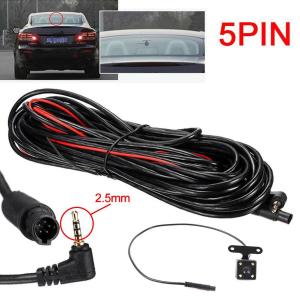
5 Pin HD Car Rear View Camera Reverse 4LED Night Vision Camera Parking Wide For Car Video Angle Camera 170 Accessories Degree P4C9