SG105C 5-port Switch Home Full Gigabit Port Ethernet Network Hub Factory Outlet
SG105C 5-port Switch Home Full Gigabit Port Ethernet Network Hub Factory Outlet
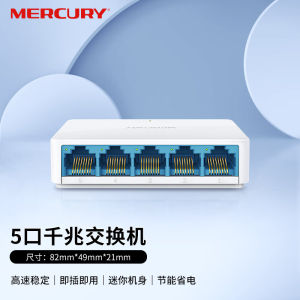
What is the SG105C 5-port Switch?
The SG105C is a highly advanced 5-port Gigabit Ethernet switch designed specifically for home networking needs. As a full gigabit port switch, it ensures fast and reliable data transfer rates, making it an ideal choice for connecting multiple devices within your home network. This factory outlet network equipment is built to withstand everyday use and provide seamless connectivity.
Key Features and Benefits
The SG105C comes packed with several features that make it stand out from other home networking devices. Some of its notable benefits include:
- High-speed connectivity: With its five gigabit ports, the SG105C guarantees fast data transfer rates, ensuring that all connected devices enjoy lightning-fast internet speeds.
- Plug-and-play installation: Setting up the SG105C is a breeze, thanks to its simple plug-and-play design. No complicated configurations or technical expertise is required.
- Compact and durable design: The switch has a sleek, compact design that makes it easy to fit in tight spaces, such as behind your TV or beneath your desk. Additionally, its robust build ensures that it can withstand everyday wear and tear.
How It Differs from Other Home Networking Devices
While there are many home networking devices available on the market, the SG105C stands out due to its superior performance and ease of use. Unlike other switches that offer limited port speeds, the SG105C provides full gigabit connectivity, ensuring that all connected devices can take advantage of fast data transfer rates. Furthermore, its plug-and-play design and compact form factor make it a top choice for homeowners who want a hassle-free networking solution.
Setting Up Your SG105C 5-port Switch
Setting up the SG105C is straightforward and requires minimal effort. Follow these steps to get started:
Step-by-Step Installation Process
- Unpack the SG105C switch and locate the power adapter.
- Connect the power adapter to the switch and plug it into a power outlet.
- Connect an Ethernet cable from your modem or router to one of the switch's ports.
- Connect Ethernet cables from the remaining ports to your desired devices, such as computers, printers, or smart TVs.
Configuring Your Network
Once your SG105C is connected, there's no need to configure your network manually. The switch automatically detects and assigns IP addresses to each device, ensuring seamless connectivity.
Connecting Devices
To connect a device to the SG105C, simply plug an Ethernet cable into one of the available ports. The switch will automatically detect the device and establish a connection. Repeat this process for each device you wish to connect.
Maximizing Performance & Troubleshooting
To get the most out of your SG105C switch, follow these tips for optimal performance and troubleshooting:
Tips for Optimal Performance
- Keep the switch in a cool, dry area to prevent overheating.
- Ensure that all cables are securely connected to avoid loose connections.
- Regularly update firmware to maintain the switch's performance.
Common Issues & Solutions
- Slow internet speeds: Check that all cables are securely connected and that there are no physical obstructions blocking the signal path.
- Device not connecting: Verify that the device is powered on and that the Ethernet cable is properly connected to both the device and the switch.
- Firmware issues: Update the firmware to the latest version to resolve any potential compatibility problems.
Contacting Support
If you encounter any issues with your SG105C switch, don't hesitate to reach out to our dedicated support team. They are available to assist you with any questions or concerns you may have.

F S Shenzhen Huaqiang North Electronics City
Review

You May Also Like

Functional Acrylic Bead Phone Chain With Vibrant Colors Perfect For Individualized Mobile Decoration And Daily Use
for MacBook Pro 13/15/16 Inch Microfiber Dustproof Laptop Screen Cleaning Cloth Protective Notebook Palm Keyboard Blanket Cover

Panda Face round Face Suitable Phone Case for iPhone 13 pro 17 pro Max Cartoon Magnetic Absorption Full Cover Anti-Fall Protection
Travel Pouch Box Shockproof Water Resistant For Retroid Pocket Flip 2 Gaming Console Stylish EVA Organizers Carrying Bag
1pc For Makita 18V&40V With USB With Type-C Battery Holder For Makita Battery BL1840 BL1850 BL1860 Charger Adapter Charging

4Pcs Replacement Nibs for Apple Second Generation/First Generation Nibs Accessories for Apple Pencil 2nd/1st Generation Pencil Tips

Universal Adhesive Ring Holder for Apple Android Phones Shockproof Lazy Desk Stand Support Bracket Clip Pull Ring Buckle
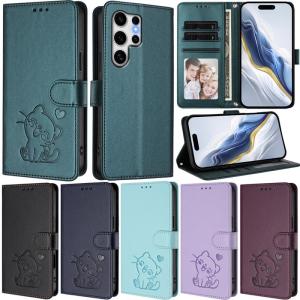
Luxury Casing For Samsung Galaxy S25 Ultra S24 FE S24 Ultra S25 FE S23 Ultra S25 Edge S22 Ultra S24+ S23+ S22+ Heart Cat Pattern Wallet Leather Card Slot Flip Skin Stand Cover

Fantech ACGP01 Smart Gaming Grip Freely Adjustable with Anti Slip Grip

LUMISPARK T605 Graphic Tablet: A Comprehensive Guide

ACB KING 32G M8 4K Wireless Gaming Controller 2.4G Retro Handheld Game Controller