Camera Control Button Protector for iPhone 16 Pro Max & 16 Plus: Soft Silicon Side Button Anti-scratch Sticker
Camera Control Button Protector for iPhone 16 Pro Max & 16 Plus: Soft Silicon Side Button Anti-scratch Sticker
Introduction to Camera Control Button Protectors
In today's world, our smartphones have become an integral part of our daily lives. They hold valuable memories, important data, and serve as a communication tool. As such, it is essential to protect these devices from damage. One often overlooked aspect of smartphone protection is the camera control buttons. These buttons are crucial for taking photos and videos, and they are also prone to scratches and wear and tear. To address this issue, we introduce the Camera Control Button Protector for iPhone 16 Pro Max & 16 Plus, a soft silicon side button anti-scratch sticker that provides comprehensive protection for your device.
Why Choose a Soft Silicon Protector?
Soft silicon is an ideal material for protecting your iPhone's camera control buttons because it is flexible, durable, and easy to install. This material conforms to the shape of the buttons, providing a snug fit that prevents dust, dirt, and debris from entering the gaps. Additionally, the soft texture of the silicon ensures that the buttons remain responsive, allowing you to take photos and videos with ease.
Benefits of Anti-scratch Stickers
Anti-scratch stickers offer several benefits for your iPhone's camera control buttons. Firstly, they provide a barrier against scratches and scuffs, which can occur from everyday use or accidental drops. Secondly, they help maintain the aesthetic appeal of your device by preventing unsightly marks and blemishes. Lastly, they add an extra layer of protection against water and moisture, which can cause corrosion and damage to the buttons over time.
Key Features of iPhone 16 Pro Max & 16 Plus Case
The Camera Control Button Protector for iPhone 16 Pro Max & 16 Plus is designed specifically for these models, ensuring a perfect fit and optimal protection. Here are some of its key features:
-
Side Button Protection: In addition to the camera control buttons, this protector also covers the side buttons, including the power button and volume controls. This added protection ensures that all critical buttons on your iPhone remain safe from damage.
-
Camera Control Button Protection: The primary focus of this protector is to safeguard the camera control buttons, which are essential for capturing moments and memories. By using a soft silicon material, the protector maintains the responsiveness of the buttons while providing robust protection against scratches and wear.
-
Soft Silicon Material: The soft silicon material used in this protector offers several advantages. It is flexible, conforming to the shape of the buttons and providing a snug fit. It is also durable, resisting wear and tear over time. Furthermore, the soft texture ensures that the buttons remain responsive, allowing you to take photos and videos with ease.
How to Install the Camera Control Button Protector
Installing the Camera Control Button Protector is a simple process that can be completed in just a few minutes. Follow these steps to ensure proper installation:
- Clean the surface of the camera control buttons and side buttons with a microfiber cloth to remove any dirt or debris.
- Peel off the protective film from the back of the protector.
- Align the protector with the camera control buttons and gently press it onto the surface.
- Repeat the process for the side buttons.
- Once installed, inspect the protector to ensure it is properly aligned and secure.
Tips for Proper Placement
To ensure the best results, here are some tips for placing the Camera Control Button Protector:
- Make sure the surface of the buttons is clean and free of dirt before installing the protector.
- Take your time when aligning the protector with the buttons to ensure a precise fit.
- Press firmly but gently to avoid damaging the buttons or the protector.
- Inspect the protector after installation to ensure it is properly aligned and secure.
Maintaining Your iPhone 16 Pro Max & 16 Plus Case
To keep your Camera Control Button Protector in top condition, it is essential to follow proper cleaning and care instructions. Here are some tips for maintaining your iPhone 16 Pro Max & 16 Plus case:
- Regularly clean the surface of the protector with a microfiber cloth to remove any dirt or debris.
- Avoid using harsh chemicals or abrasive materials, as they can damage the soft silicon material.
- If the protector becomes loose or damaged, replace it immediately to ensure continued protection for your iPhone.
Troubleshooting Common Issues
If you encounter any issues with your Camera Control Button Protector, here are some common solutions:
- If the protector is not properly aligned, carefully remove it and re-install it, following the installation guide.
- If the protector is damaged or worn out, replace it with a new one to ensure continued protection for your iPhone.
- If the buttons become unresponsive, check to ensure the protector is not blocking them. If necessary, adjust the placement of the protector or replace it with a new one.

Best 3C Accessories Store
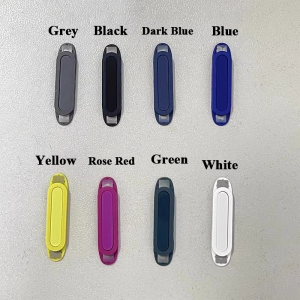
Review

You May Also Like
LCD Air Conditioner Remote Control Universal Replacement for DB93-14643 DB93-1463T DB93-1463S DB93-15882Q LCD Remote

Smart Mirror Flip Case For VIVO Y3 Y5S Y12 & More

Vivo X300 pro Silicone Phone Case with Wrist Strap Crossbody Stand Ultra Lightweight Hanging Rope Horse Pattern Mobile Phone Cover
Tri-Town 4Pcs 9D Full Tempered Glass Screen Protectors
Jelly Back Covers & Rugged Cases for Tecno, Infinix, & OPPO Phones

🇵🇭 Stock&COD GOOJODOQ Rechargeable Keyboard Bluetooth 5.0 & 2.4G Wireless Keyboard and Mouse Combo Mini Multimedia Keyboard Mouse Set For Laptop PC TV iPad Macbook Android
Magnetic Leather Wallet Phone Cases for OPPO, Realme, and Vivo Models
IBYWIND Screen Protector For Xiaomi Poco F5 Pro: A Comprehensive Guide

Sewing Machine Oil Dispenser: 120ml Plastic Screw On Cap Extended Spout Oil Bottle For DIY Craft
Cute Candy Colors Phone Chain: A Stylish & Practical Solution
Coolkiller Transparent Office Calculator Multifunctional Digital Keyboard USB Mechanical Keyboard Business Office Supplies