ORICO PCIe3.0 NVMe SSD Premium NAND Flash Up To 3600MB/s Read Speeds Capacity Upgrade Worry-Free Storage
ORICO PCIe3.0 NVMe SSD Premium NAND Flash Up To 3600MB/s Read Speeds Capacity Upgrade Worry-Free Storage
Introduction to ORICO PCIe3.0 NVMe SSD
What is ORICO PCIe3.0 NVMe SSD?
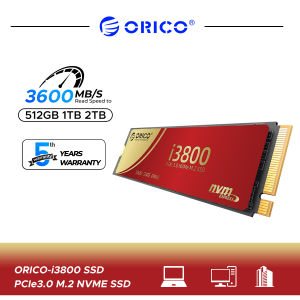
The ORICO PCIe3.0 NVMe SSD is a high-performance solid-state drive designed for users who demand exceptional storage performance. This drive utilizes the latest PCIe 3.0 interface and NVMe protocol to deliver outstanding read speeds up to 3600MB/s. It features premium NAND flash storage, making it an ideal choice for upgrading your system's capacity and improving overall performance.
Why Choose ORICO PCIe3.0 NVMe SSD?
When it comes to choosing a reliable and high-performance SSD, the ORICO PCIe3.0 NVMe SSD stands out from the competition due to its fast read speeds, worry-free capacity upgrade, and premium NAND flash storage. These features make it an excellent choice for users looking to enhance their computer's performance and storage capabilities.
Key Features of ORICO PCIe3.0 NVMe SSD
High Performance SSD & Premium NAND Flash Storage
The ORICO PCIe3.0 NVMe SSD offers unmatched performance thanks to its PCIe 3.0 interface and NVMe protocol. Additionally, the drive features premium NAND flash storage, providing users with a reliable and long-lasting storage solution.
Up to 3600MB/s Read Speed
One of the standout features of the ORICO PCIe3.0 NVMe SSD is its impressive read speed, which can reach up to 3600MB/s. This allows users to quickly access and transfer files, enhancing their overall computing experience.
Worry-Free Capacity Upgrade
With the ORICO PCIe3.0 NVMe SSD, users can easily upgrade their system's storage capacity without any worries. This drive offers a simple installation process and is compatible with various systems, making it a convenient choice for those looking to expand their storage space.
How to Install ORICO PCIe3.0 NVMe SSD
Preparing Your System for Installation
Before installing the ORICO PCIe3.0 NVMe SSD, ensure that your system meets the necessary requirements. This includes having a compatible motherboard with an available M.2 slot and a sufficient power supply.
Installing ORICO PCIe3.0 NVMe SSD
To install the ORICO PCIe3.0 NVMe SSD, simply slide the drive into the M.2 slot on your motherboard and secure it using the provided screw. Make sure to align the drive correctly before securing it in place.
Configuring ORICO PCIe3.0 NVMe SSD
After installing the ORICO PCIe3.0 NVMe SSD, you'll need to configure it using your operating system's built-in tools. This may involve initializing the drive, creating partitions, and formatting it with your preferred file system.
Conclusion
The ORICO PCIe3.0 NVMe SSD is the best choice for users seeking a high-performance storage solution. With its fast read speeds, premium NAND flash storage, and easy-to-install design, this drive offers an excellent balance of performance and convenience. Whether you're a professional or a casual user, the ORICO PCIe3.0 NVMe SSD is an ideal choice for upgrading your system's storage capacity and enhancing your overall computing experience.

ORICO HOME
Review

You May Also Like

Hard Shell Portable EVA Protective Case Shockproof Storage Case Large Capacity Suitable for RG557 RG556 Gaming Console

Replacement 15.6" FHD LCD Screen For Huawei Matebook D15 Boh-WAQ9R Boh-WAQ9L BOB-WAH9 BOB-WAI9 BOD-WDI9 Woh-WAQ9L Bob-WAI9Q WXX9 Laptop LCD FHD Screen LED Display
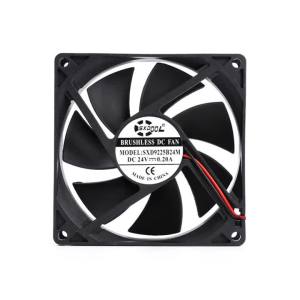
2PCS 24V Dual Ball 92mm cooling fan 90mm 9cm 92x92x25mm 0.20A 3000RPM PC Computer Cooling Fan DC Brushless cooling fan

Western Digital 24TB WD Purple Pro 7200 rpm SATA III 3.5" Internal Surveillance Hard Drive

Expose UPS Power Supply Mini 12400mAh 36W Mini UPS Uninterrupted For WiFi Router Modem Powerbank Security Camera battery

Cooling Fan Clip Fan 6000mAh Rechargable Waist Fan ABS Texture Belt Fan 100 Adjustable Speed for Indoor and Outdoor Use

Additional Bronze 3D Printer Nozzle Tall Warm Conductivity For Ender5 Extreme Decreased Wear And Tear
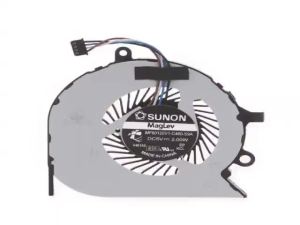
Laptop CPU Cooling Fan for Dell Latitude E7270 E7470 DC5V 4-pin Laptop CPU Cooler Radiator Computer Accessories

DC-DC Step Down Power Supply Module 4.5-20V to 1.8V/2.5V/3.3V/5V/9V/12V 2A Voltage Adjustable Buck Converter Voltage Regulators
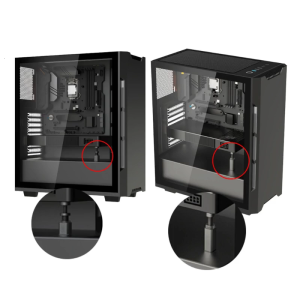
Vertical Mounting GPU Holder Bracket Telescopic Rotary Screw Stand for Graphics Easy Installation Magnetic Base

SAMSUNG SSD 870 EVO 500GB 1TB Internal Hard disk Solid State Drive SATA 2.5 Laptop Desktop 5Years Warranty