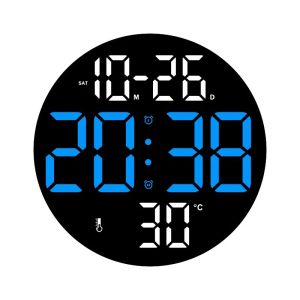
LED Wall Clock Digital Alarm Clock with Remote Control: A Comprehensive Guide
LED Wall Clock Digital Alarm Clock with Remote Control: A Comprehensive Guide
Overview of the LED Wall Clock Digital Alarm Clock
Introducing our latest LED Wall Clock Digital Alarm Clock with Remote Control, a perfect addition to any home, bedroom, or living room. This stylish and functional timepiece features adjustable brightness, remote control operation, and date week display, making it an ideal choice for any setting.
Product Components
Our LED Wall Clock Digital Alarm Clock comes with the following components:
- Wall clock *1
- Data cable *1
- Remote control *1
- Bracket *1
- Manual *1
Key Features
Some of the key features of this LED Wall Clock Digital Alarm Clock include:
- Adjustable brightness for comfortable viewing in any lighting condition
- Remote control operation for easy time and date adjustments
- Date week display for added convenience
- Multiple alarm settings for improved organization
- Easy installation and setup
Why Choose This LED Wall Clock?
There are several reasons why you should consider purchasing our LED Wall Clock Digital Alarm Clock:
- Stylish design that complements any decor
- User-friendly interface and remote control operation
- High-quality materials and construction
- Versatile use in home, bedroom, or living room
- Affordable price point
How to Set Up Your New LED Wall Clock
Setting up your new LED Wall Clock Digital Alarm Clock is simple and straightforward. Follow these steps:
Installing the Bracket
- Attach the bracket to the wall using the screws provided in the manual.
- Position the bracket at the desired height and angle.
Connecting the Data Cable
- Insert the data cable into the clock's port.
- Plug the other end of the data cable into a power source.
Pairing the Remote Control
- Press and hold the "SET" button on the clock until the display blinks.
- Press and hold the "SET" button on the remote control until the display on the clock shows "R".
- Release both buttons.
How to Use the Adjustable Brightness Feature
Adjusting the brightness of your LED Wall Clock Digital Alarm Clock is simple. Follow these steps:
Setting the Desired Brightness Level
- Press the "BRIGHTNESS" button on the remote control.
- Use the arrow keys to adjust the brightness level.
- Press the "OK" button to confirm the setting.
Benefits of Adjustable Brightness
Adjustable brightness offers several benefits, including:
- Comfortable viewing in any lighting condition
- Reduced eye strain
- Energy savings
Maximizing Your Experience with the Remote Control
The remote control offers several features and tips to maximize your experience with the LED Wall Clock Digital Alarm Clock:
Customizing Time & Date Display
Customize the time and date display using the remote control. Follow these steps:
- Press the "SET" button on the remote control.
- Use the arrow keys to navigate through the settings.
- Press the "OK" button to confirm changes.
Setting Multiple Alarms
Set multiple alarms to improve organization and productivity. Follow these steps:
- Press the "ALARM" button on the remote control.
- Use the arrow keys to navigate through the alarms.
- Press the "OK" button to confirm changes.
Additional Features & Tips
Additional features and tips include:
- Customize the clock's display with the remote control
- Set multiple alarms for improved organization
- Adjust the brightness level for comfortable viewing
Conclusion
Our LED Wall Clock Digital Alarm Clock with Remote Control is a stylish and functional addition to any home, bedroom, or living room. With adjustable brightness, remote control operation, and multiple alarm settings, this timepiece offers a range of features to improve your daily routine. Follow the setup instructions and maximize your experience with the remote control to enjoy all the benefits of this high-quality LED Wall Clock Digital Alarm Clock.

TELEHILL
You May Also Like

Anti Slip Kitchen Rubber Matting Industrial Grade For Heavy Duty Restaurant Usage Safety & Security
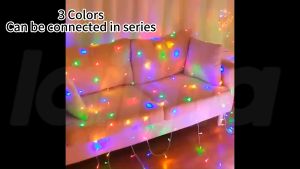
LAIMA 220V LED String Light Strip: A Comprehensive Guide

Blessed Wooden Rosary – Pope Leo | Gentle Rose Scent | Holy Gift

Christmas Faceless Doll Gnome Ornaments LED Light Plush Knitting Crafts Tree Pendant Christmas Decorations for Home Kids Gift

50/100Pcs Mini Curtain Hook Clip Multifunctional Metal Curtain Clips Photo Picture Hanging Clamps Clothesline Laundry Peg Hanger Hooks Art Craft Display Hanger Hooks Window Curtain Accessories
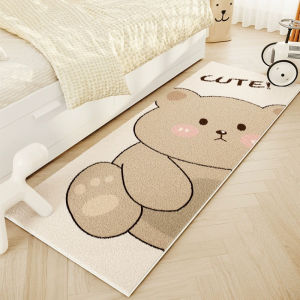
Simple Modern Bedroom Carpet: Soft, Comfortable & Not Easy to Shed
E14 E27 LED Corn Bulb 20w 30w 20w 30w 360 beam Lampada Aluminum+pc 110v 220v 2835smd Cool Warm Light Bulbs Home Appliance Decor Bedroom Livingroom Super Long Lifespan Night

Igood Home Use Christmas Tree 2025 New Model 18m 21m Eco-friendly Glowing Dual-color Leaf Encrypted Simulation Festival Decoration

Mansheng Velvet Bedside Pillow Sofa Long Cushion Double Soft Cover Combination Backrest Removable And Washable Home Decor

B1T1 2025 Christmas Tree Full Shape PVC w/Metal Stand High-Quality Green Pine Snow X-Mas Tree For Decoration

Giant Rose Flowers & Artificial Peonies: Creative Gifts for Weddings, Anniversaries & Valentine's Day