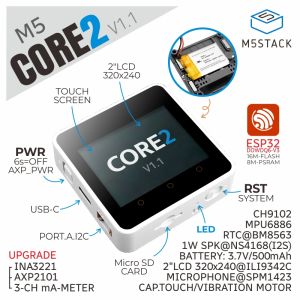
M5Stack Official Core2 ESP32 IoT Development Kit V1.1
M5Stack Official Core2 ESP32 IoT Development Kit V1.1
The M5Stack V1.1 Kit is a powerful and versatile development kit designed specifically for electronics enthusiasts who want to explore the world of Internet of Things (IoT) projects. This comprehensive guide will help you understand the key features of the M5Stack Core2 ESP32 Development Kit, set up your development environment, and explore various IoT applications.
What is the M5Stack V1.1 Kit?
The M5Stack V1.1 Kit is an advanced development board based on the ESP32 microcontroller, offering a wide range of functionalities for IoT projects. It includes essential components like sensors, actuators, and communication modules, making it easy for users to build innovative solutions.
Key Features of the M5Stack Core2 ESP32 Development Kit
- ESP32 Microcontroller: The M5Stack Core2 ESP32 Development Kit utilizes the powerful ESP32 microcontroller, which supports Wi-Fi and Bluetooth connectivity.
- Sensors & Actuators: The kit includes various sensors and actuators, allowing users to easily integrate environmental monitoring, motion detection, and more into their projects.
- Communication Modules: With built-in Wi-Fi and Bluetooth capabilities, the M5Stack V1.1 Kit enables seamless communication between devices and cloud platforms.
How the M5Stack V1.1 Kit Empowers Electronics Enthusiasts
The M5Stack V1.1 Kit offers a user-friendly platform for electronics enthusiasts to explore IoT development. Its modular design and comprehensive documentation make it easy for beginners to get started, while its advanced features cater to experienced developers.
Setting Up Your M5Stack V1.1 Kit
To start developing IoT projects with the M5Stack V1.1 Kit, you'll need to connect the M5Stack Core2 ESP32 Development Board and install necessary software and libraries.
Connecting the M5Stack Core2 ESP32 Development Board
- Connect the M5Stack Core2 ESP32 Development Board to your computer using a USB cable.
- Ensure that the board is powered on and recognized by your computer.
Installing Necessary Software & Libraries
- Install the Arduino IDE on your computer.
- Add the M5Stack library to your Arduino IDE by following the instructions provided in the M5Stack documentation.
Exploring IoT Projects with the M5Stack V1.1 Kit
With your M5Stack V1.1 Kit set up, you're ready to dive into IoT project development. Let's explore some examples to get you started.
Building Your First IoT Project
- Create a new sketch in the Arduino IDE.
- Include the M5Stack library at the top of your code.
- Initialize the M5Stack Core2 ESP32 Development Board and set up any necessary sensors or actuators.
- Write the main loop to read sensor data, perform calculations, and send data to a cloud platform.
Advanced IoT Applications & Examples
Once you're comfortable with basic IoT project development, you can explore advanced applications such as:
- Smart Home Automation: Control lights, thermostats, and other home appliances using voice commands or mobile apps.
- Environmental Monitoring: Monitor temperature, humidity, air quality, and other environmental factors in real-time.
- Asset Tracking: Track the location and status of valuable assets using GPS and wireless communication.
Conclusion & Future Prospects
The M5Stack V1.1 Kit has revolutionized IoT development by providing a powerful, versatile, and user-friendly platform for electronics enthusiasts. With its extensive features and support resources, the M5Stack V1.1 Kit is poised to continue driving innovation in the world of IoT.
M5Stack V1.1 Kit's Impact on IoT Development
The M5Stack V1.1 Kit has democratized IoT development by making it accessible to a wider audience, enabling new applications and solutions to emerge.
Where to Find More Resources & Support
For more information and support, visit the M5Stack website and join the M5Stack community forums to connect with fellow enthusiasts and share your experiences.

Yisunder.sun
Review

You May Also Like
8V-32V to 5V/9V/12V PD 30W Power Supply Power Module USB C Output Power Adapter Converter for Car Automobiles
AntiStatic Probes Spring Needle Cable for Sop8 Wson Chip Programming with Various Pitches Option
GEEKOM Intel Core-i9 Ai Mini-PC 32GB RAM 512GB/1TB/2TB NVMe SSD Gigabit WiFi-6/6E Windows 11
14 Inch Laptop LCD Screen N140HCG-EQ1 B140HAN06.8 NV140FHM-N66 Display Matrix Panel Replacement 1920x1080 eDP 30 Pins Non-Touch
75mmx30mm CPU Cooling Fan 12V 2pin Silent Cooling Fan CPU Cooler Chassis Radiator for Desktop Computer 2700RPM Fan
FUJIAS3 Computer Desktop Aluminum Switch Button Desktop Host External Power Supply Power Button External Extension
for RTX4080 and RTX4090 Series 8Pin Female to PCIE 16-Pin Straight/Elbow Head Cable with Combs Streamlined Cable
New G10 Wireless Earphones Live Broadcast Sound Card All-in-one Machine Neck Hanging Open Indoor Households
RP2350 One High Speed Two Core ARM RISC V Development Board with 150MHz Clock 4MB Flash PCB Integration
COMPUTER SET 1 DELL SFF I5-3RD GEN 8GB 256GB SSD

Laptop Case Laptop Sleeve with Handle Multifunctional Computer Carrying BagLaptop Sleeve Bag Computer Bag Cover Gifts