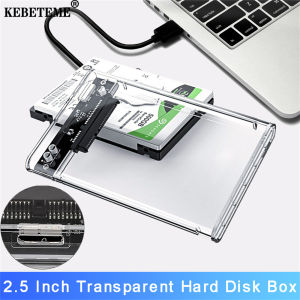
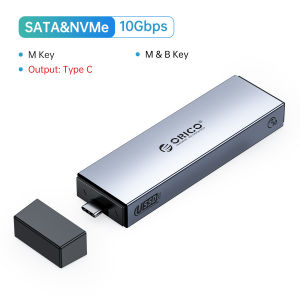
ORICO M2 NVMe SSD Case With Retractable Interface Type C USB3.1 UASP M.2 USB NVME Enclosure Aluminum Hard Drive Disk
ORICO M2 NVMe SSD Case With Retractable Interface Type C USB3.1 UASP M.2 USB NVME Enclosure Aluminum Hard Drive Disk
What is the ORICO M2 NVMe SSD Case?
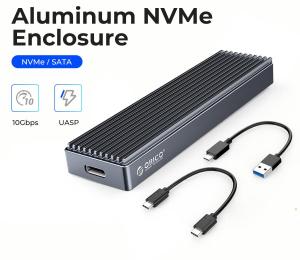
The ORICO M2 NVMe SSD Case is a compact and stylish external enclosure designed to transform your M.2 NVMe SSD into a portable storage solution. It features a retractable USB3.1 interface, providing a sleek and secure connection to your computer or laptop. The case is made of aluminum, ensuring durability and a cool look.
Key Features & Benefits
- Retractable USB3.1 Interface: Easily connect your NVMe SSD to any computer or laptop with a USB Type-C port, while keeping the cable safely stored when not in use.
- Compact NVME SSD Holder: The case is designed to accommodate M.2 NVMe SSDs, offering a slim profile that doesn't take up much space on your desk or in your bag.
- UASP M.2 Enclosure: Supports UASP (USB Attached SCSI Protocol), which enables faster data transfer rates compared to traditional USB mass storage protocols.
- Aluminum Hard Drive Disk: The aluminum construction provides excellent heat dissipation, ensuring your NVMe SSD stays cool even during intense data transfers.
Compatibility & Support
The ORICO M2 NVMe SSD Case is compatible with most M.2 NVMe SSDs and works with Windows, macOS, and Linux operating systems. It supports UASP protocol, making it ideal for users who require fast data transfer rates and reliable performance.
How to Use the ORICO M2 NVMe SSD Case
Using the ORICO M2 NVMe SSD Case is simple and straightforward. Follow these steps to get started:
- Connect your M.2 NVMe SSD to the ORICO M2 NVMe SSD Case by inserting it into the designated slot.
- Extend the retractable USB3.1 interface and connect it to your computer or laptop's USB Type-C port.
- Your NVMe SSD will now be recognized by your computer, and you can start using it as an external storage device.
Troubleshooting Common Issues
If you encounter any issues while using the ORICO M2 NVMe SSD Case, try the following troubleshooting steps:
- Issue: NVMe SSD not recognized by computer.
- Solution: Make sure the NVMe SSD is properly connected to the case and the USB3.1 interface is securely connected to your computer's USB Type-C port.
- Issue: Slow data transfer rates.
- Solution: Ensure that UASP protocol is enabled on your computer. You can check this in your operating system's settings or device manager.
Why Choose ORICO M2 NVMe SSD Case?
There are several reasons why the ORICO M2 NVMe SSD Case is an excellent choice for users who want to make the most of their M.2 NVMe SSDs:
Performance & Reliability
The ORICO M2 NVMe SSD Case supports UASP protocol, providing faster data transfer rates compared to traditional USB mass storage protocols. This makes it ideal for users who require reliable performance and fast data transfers.
Durability & Design
The aluminum construction of the ORICO M2 NVMe SSD Case provides excellent heat dissipation, ensuring your NVMe SSD stays cool even during intense data transfers. Additionally, the retractable USB3.1 interface keeps the cable safely stored when not in use, reducing the risk of damage or loss.
Conclusion
The ORICO M2 NVMe SSD Case is a high-quality, compact, and stylish external enclosure that transforms your M.2 NVMe SSD into a portable storage solution. Its retractable USB3.1 interface, UASP support, and aluminum construction make it an excellent choice for users who require reliable performance and fast data transfers. If you're looking for a durable and reliable way to access your NVMe SSD, the ORICO M2 NVMe SSD Case is definitely worth considering.

ORICO HOME
Review

You May Also Like
ORICO Dual Protocol M.2 SSD Case: A High-Speed Storage Solution

【Car Music USB Flash Drive】High Quality Popular Songs USB Flash Drive Pendrive Song Music Mp3 Stick 车载音乐U盘
Readystock+FREE Shipping+COD Vivo Class 10 Micro SD Card 16GB 128GB 256GB TF Flash Memory Card Video Card
general Silicone protections Sleeve for USB Drives with Hanging Rope Water & Dusts Resistant Flexible USB Stick Case
Ministar 2.5 USB 3.0 to SATA SSD HDD Hard Drive Disk External Case Enclosure
![[COD] KOQZM KITCHEN 64MB usb 2.0 flash memory stick thumb drive pc laptop storage](https://img.lazcdn.com/g/p/7ff6358c167b7ecb8a58b05e9f0f22c0.jpg_300x300q80.jpg)
[COD] KOQZM KITCHEN 64MB usb 2.0 flash memory stick thumb drive pc laptop storage
eSATA to SerialATA Adapter 7P Female eSATA to Male Fast Speed Data Transfer

Seagate 1TB/2TB External Hard Drive For PC Laptop Windows Portable USB 3.0 External
Advanced USB3.2CFexpress Type B Memory Reader CFexpressAdapter For Seamlessly Use Across Multiple Devices
2.5 Inch External Hard Drive Enclosure USB 3.0 Tool-Free Clear Hard Disk Case for 2.5 inch 7mm 9.5mm SATA HDD SSD
SFF 8087 to Right Angle MiniSAS 8643 Internal Cable for Hard Drive and Server Connection with Coaxials Interfaces