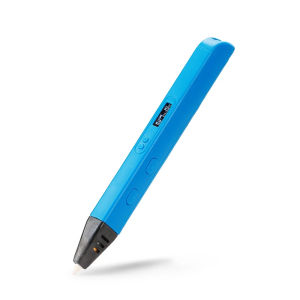
RP800A 3D Professional Printing 3D Pen With OLED Display Generation 3D Drawing Pen for Doodling Art Craft Making and Education
RP800A 3D Professional Printing 3D Pen With OLED Display Generation 3D Drawing Pen for Doodling Art Craft Making and Education
Introduction to the RP800A 3D Professional Printing Pen
The RP800A 3D Professional Printing Pen is a cutting-edge device designed for both professional artists and beginners alike. This versatile tool allows users to create intricate designs and models using a variety of filaments, including PLA, ABS, and more. In this article, we will explore the features, benefits, and applications of the RP800A 3D Pen, as well as how it can be used in education and creative projects.
Overview of the RP800A 3D Pen
The RP800A 3D Professional Printing Pen is equipped with an OLED display, allowing users to easily adjust settings such as temperature, speed, and filament type. The pen's ergonomic design makes it comfortable to hold and use for extended periods, while its lightweight construction ensures portability.
Key Features & Benefits
- OLED display for easy adjustment of settings
- Compatible with various filaments, including PLA and ABS
- Ergonomic design for comfortable use
- Lightweight and portable
- Ideal for both beginners and professionals
How to Use the RP800A 3D Pen for Doodling Art Craft
Using the RP800A 3D Pen is simple and straightforward, making it perfect for both beginners and experienced artists. Here are some tips for getting started:
Setting Up Your Workspace
Before beginning your project, ensure you have a clean, flat surface to work on. Place your RP800A 3D Pen on a heat-resistant mat or tray to prevent damage to your workspace. Load your chosen filament into the pen, and adjust the temperature and speed settings according to the type of filament you are using.
Creating Basic Shapes & Designs
Once your workspace is set up, it's time to start creating! Begin by practicing basic shapes and designs, such as lines, circles, and squares. As you become more comfortable with the pen, you can move on to more complex designs, such as flowers, animals, or even 3D models.
Tips for Advanced Users
For advanced users, here are some tips to help take your RP800A 3D Pen skills to the next level:
- Experiment with different filaments to create unique textures and effects
- Try layering different colors to add depth and dimension to your designs
- Practice your hand-eye coordination by creating intricate designs and models
Using the RP800A 3D Pen in Education
The RP800A 3D Pen is not only a fun and creative tool for artists, but it can also be used in educational settings to enhance learning outcomes. Here are some ways to incorporate 3D pens into classroom activities:
Incorporating 3D Pens in Classroom Activities
- Have students create 3D models of historical landmarks or famous works of art
- Use 3D pens to teach geometry concepts, such as angles and shapes
- Encourage students to design and build their own 3D models, fostering creativity and problem-solving skills
Enhancing Learning Outcomes with 3D Pens
Using 3D pens in education can help students develop a range of skills, including spatial awareness, fine motor control, and critical thinking. By incorporating 3D pens into classroom activities, teachers can create engaging and interactive learning experiences that cater to different learning styles.
Exploring OLED Display 3D Pens
The RP800A 3D Pen features an OLED display, which offers several advantages over traditional LCD displays:
Understanding OLED Displays in 3D Pens
OLED displays offer superior contrast ratios, wider viewing angles, and faster response times compared to LCD displays. This means that users can easily adjust settings and monitor their progress while working with the RP800A 3D Pen.
Advantages of OLED Display 3D Pens
- Superior contrast ratios for easier adjustment of settings
- Wider viewing angles for better visibility
- Faster response times for smoother operation
Conclusion: The Future of 3D Pens
The RP800A 3D Professional Printing Pen is a versatile and innovative tool that offers endless possibilities for both artists and educators. With its OLED display, ergonomic design, and compatibility with various filaments, the RP800A 3D Pen is the perfect choice for anyone looking to explore the world of 3D printing and creative design.

Yisunder.sun
Review

You May Also Like
Original Galaxy Eco Solvent Ecosolvent Tarpaulin Ink and Cleaning Solution 1 Liter

INKSCRIBED CRG-045 CRG045 Canon 045 Compatible Toner Cartridge imageclass MF635CX MF633CDW MF631CN LBP613CDW LBP611CN

Thick Copperplate Small Card Support Print Lomo Self Printing Environmentally Friendly Ink Double Sided Printing Laser Love Idol Photo
16x36mm 32x36mm MY-380 Coding Printer Hot Ink Roller CPI Hot Ink Roller
Mini Portable Thermal Printer Pocket Printer Wireless Bluetooth Android IOS Phone Picture Printer
KAYSION SK58 Label Maker Commercial Portable Label Printer Sticker Clothing Jewelry Labeling Barcodes Price Name Label Printer
MP2501 Photo Conductor Unit PCU Compatible with Mp1813 1913 2013 2001 2501
Original Brother DR-3455 Drum Unit for HL-L5100DN HL-L6200DW HL-L6400DW MFC-L5700DN MFC-L5900DW
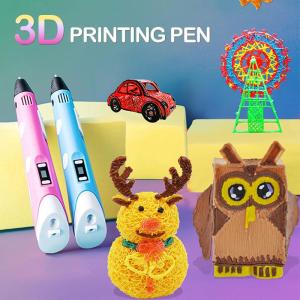
Original 2nd Gen USB 3D Pen DIY Printing pens PLA & ABS Filament Arts Drawing Modeling LED Display Toys Crafting Doodle Art Printer Tools Creative Toy Birthday Design Gift For Kids Christmas Full Set
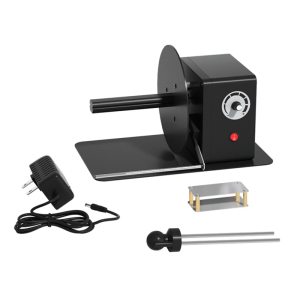
Industrial Label Rewinder Automatic Speed Adjustment 12cm Paper Length Support
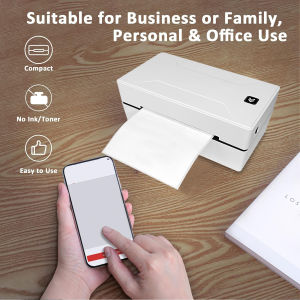
Marklife D100 Thermal Shipping Label Printer Bluetooth Inkless Printer Thermal Printer Maker 4x6 for Small Business School Offic