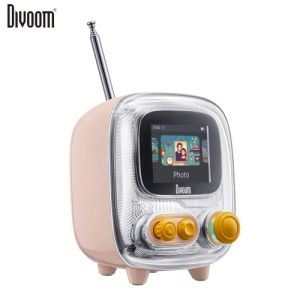
Divoom Tiivoo 2 Pixel Art Bluetooth Speakers: A Cute Gift Home Decor
Divoom Tiivoo 2 Pixel Art Bluetooth Speakers: A Cute Gift Home Decor
What is Divoom Tiivoo 2 Pixel Art Bluetooth Speaker
The Divoom Tiivoo 2 Pixel Art Bluetooth Speaker is a versatile and stylish device that combines the convenience of a portable alarm clock with a display board, making it a perfect addition to any home decor. With its compact size and eye-catching design, this speaker is not only functional but also serves as a cute gift for friends and family.
Key Features
- Bluetooth Connectivity: Connect wirelessly to your smartphone, tablet, or computer for seamless audio streaming.
- Pixel Art Display: Display lyrics, FM radio stations, and even your favorite photos on the built-in pixel art display board.
- FM Radio: Listen to your favorite radio stations with the integrated FM tuner.
- Photo Album Functionality: Create a digital photo album to showcase your memories on the display board.
- Alarm Clock: Set alarms and customize them to suit your needs.
Comparison with FM Radio Photo Album Speaker
The Divoom Tiivoo 2 Pixel Art Bluetooth Speaker offers several advantages over traditional FM radio photo album speakers. In addition to its Bluetooth connectivity, this speaker features a pixel art display that can show lyrics, FM radio stations, and photos. Moreover, the alarm clock functionality allows users to set multiple alarms, making it a versatile device for home use.
How to Use Divoom Tiivoo 2 Portable Alarm Clock with Display
Setting up and using the Divoom Tiivoo 2 Portable Alarm Clock with Display is easy and straightforward. Follow these steps to get started:
Setting Up Your Alarm
- Connect the speaker to a power source.
- Press the "Alarm" button to enter alarm setup mode.
- Use the arrow buttons to set the desired time for your alarm.
- Press the "Confirm" button to save your settings.
Using the Display Board
To display lyrics, FM radio stations, or photos on the pixel art display board, follow these steps:
- Connect your smartphone, tablet, or computer to the speaker via Bluetooth.
- Open the Divoom app on your device.
- Select the desired display mode: Lyrics, FM Radio, or Photo Album.
- Customize the display settings according to your preferences.
DIY Pixel Art Speaker: A Fun Project for Home Decoration
Transform your Divoom Tiivoo 2 Pixel Art Bluetooth Speaker into a unique piece of home decor by creating a DIY pixel art project. Follow these steps to get started:
Materials Needed
- Divoom Tiivoo 2 Pixel Art Bluetooth Speaker
- Colored markers or paint pens
- Clear adhesive tape
- Optional: Stickers, washi tape, or other decorative elements
Step-by-Step Guide
- Clean the surface of the speaker to remove any dust or debris.
- Plan your design using a pencil or erasable marker.
- Apply colored markers or paint pens to create your desired pixel art design.
- Once satisfied with your design, cover it with clear adhesive tape to protect it from wear and tear.
- Add optional decorative elements, such as stickers or washi tape, to enhance your design.
Conclusion & Final Thoughts
The Divoom Tiivoo 2 Pixel Art Bluetooth Speaker is a versatile and stylish device that offers numerous features for home use. From its compact size and eye-catching design to its Bluetooth connectivity and pixel art display, this speaker is perfect for both functional and decorative purposes. By following the step-by-step guide for setting up your alarm and using the display board, you can easily enjoy the benefits of this device. Additionally, creating a DIY pixel art project allows you to personalize your speaker and make it a unique addition to your home decor.

Qilmily
You May Also Like
BWOO BW86 True Wireless Stereo Earphones - Half-In-Ear Design Bluetooth V5.3 Connectivity Superior Sound Quality
SOKC Mixing Console: 8/12 Channel Mixer for Live Performances

Cell Phone Stand Wireless BT Speaker Portable Anti-Slip Base 9D Surround Sound Perfect for Home Outdoors Holder

Vivo Y11 Y12 Y20 Y30 Y91 V7 V9 V11 In-Ear Universal earphone earphones headset headphone with mic

New QKZ AK6 Copper Driver HiFi Sport Headphones: A Comprehensive Guide
Headband Padding Upgrades Sponge Filled Cushioning Over Ear Headphones Accessory for Tune 500/510/520 Easy Installation
Megapro Plus Piolo SD 32GB Karaoke Player: Features & Benefits
YMAO 777 Network Global POC Walkie-Talkie Long Range 6000KM Intercom Two Way Radio 4000mAh Battery Type-C Free SIM Card

Pioneer True Wireless Bluetooth Earphones TWS Half In-Ear Noise Reduction Sports Gaming Suitable for Apple Xiaomi
BEIJI GLXD4 Original UHF Professional Wireless Microphone Dual Mic For Party bKaraoke
T&G TG-419 TWS Portable Wireless + Hands-Free Call Function + TF Card+ USB + AUX Line Stereo Bass Bluetooth V5.4 Speaker