PaperLike Screen Protector: Ultimate Guide for Microsoft Surface Users
PaperLike Screen Protector: Ultimate Guide for Microsoft Surface Users
Introduction to PaperLike Screen Protector
A PaperLike Screen Protector is a unique type of screen protector designed specifically for Microsoft Surface devices. This screen protector offers a paper-like texture, making it perfect for users who enjoy drawing, sketching, or writing on their device. Unlike traditional glass screen protectors, the PaperLike Screen Protector is made from PE soft film, providing a premium material that is both durable and easy to install.
What is a PaperLike Screen Protector?
The PaperLike Screen Protector is a specially designed film that is placed over the screen of your Microsoft Surface device. This film provides a paper-like texture, allowing you to experience the sensation of writing on actual paper while using your device. The matte surface of the film ensures that there is no slipping or sliding when writing, making it ideal for artists, writers, and students alike.
Key Features: Anti-Fingerprints & Anti-Glare
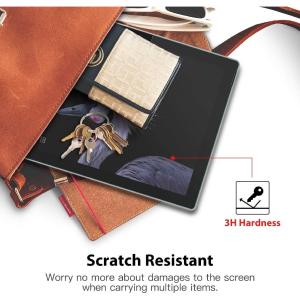
One of the most significant advantages of the PaperLike Screen Protector is its ability to reduce fingerprints, skin grease, and smudges. With a 3H hardness rating, the matte surface coating offers anti-fingerprint, anti-glare, anti-scratch, and dust-proof capabilities. Additionally, the ultra-high transparency of the film ensures clear visibility, reducing eye strain during extended use.
Compatible Devices: Microsoft Surface Pro & Surface Go
The PaperLike Screen Protector is compatible with various Microsoft Surface devices, including the Surface Pro 3, Surface Pro 4/5/6/7, Surface Go, Surface Go 2/3, Surface Book 1/2/3 (13" and 15"), Surface Laptop 1/2/3/4 (13.5"), Surface Laptop 4 (15"), Surface Pro 10.6", Surface Pro X/9/8, and Surface Laptop Go 12.4".
How to Install Your PaperLike Screen Protector
Installing a PaperLike Screen Protector is a straightforward process that can be completed in just a few simple steps. Here is a step-by-step installation guide:
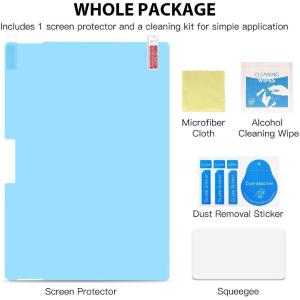
- Clean the screen of your Microsoft Surface device thoroughly with a microfiber cloth and alcohol wipe.
- Remove the backing from the PaperLike Screen Protector.
- Align the top edge of the screen protector with the top edge of your device's screen.
- Slowly lower the screen protector onto the screen, starting from the top and working your way down.
- Use a credit card or similar tool to remove any air bubbles that may have formed during installation.
Tips for a Smooth Installation Process
To ensure a smooth installation process, it is essential to work in a clean environment free from dust and debris. Make sure to handle the screen protector carefully, avoiding touching the adhesive side. Additionally, take your time during the installation process to avoid trapping any air bubbles under the film.
Benefits of Using a PaperLike Screen Protector
Using a PaperLike Screen Protector offers numerous benefits for Microsoft Surface users. Here are some of the key advantages:
Enhanced Writing Experience: Paper-Like Texture
The PaperLike Screen Protector provides a realistic paper-like texture, making it perfect for artists, writers, and students who enjoy drawing, sketching, or writing on their device. The matte surface ensures that there is no slipping or sliding when writing, providing a comfortable and enjoyable experience.
Improved Visibility: Ultra-High Transparency
With ultra-high transparency, the PaperLike Screen Protector ensures clear visibility, reducing eye strain during extended use. The matte surface coating also reduces glare, making it easier to see your screen in bright environments.
Premium Material: PE Soft Film
Made from PE soft film, the PaperLike Screen Protector is both durable and easy to install. The 3H hardness rating ensures that the film is resistant to scratches and other damage, providing long-lasting protection for your device.
Conclusion & Final Thoughts
In conclusion, the PaperLike Screen Protector is an excellent choice for Microsoft Surface users who enjoy drawing, sketching, or writing on their device. With its paper-like texture, ultra-high transparency, and premium material, this screen protector offers a unique and enjoyable experience for artists, writers, and students alike. If you're looking for a high-quality screen protector that enhances your writing experience, the PaperLike Screen Protector is definitely worth considering.

TR Tech Live
Review

You May Also Like
Webcam 4K Ultra HD EMEET S800 Webcams With HDR Streaming Camera USB Computer Camera 1080P 60fps Perfect for Live Streaming/Laptop/Desktop
Ultra Clear Full Screen Tempered Glass Film for OnePlus Ace5/3/2 Privacy Protection Super High Definition Curved Surface Coverage
Yoobao IP7 Plus 2910MAh STANDARD High Quality Phone Battery Replacement
Caile Unique Sweet Strawberry Phone Charms Pendant Cute Bow Heart Beaded Keychain Camera Schoolbag Decoration Accessories Gifts
CROWMSTAR Double Slot 18650 Charger For Rechargeable Lithium Battery

3M Self-Adhesive Leather Repair for Car Interior Renovation
Cute Dog Mirror Phone Case for Huawei Pura80 P70pro/60 New Mate80pro+MATE70/60/50E/20 Protective Cover Anti-fall Women P40/30PRO Fox Tail
Ultra-Thin Luxury Gold Thread Silver Brocade Leather Pattern Huawei MateX6 Phone Case Foldable Screen Protection for Women
Romantic Fireworks Charger Protective Case Suitable for Iphone15/20W Fast Charge Protective Case iPad Data Cable Case
Ultimate Guide to POCO X7 PRO & X3 NFC Premium Tempered Glass Screen Protectors
Universal Type C To USB A C High Power Charger Cord 240W with Power Screen for Xiaomi Huawei OPPO VIVO IPhone 15 16 17 Samsung