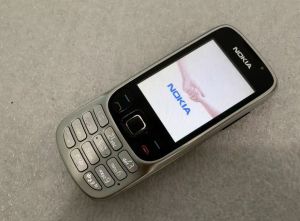
Nokia 6303C: A Compact Classic Mobile Phone
Nokia 6303C: A Compact Classic Mobile Phone
Introduction to the Nokia 6303C
The Nokia 6303C is a compact classic mobile phone that offers a blend of nostalgia and modern features. With its sleek design, high-quality audio, and Bluetooth connectivity, this device is perfect for those who value simplicity and functionality. In this article, we will explore the key features of the Nokia 6303C, how to use it, and why it stands out among other classic design mobile phones.
Key Features of the Nokia 6303C
-
Compact Size: The Nokia 6303C has a compact size, making it easy to carry around in your pocket or bag. It's designed to fit comfortably in your hand, providing a familiar feel reminiscent of classic mobile phones.
-
2.2 Inch TFT Display: This mobile phone features a 2.2 inch TFT display that offers clear and vibrant visuals. The screen size is perfect for reading messages, browsing the web, and enjoying multimedia content.
-
Bluetooth Connectivity: The Nokia 6303C supports Bluetooth connectivity, allowing you to connect to wireless headphones, speakers, and other compatible devices. This feature enhances your audio experience and provides a convenient way to share files with other Bluetooth-enabled devices.
-
1050mAh Battery: The Nokia 6303C comes with a 1050mAh battery that provides reliable power for extended use. It's designed to last throughout the day, so you can stay connected without worrying about running out of juice.
What Comes in the Box
When you purchase the Nokia 6303C, you'll receive the following items:
- 1 x phone
- 1 x charger
- 1 x battery
- 1 x box
How to Use the Nokia 6303C
Setting Up the Mobile Phone
To set up your Nokia 6303C, follow these steps:
- Insert the battery into the back of the device.
- Connect the charger to the phone and plug it into a power outlet.
- Press the power button to turn on the phone.
- Follow the on-screen instructions to complete the initial setup.
Charging the Battery
To charge the battery of your Nokia 6303C, follow these steps:
- Connect the charger to the phone.
- Plug the charger into a power outlet.
- Wait for the battery to charge fully before disconnecting the charger.
Playing Music on the Nokia 6303C
To play music on your Nokia 6303C, follow these steps:
- Connect your phone to a Bluetooth-enabled speaker or headphones.
- Select a song from your music library.
- Press the play button to start playing the song.
Comparing the Nokia 6303C with Other Classic Design Mobile Phones
The Classic Design of the Nokia 6303C
The Nokia 6303C features a classic design that harkens back to the days of flip phones and candy bar phones. Its sleek and compact form factor makes it easy to carry around, while its familiar layout provides a comfortable and intuitive user experience.
Bluetooth Connectivity in the Nokia 6303C
The Nokia 6303C supports Bluetooth connectivity, allowing you to connect to wireless headphones, speakers, and other compatible devices. This feature enhances your audio experience and provides a convenient way to share files with other Bluetooth-enabled devices.
2.2 Inch TFT Display on the Nokia 6303C
The Nokia 6303C features a 2.2 inch TFT display that offers clear and vibrant visuals. The screen size is perfect for reading messages, browsing the web, and enjoying multimedia content.
Conclusion: Why Choose the Nokia 6303C
The Nokia 6303C is a compact classic mobile phone that offers a blend of nostalgia and modern features. With its sleek design, high-quality audio, and Bluetooth connectivity, this device is perfect for those who value simplicity and functionality. Whether you're looking for a reliable backup phone or simply want to enjoy the classic feel of a flip phone, the Nokia 6303C is an excellent choice.

Bobby_3C
Review

You May Also Like
Original Xiao MI PAD 6 Android 5G Tablet Pad 6 PRO 12 Inch 16GB+512GB Dual sim4K Display Dual SIM Card WIFI Tab
Nokia 3110 Type NHE-8 Openline | Rare Nokia Vintage Phone
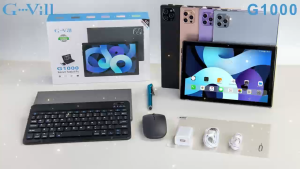
G-Vill G1000 10.1-inch HD Tablet PC comes with a free protective case stylus and mouse.
Alcatel One Touch Idol 2 Mini S: A Comprehensive Guide
Blackview OSCAL MODERN 8 Ultra Thin Smartphones 6.75 Inch HD+ 8GB+128GB/256GB Mobile Phone 50MP Camera 6000mAh 18W Fast Charging
Cellphone Stand Angle Chair ShapePhone Holer for Desk Taller Office Desk Accessories Stand Fits All Mobile Phones
Numchai a60 Original cellphone sale Brand new smartphone Snapdragon 680 12GB+512GB Android phone 90HZ Gaming phone 45W Fast charging
Complete Display Assembly Drop Defense Shockproof Touches Screens Assembly Cracks Screens Replacement for S21 G991
Suoye XS15: A Quad Core Mini Smartphone for Primary School Students
For Nokia 206 2060 Original Unlocked Phone Dual Sim 2G GSM 1.3MP 1100mAh
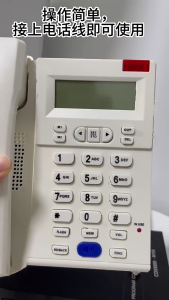
Large Button Phone for Seniors Corded Phone Noise Reduction Phone with Call Display for Hearing Guest Room Hotel Office