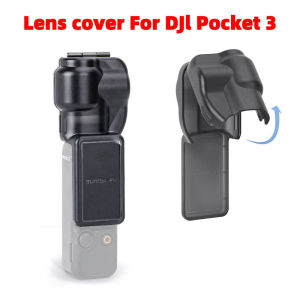
Sunnylife Silicone Lens Cover For DJI Osmo Pocket 3 Integrated Gimbal Protection Case Camera Accessories
Sunnylife Silicone Lens Cover For DJI Osmo Pocket 3 Integrated Gimbal Protection Case Camera Accessories
What Is the Sunnylife Silicone Lens Cover?
The Sunnylife Silicone Lens Cover is a specialized accessory designed to protect the lens and gimbal of the DJI Osmo Pocket 3 camera. This high-quality silicone cover provides reliable protection against dust, scratches, and minor impacts, ensuring that your camera remains in top condition throughout its lifespan. The lens cover is easy to install and remove, making it a convenient addition to any videographer's toolkit.
Key Features of the Lens Cover
- Durable Material: Made from high-quality silicone, this lens cover is built to last and withstand the rigors of everyday use.
- Easy Installation: Simply slide the cover over the lens and gimbal for a secure fit that won't interfere with your camera's operation.
- Clear Vision: The transparent design allows for clear, unobstructed views through the lens, so you can capture stunning footage without any visual distortions.
- Integrated Gimbal Protection: The lens cover includes a built-in gimbal protection case that shields the delicate components of the camera's stabilization system.
Benefits of Using the Lens Cover
- Protection Against Damage: By using the Sunnylife Silicone Lens Cover, you can safeguard your camera against dust, scratches, and minor impacts, extending its lifespan and ensuring consistent performance.
- Peace of Mind: With the lens cover in place, you can enjoy peace of mind knowing that your investment is protected during filming sessions.
- Enhanced Camera Performance: The integrated gimbal protection case helps maintain the camera's stability and balance, leading to smoother, more professional-looking footage.
How to Install the Lens Cover
Installing the Sunnylife Silicone Lens Cover is a straightforward process that can be completed in just a few simple steps.
Step-by-Step Guide to Installation
- Turn off your DJI Osmo Pocket 3 camera and remove any existing lens covers or accessories.
- Align the lens cover with the camera's lens and gimbal.
- Gently slide the cover onto the camera until it clicks into place.
- Verify that the cover is securely attached and not interfering with the camera's operation.
Troubleshooting Common Issues
If you encounter any problems during installation, refer to the following troubleshooting tips:
- Lens Cover Not Attaching Properly: Ensure that the camera is turned off and that the lens and gimbal are clean and free of debris. If the issue persists, consult the manufacturer's support resources for further assistance.
- Interference with Camera Operation: If the lens cover is interfering with the camera's operation, gently adjust its position until it no longer obstructs any buttons, ports, or sensors.
Exploring Camera Accessories for DJI Osmo Pocket 3
In addition to the Sunnylife Silicone Lens Cover, there are several other must-have accessories that can enhance your DJI Osmo Pocket 3 experience.
Lens Covers & Gimbal Protection Cases
- Sunnylife Silicone Lens Cover: As discussed earlier, this lens cover offers reliable protection against dust, scratches, and minor impacts while also providing integrated gimbal protection.
- Other Lens Covers: Consider exploring other lens covers that offer similar features and benefits, such as those made from TPU or other high-quality materials.
Other Must-Have Accessories
- Tripod Mount: A tripod mount can help stabilize your camera during filming sessions, leading to smoother, more professional-looking footage.
- Microphone: Invest in a high-quality microphone to capture crystal-clear audio during your shoots.
- External Battery Pack: Extend your camera's battery life with an external battery pack, allowing you to film for longer periods without worrying about running out of power.
Protecting Your Investment: The Importance of DJI Osmo Pocket 3 Protection
Investing in the right protection for your DJI Osmo Pocket 3 camera is essential for maintaining its performance and extending its lifespan.
Why Invest in Protection?
- Prevent Damage: By using a lens cover and other protective accessories, you can safeguard your camera against dust, scratches, and minor impacts, reducing the risk of costly repairs or replacements.
- Enhance Performance: Protecting your camera can help maintain its stability, balance, and overall performance, leading to smoother, more professional-looking footage.
- Peace of Mind: Knowing that your investment is protected can provide peace of mind during filming sessions, allowing you to focus on capturing stunning footage without worrying about damaging your equipment.
Choosing the Right Protection for Your Needs
When selecting protection for your DJI Osmo Pocket 3, consider your specific needs and preferences. Some key factors to consider include:
- Level of Protection: Determine how much protection you require based on your intended use and filming environment.
- Compatibility: Ensure that the chosen accessories are compatible with your camera model and won't interfere with its operation.
- Budget: Set a budget for your protective accessories and choose options that offer the best value for your money.
Conclusion
The Sunnylife Silicone Lens Cover is an excellent choice for protecting your DJI Osmo Pocket 3 camera against dust, scratches, and minor impacts. By investing in the right protection, you can extend your camera's lifespan, enhance its performance, and enjoy peace of mind during filming sessions. Consider exploring other must-have accessories, such as tripods, microphones, and external battery packs, to further enhance your DJI Osmo Pocket 3 experience.

tekulamall
Review

You May Also Like
Easy to Use 600ML Stainless Steel Mocha Pot Stovetop Coffee Maker Espresso Pot Perfect for Handmade Coffee Experience
Metal Sport Watch Band Compatible with Apple Watch S10 Milanese Style Iwatchs9 Ultra2 Men S67 Women S8 S9 Magnetic Buckle Parachute Buckle
Apple 16 Series Silicone Phone Case Breathable Heat Dissipation Woven Design Anti-Fall Full Cover Protection for Men And Women
Honor60 Womens Curved Screen Tempered Glass Phone Case Creative Luxury Glitter Stand Design Shockproof Silicone Protective Cover

freezer small home freezer large capacity horizontal freezer and refrigerator energy saving
Black Metal Bumper Case For iPhone 16e 16 E 15 Pro Max 14 Plus 13 Mini 12 11 X XS XR SE 2022 2020 7 8 iPhone16 Phone Accessories
New Womens Style Apple 17 Phone Case Yellow Flower Lanyard Full Cover Creative Silicone Protective Shell for iPhone Series

Little Monster Key Cap: A Comprehensive Guide to Customizing Your Mechanical Keyboard
FUJIAS3 New retro wood phone holder stand pendant keychain car keyringfashion accessorie
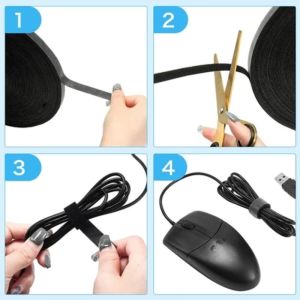
5M Tape Cable Strap Cable Organizer Earphone Holder Cable Desk Organizer Straps Loop Straps Tape
Ultra-Thin Matte Silicone Phone Case for Apple 16Pro 17New iPhone 15Pro Max Full Cover Anti-Fall Compatible with 14Pro 16Plus